
Permissions
Editing escalation policies requires the Message_Rule_Update entitlement (to add and update escalation rules) and Message_Rule_View (to view them). The Owner and App Admin user roles have these entitlements.
Overview
Relevant for App Admins building custom escalation policies
AlertOps ships with pre-built escalation policies for ease of use, but admins can build their own customized policies. Cloning an existing policy is also supported and is the fastest way to produce a near-duplicate with one or two changes.
What Is an Escalation Policy?
Relevant for Anyone new to escalation policies
An escalation policy is the rulebook AlertOps follows to decide who gets notified about an alert, how, and in what order — and what happens when no one responds. It maps the member roles in a group (Primary, Secondary, Manager, and any custom roles) to a timed sequence of notifications, so an unacknowledged alert automatically climbs from the first responder to the next tier until someone takes it or it is closed.
Every alert is routed through an escalation policy. It is attached to an integration or technical service, or chosen on a manual alert. This escalation policy controls which roles are notified and in what order (the tiers), how long to wait before escalating, which contact methods fire and with what delays, how many times to retry, the SLA target, and any automation (workflows) that should run.
Get the policy right, and the right person is reached fast, every time. Get it wrong, and alerts are missed, or everyone is paged for everything.
Create a New Escalation Policy
Relevant for App Admin
- Click Configuration on the menu bar and select Escalation Policies.
- Click the Add Escalation Policy button in the top right corner.
- Fill in Rule Name, Priority, and Description in the empty fields.
- Click Submit to save.
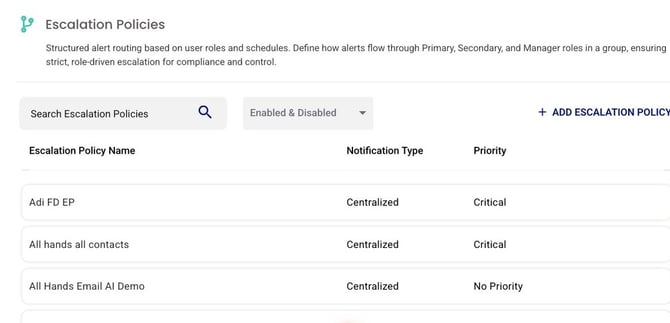
Figure 1. The Escalation Policies list (Configuration → Escalation Policies). Search and the Enabled & Disabled filter sit at the top; + ADD ESCALATION POLICY is in the top-right. Each row shows the policy's Notification Type (Centralized or User Preference) and Priority.
Once saved, the new policy opens to its detail page, where you build out the escalation rules. The Settings section at the top holds the Name, Priority, and Description you just entered, plus Quick Launch and Enabled toggles and Clone / Edit / Delete actions.

Figure 2. The Settings section of a saved escalation policy. Name, Priority, and Description are the fields from the create form; Quick Launch makes the policy available for Manual Alerts; CLONE (top-right) copies the policy as a template.
Build Out the Escalation Rules — Every Portion
Relevant for App Admin configuring the full policy
Creating the policy only sets its Name, Priority, and Description. The actual escalation behavior is built across the policy's tabs — Rules, Communication, Automation, Usage, and Access. Configure each in turn.
Rules — Notify Using (User vs Centralized)
At the top of the Rules tab, the Notify Using toggle picks the delivery mode.
Centralized applies admin-defined contact methods and ordering to every member in a role (consistent delivery).
User uses each member's own profile preferences.
These two modes also time their tiers differently. See User vs Centralized Notification.
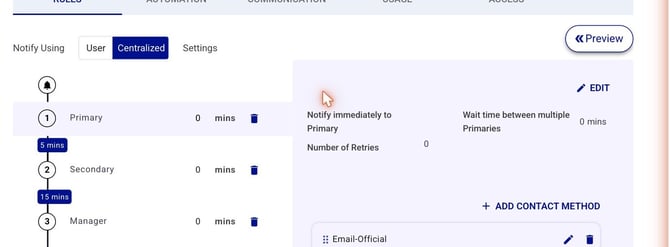
Figure 3. The Rules tab. Notify Using (User / Centralized) top-left; the member-role chain (Primary → 5 min → Secondary → 15 min → Manager) on the left; the selected role's contact methods, retries, and wait times on the right; Preview top-right.
Rules — Member Roles and Tiers
The left-hand chain is the escalation ladder. By default(In Centralized mode), it runs Primary → Secondary → Manager; use Add Member Role to add roles. Each tier is notified in this specified order, and if the alert is still unassigned and unclosed after that tier's wait time, escalation moves to the next role.
Rules — Timing (Wait Times and Retries)
Each role carries timing controls: the wait time before escalating to the next role; Wait Time Between Multiples (the gap before notifying a second person in the same role); Number of Retries and the retry interval (how many times, and how often, to re-notify a member before moving on); and, for nested or multiple groups, the wait time before notifying the next group.
Rules — Contact Sequence
For each role, the right-hand panel lists the contact methods in the order they fire, each with its own delay (for example, Email immediately, Phone after 4 minutes, SMS after 2 minutes, Push after 12 minutes). Use the "Add Contact" Method to add channels and drag to reorder. Under Centralized mode, these are admin-defined; under User mode, they come from each user's profile.
Communication Tab
The Communication tab maps each response action (Acknowledgement / Assignment / Escalate / Close) to channels (VOIP / SMS / Email / Group Chat), and holds the Alert Type, the message short/long-text settings, the Escalation Policy for reply, and the SLA (in hours) that SLA-based workflows measure against. Additional valid options include Add Recipients, One Email Per Message, and One Message Per Recipient (see Escalation Policy Overview).
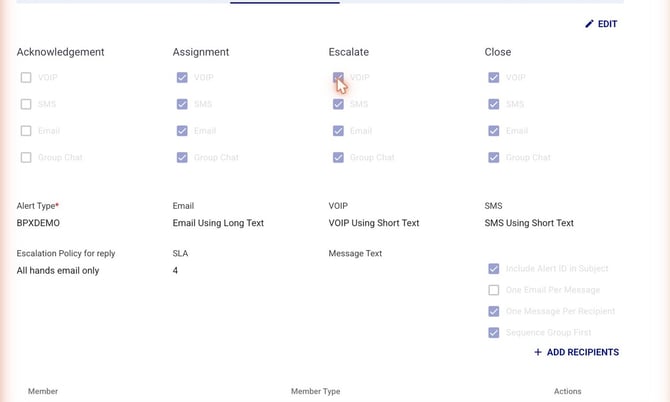
Figure 4. The Communication tab — the response-action-to-channel grid, Alert Type, message settings, Escalation Policy for reply, and the SLA field.
Automation Tab
The Automation tab attaches Workflows and Outbound Actions to the policy — for example, a pre-breach SLA warning, an auto-create-ticket workflow, or a chat notification. Use Add Workflow to attach one (see Service-Level Agreements and Workflows Overview).
Escalation Policy for Reply:
You can designate a specific escalation policy for responding to alerts or when adding others to them. When a user clicks Add Others on an alert, additional users are notified via the reply policy. Replying directly to the alert also triggers notifications through the reply policy that is set here.
Usage and Access Preview
Usage shows which integrations and workflows reference this policy.
Access controls who can view or edit it.
Before going live, use Preview (top-right of the Rules tab) to simulate the escalation against a real group and confirm the timing and ordering behave as intended.
Cloning Escalation Policies
Relevant for App Admin
Cloning makes a copy of an existing Escalation Policy that you can use as a template when creating a new one.
- From the Escalation Policies page, select an Escalation Policy.
- Click the Clone button in the top right corner.
- Add details (you'll typically want to change the Rule Name at a minimum).
- Click Submit to save the clone.
Set up Field Reference
|
Field |
Description |
|
Rule Name |
The policy's name as it appears on the Escalation Policies list and on integrations / groups that reference it. |
|
Priority |
The policy's priority value. Determines ordering when multiple policies are applicable. |
|
Description |
Free-text description of what the policy does and when to use it. |