
FreshService Integration Guide
FreshService is a cloud based ITSM software for your service desk and a powerful IT help desk automation tool to manage incidents, assets and more. Integrate AlertOps' alert management platform with FreshService to receive and respond to critical alerts through email, SMS, push notification, and phone alerts. AlertOps ensures that alerts received from Freshservice always reach the correct, available team member by utilizing escalation policies and on-call schedules.
AlertOps Configuration
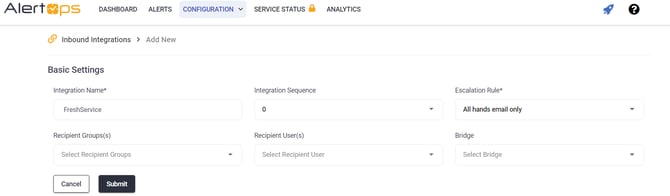
- Navigate to Configuration -> Integrations -> Add API Integration -> API Integration Detail page
- Select FreshService from the pre-built Integration Templates.
- Enter a name for the integration.
- Select an escalation rule to determine the integration's escalation policy. And enter the names of recipient group(s) and recipient user(s).
- Click 'Submit.'
- Click 'COPY URL' to copy the URL endpoint to be used in the FreshService configuration.
Freshservice Configuration
1) In the left nav-bar, click on Admin (the gear icon). Search for Workflow Automator.

2) Select 'Tickets' under Modules, click on 'New Work7ow'. Give a Title, select type as Event Based Workflow.

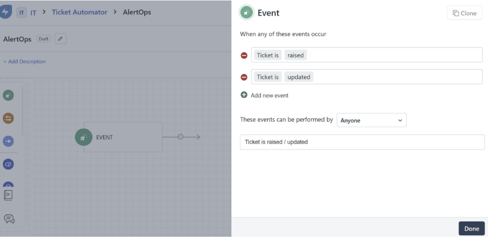
3. Give the following events (Ticket is raised/Ticket is updated).
4.Select 'Action' in the left, drag and add it to the flow. Select the action as 'Trigger Webhook' , request type is POST, under Callback URL, paste the AlertOps inbound integration URL.
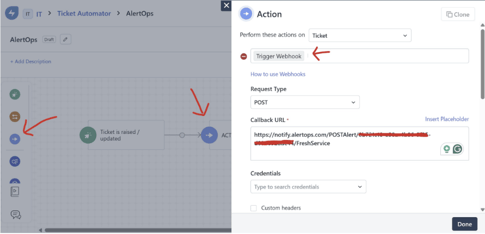
5. Under Content, Select everything. Done. Activate Workflow.
Click here to view advanced integration options.
Alert Triggering Information
AlertOps will automatically create an alert when a new Ticket is added in FreshService with a status of “Open” and will close automatically when it 'Closed' or 'Resolved'
Testing and Troubleshooting
Click here to read about Web API Testing and Troubleshooting.