
Purpose
Group Member Roles — Primary, Secondary, and Manager — decide the order in which users in a group are paged when an alert arrives. Getting them right is the difference between the correct person being woken up first and everyone on a team being woken up simultaneously.
Audience
Relevant for App Admins and in-group Managers
App Admins can set roles on any group. The Manager role on a specific group grants edit rights to that group — a Manager can update members, schedules, and out-of-office coverage without needing App Admin privileges.
Prerequisites
- At least one group that contains one or more users.
- App Admin platform role, or the Manager role on the group you want to edit.
- Familiarity with Group Management (where group roles live).
The Three Member Roles
|
Role |
When it fires |
What else it controls |
|
Primary |
First responders. AlertOps pages Primary members first when an alert arrives at the group. |
No in-group edit rights. Purely an escalation assignment. |
|
Secondary |
Backup responders. Paged if no Primary acknowledges within the escalation policy's wait window. |
No in-group edit rights. |
|
Manager |
Final escalation. Paged after Primary and Secondary have both failed to respond within their windows. |
Can edit the group — members, schedules, out-of-office entries. A Manager can also hold the Primary or Secondary role on top. |
|
Group Member Roles are not the same as platform roles Group Member Roles (Primary / Secondary / Manager) control where a user sits in the escalation order of one specific group. Platform Roles (App Admin, Basic, etc.) control what the user can do across the whole AlertOps account. A user has independent assignments for each — App Admin on the platform, Primary on one group, Manager on another. |
Assign Group Member Roles
Relevant for App Admins and Group Managers
- Go to Configuration → Groups and Schedules and open the group.
- On the Members tab, each row has checkbox columns for Primary, Secondary, and Manager.
- Tick the roles you want the user to hold. A user can hold more than one — for example, Primary and Manager together.
- Use the sequence handle (⋮⋮) on the left of each row to drag members into the order AlertOps should page them within each role tier.
- Changes save as you make them; there is no separate Save button on the Members tab.
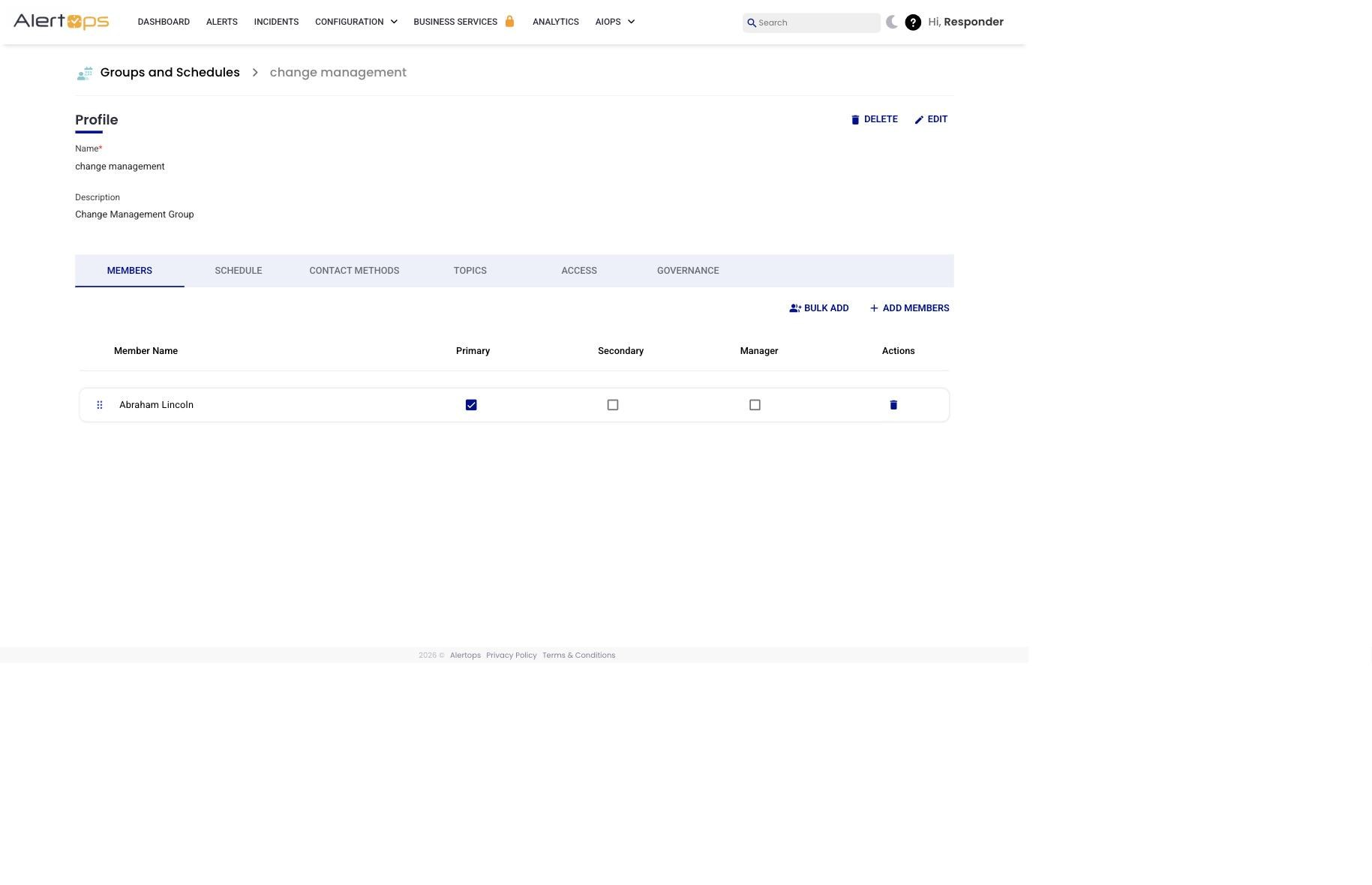
Figure 1. Members tab — Primary / Secondary / Manager checkboxes next to each member row; the ⋮⋮ handle on the left sets sequence within a tier.
Sequence — Who Gets Paged First Within a Tier
When more than one user holds the same Group Member Role (for example, three Primaries), AlertOps needs to know who to page first. The sequence — the vertical order of members on the Members tab — is that tiebreaker. The member at the top of the list is paged before the member below them.
- Drag the ⋮⋮ handle on the left of any row to reorder.
- Sequence applies within each role tier independently: Primary sequence, Secondary sequence, Manager sequence.
- If two members hold the same Role and you want them paged simultaneously, that is a job for the escalation policy (set a zero-wait step), not the sequence.
What the Manager Role Can Do Beyond Escalation
Assigning a user the Manager role on a group gives them edit rights scoped to that group. A Manager can:
- Change the group's member order (sequence) on the Members tab.
- Create, edit, and delete shifts on the Schedule tab.
Managers do not get edit rights outside those surfaces — group Profile edits, Access, and Governance remain App Admin territory.
Best Practices
Do
- Keep a clear intent for each tier — Primary for the first responder, Secondary for backup, Manager for final escalation. Document the intent in the group description so it is visible to anyone auditing the group later.
- Promote at least one experienced member of each group to Manager so they can manage the group without filing an App Admin ticket for every rotation change.
- When you migrate a group from Members-tab Primary/Secondary to shift-based roles, audit every shift's Primary / Secondary before relying on the rotation in production.
Don't
- Assign Manager to everyone in the group. The role carries edit rights; reserve it for a small number of trusted leads.
- Rely on "Primary = first responder" alone if you have shifts configured — the shift overrides the Members-tab setting. Check the active shift.
- Use the sequence to try to achieve simultaneous paging. Configure the escalation policy instead.