
LibreNMS Integration Guide
LibreNMS is a fully featured network monitoring system that provides a wealth of features and device support. Integrate AlertOps’ alert management platform with LibreNMS to receive and respond to critical alerts through email, SMS, push notification, and phone alerts. AlertOps ensures that alerts received from LibreNMS always reach the correct, available team member by utilizing escalation policies and on-call schedules.
AlertOps Configuration
- Navigate to Configuration -> Integrations -> Add API Integration -> API Integration Detail page.
- Select LibreNMS.
- Enter a name for the integration. Select an escalation rule to determine the integration's escalation policy. And, enter the names of recipient user(s) and recipient group(s). Click 'Save Changes.' Then, click 'Copy URL' to copy the URL endpoint to be used in the LibreNMS configuration.
- In 'Rules for Opening and Closing an Alert' under 'Advanced Settings' change the Settings exactly as per the screenshot (You would need to change Source Id, Source Status, Subject, Long Text, Short Text (changes indicated in text below the screenshots)
- Navigate to the top-left section of the window and copy the Webhook Endpoint URL. You will need this URL when configuring the Alert Transport settings in LibreNMS in a later step.
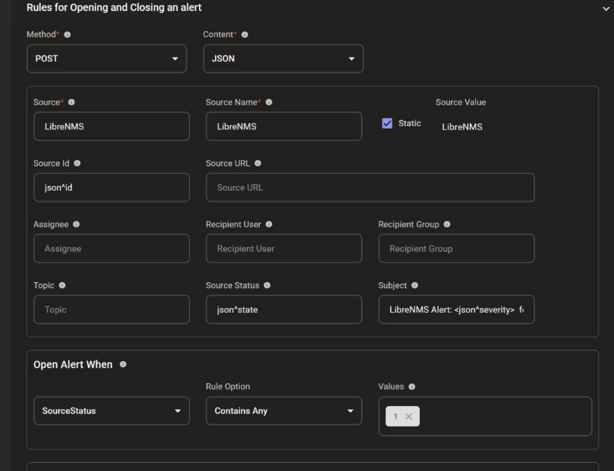
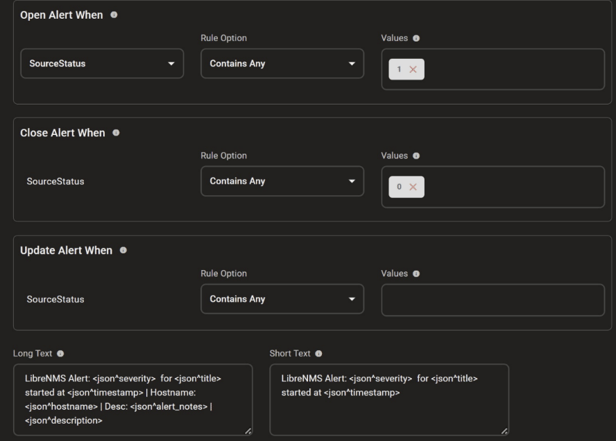
Source Id: json^id
Source Status: json^state
Subject: LibreNMS Alert: <json^severity> for <json^title>
Long Text: LibreNMS Alert: <json^severity> for <json^title> started at
<json^timestamp> | Hostname: <json^hostname> | Desc: <json^alert_notes> |
<json^description>
Short Text: LibreNMS Alert: <json^severity> for <json^title> started at
<json^timestamp>
LibreNMS Configuration
The following steps will explain how to configure LibreNMS integration for incident management.
1. From the home page, click on the Alerts tab on the top.
2. Select Alert Transports.
3. Click on Create Alert Transport
4. When creating the alert transport:
Give the Alert Transport a Name
Choose Transport type as AlertOps
Default alert is toggled to ON
Paste the webhook endpoint in the URL field
1. Once your Alert Transport has been created, click on the Alerts tab on the top and select Alert Rules.
2. You can either Add an alert rule or modify an existing one. Open the Alert Rule to trigger the AlertOps Transport.
3. Enable the toggle for Recovery Alerts to ON and click Save Rule.
4. Back in the Alert Rule dashboard, you can verify the rules for which Webhook has been added as a Transport.
That is it, your integration with LibreNMS is complete and you are good to go!
Now, every time there is an alert in LibreNMS, the alert will be sent to AlertOps.
Alert Triggering Information
AlertOps will automatically create an incident when a new alert is received from LibreNMS with an IncidentStatus status of “open”.
If an alert with status “1” matches an existing Open Alert, AlertOps will recognize the new alert as a duplicate and ignore the alert. The alert will be recorded in the Inbound Messages table as “Mapped Appended.”
AlertOps will automatically close the same incident when an alert with an IncidentStatus status “0” is received.