
Response Plays provide a simplified alternative to traditional Escalation Policies. Designed for operational flexibility, Response Plays are ideal when strict role-based escalation logic (Primary, Secondary, Manager) is not required.
Unlike Escalation Policies, which rely on role entitlements and structured escalation sequencing, Response Plays are role-agnostic. This enables quicker setup, broader targeting, and cleaner workflows for non-critical or flexible incident types.
When to Use Response Plays vs. Escalation Policies
|
Use Case |
Recommended Method |
|---|---|
|
Role-based routing (e.g., Primary → Secondary → Manager) |
Escalation Policy |
|
Major incidents, centralized control |
Escalation Policy |
|
Flexible tiering without roles |
Response Play |
|
Rapid notifications to groups or individuals regardless of role |
Response Play |
Key Features of Response Plays
- No Role Dependency – Users do not need to be tagged as Primary, Secondary, or Manager.
- Group and User Targeting – Select individual users, static groups, or both.
- Tiered Notifications – Add multiple tiers with wait times between each.
- User Profile Preferences – Notifications are sent using each user’s own contact method preferences (Email, SMS, Phone, Push).
- Time from Alert Start – Notification tiers are triggered based on time elapsed from previous recipient groups
- Group Contacts – Group-level contact methods (e.g., Slack channels, distribution lists) can also be targeted.
How Response Plays Work
Each tier in a Response Play contains a set of recipients (users or groups) and a wait time indicating when to notify them based on the alert start time.
For example:
|
Tier |
Recipients |
Wait Time |
|---|---|---|
|
1 |
Group A |
0 min (immediate) |
|
2 |
User X, User Y |
5 minutes |
|
3 |
Group B |
10 minutes |
This would notify Group A immediately, then User X and Y after 5 minutes, then Group B after 10 minutes, all based on the alert's creation time.
All members of an active shift within a group will be notified simultaneously (regardless of role).
Creating a Response Play
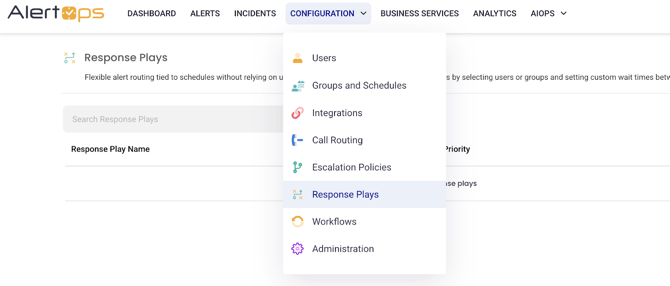
- Go to Configuration > Response Plays
- Click + Add Response Play
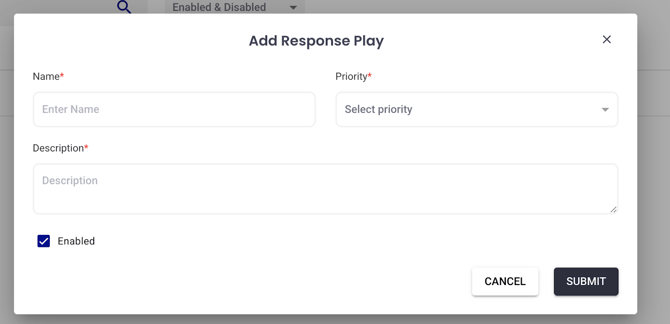
- Name the Response Play, provide a description, and Priority. The priority of the Response Play will determine Notification Overrides. (If DND / Critical Alert Override is enabled within the user’s mobile application – as long as the Response Play priority is High or Critical it will override custom sound profiles)
- Add Members:
- Choose Users, Groups
- Set Time from Start (minutes)
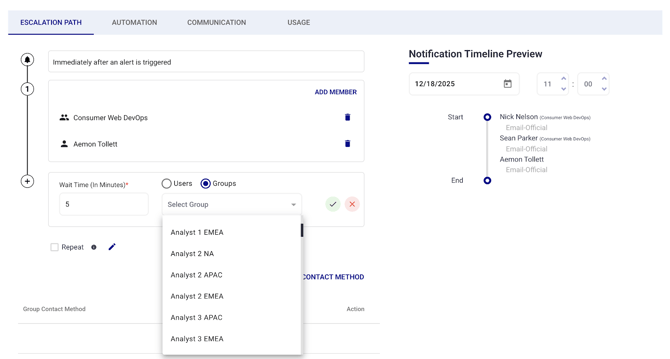
- Add Group Contact Notifications:
- These apply to all groups referenced and the timeframe is universal from the start of the alert:
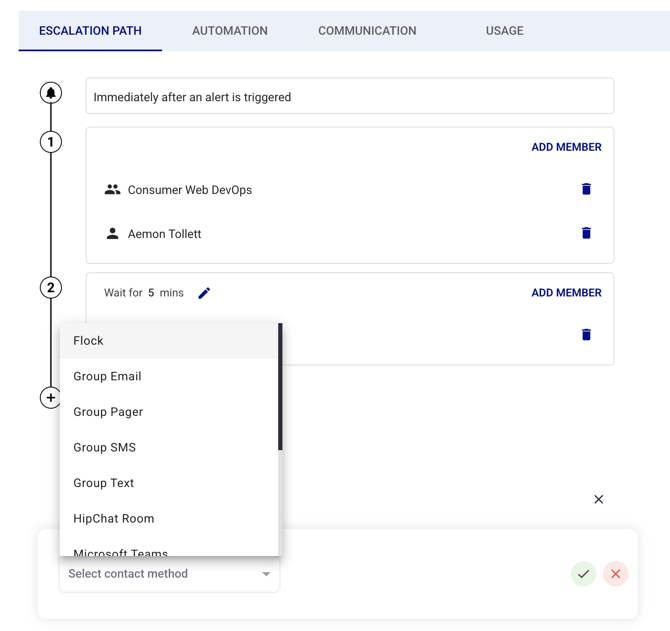
- Repeat for additional tiers as needed
- Click the Green Checkmark to save
Applying a Response Play
Response Plays can be assigned:
- To Inbound Integrations
- In Manual Alerts
- As part of Workflows or Automation
When an alert is triggered, the assigned Response Play will manage the notification flow based on the defined tiers.
Considerations
- No central management of retry logic per contact method – defined at the user profile
- Should not replace Escalation Policies for role-governed incident types (Major Incidents)
Best Practices
- When leveraging Response Plays best practice is to separate layers of escalation within separate groups. Within Tradition Escalation Policies the same shift ex. A separate group for Primaries, Secondaries, and Managers respectively.