
Purpose
This article is the canonical reference for Role-Based Access Control (RBAC) in AlertOps. It covers the three concepts (entitlements → roles → users), how to assign and edit roles safely, and lists every entitlement available in the product with its definition and practical use.
Audience
Relevant for Account Owners, App Admins, and anyone responsible for designing access policy
Reading this article is useful for any admin. Actually changing role definitions requires the SecurityAdministration_Global_Access entitlement (contained in the Owner and App Admin roles out of the box).
Prerequisites
- Account Owner or an App Admin role for full RBAC editing.
- Enterprise tier to edit built-in role entitlements or create custom roles.
- Familiarity with User Types Overview and User Roles.
How RBAC Works
Three layers — stacked:
- Entitlement — the atomic permission. Each entitlement grants one specific capability (for example, Messages_Send_GlobalAccess lets a user create manual alerts).
- Role — a named bundle of entitlements. AlertOps ships seven built-in roles (Owner, App Admin, Basic, Billing Admin, Integrations Admin, Send Message, System Viewer) and, on Enterprise, you can create custom roles with any combination of entitlements.
- User — one or more roles can be assigned. The user's effective permissions are the union of all entitlements from all assigned roles.
|
What this enables
|
Where RBAC Lives in the UI
RBAC is managed on Configuration → Administration → Roles. This is the authoritative list — all seven built-in roles show here, along with any custom roles you have created.
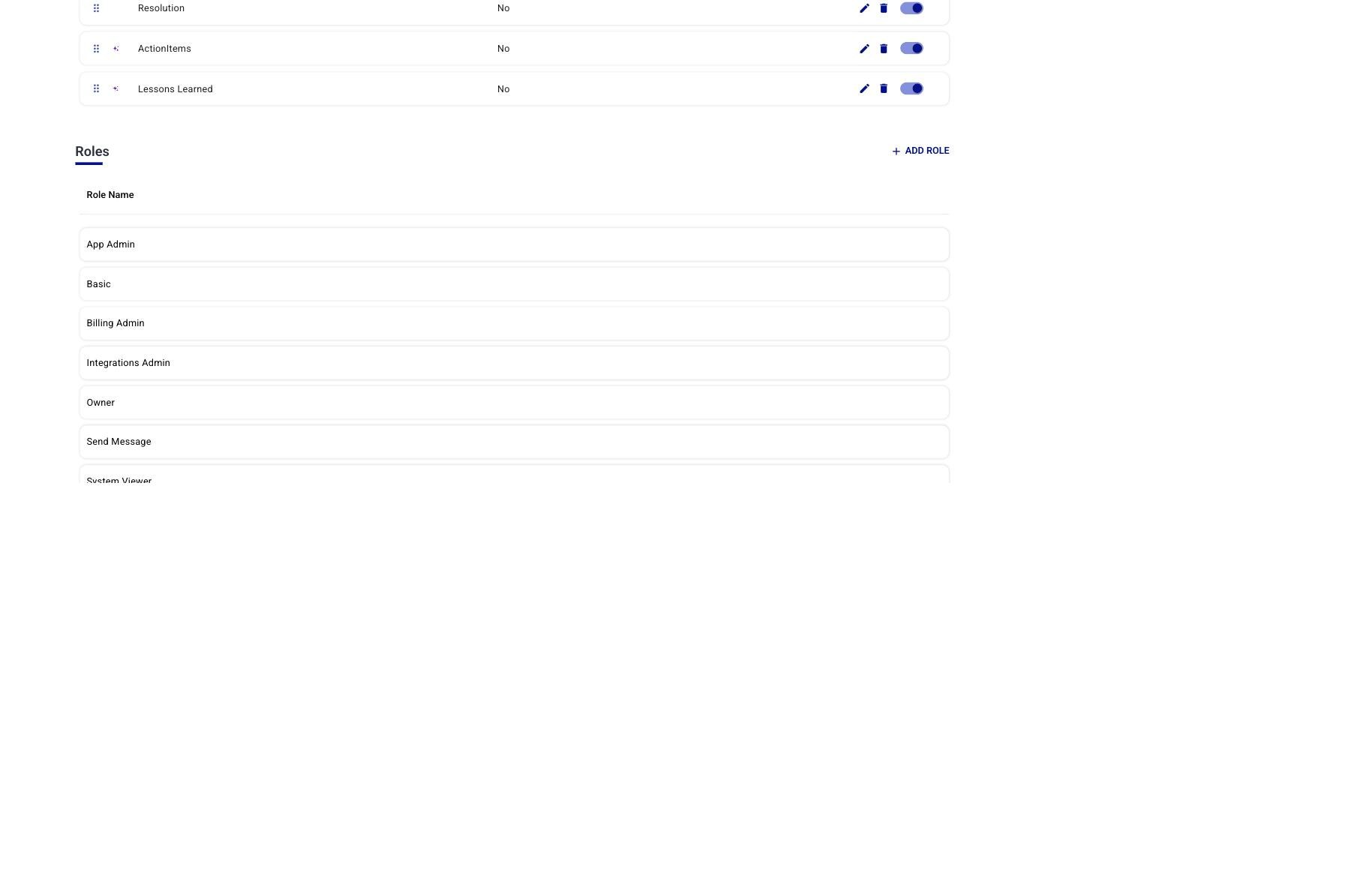
Figure 1. Configuration → Administration → Roles — the source-of-truth list. Click a role to edit its entitlements; click + ADD ROLE (Enterprise) to create a custom role.
Assign Roles to Users
Relevant for App Admins
There are two assignment paths — use whichever fits your flow. The detailed procedures are in the User Roles article; this section focuses on the RBAC implications.
From Administration → Roles → + ASSIGN USERS
Click any role, open the Users Assigned to this Role panel on the right, and click + ASSIGN USERS. The dialog is a dual-list picker — tick users on the Available side, click → to move them to Selected, Submit.
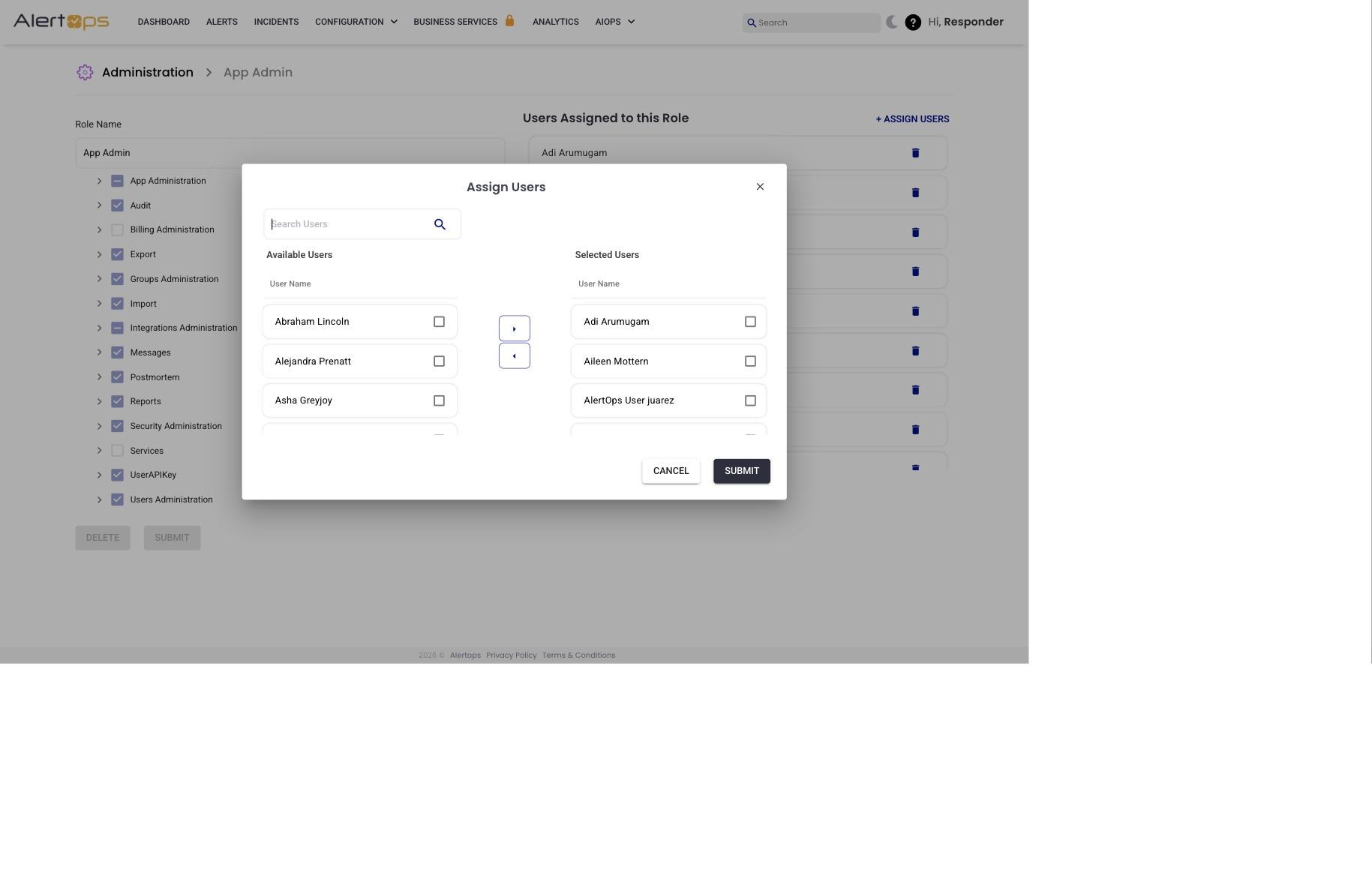
Figure 2. + ASSIGN USERS dialog — the recommended path for assigning a role to many users at once.
From the user's Profile → Roles
Every user's profile has a Roles section with live toggles. Flip a toggle on, save, and the user immediately has the role's entitlements. This is the fastest path when changing roles one user at a time.
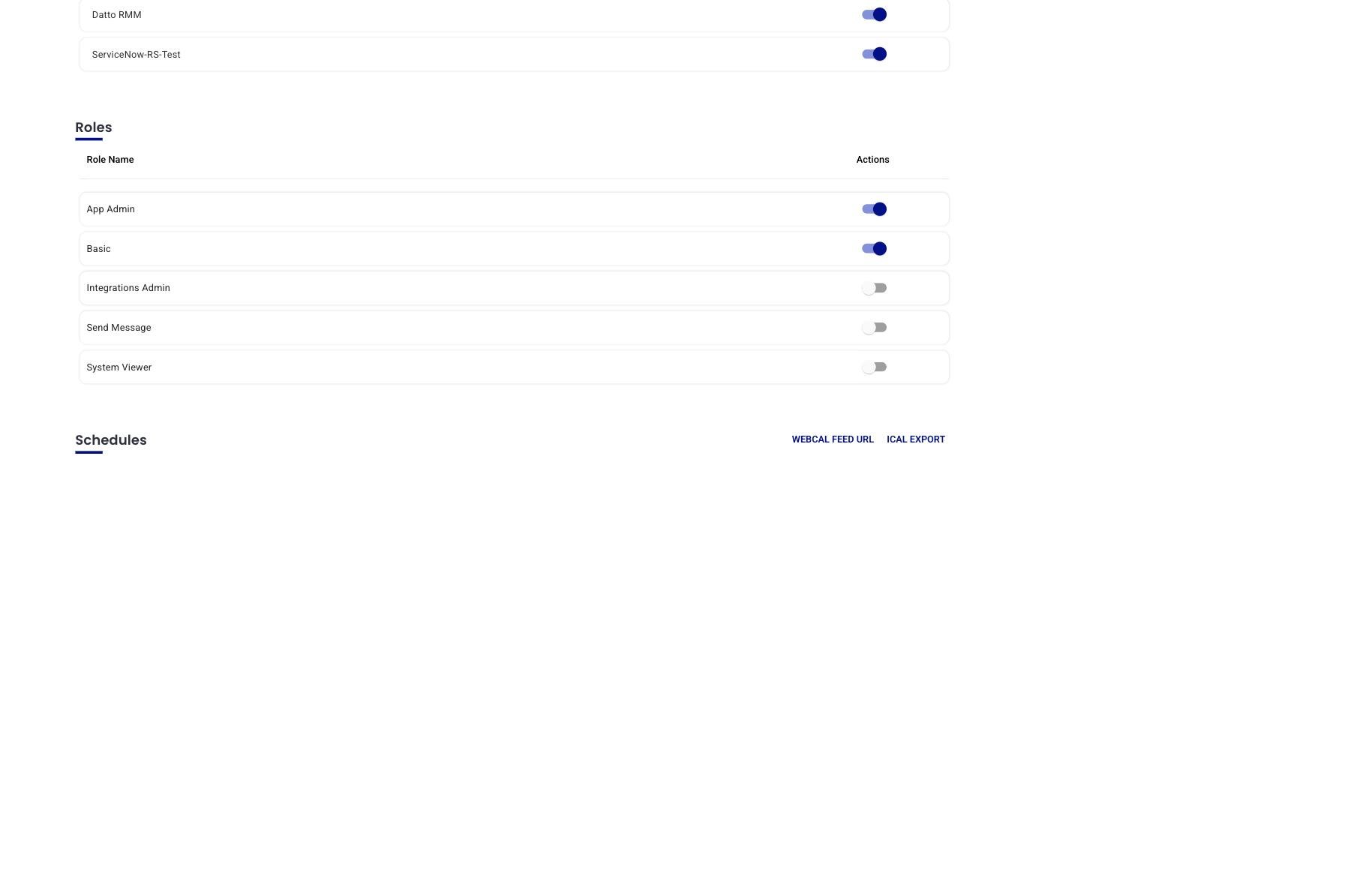
Figure 3. Profile → Roles — per-user toggles. Changes take effect on the user's next page load.
Edit a Role's Entitlements
Relevant for App Admins on Enterprise plans
Open a role in Administration → Roles → [role]. The role detail page has a checkbox tree of entitlements grouped into 14 top-level categories, plus a Users Assigned panel on the right. Expand any category to see its sub-entitlements; tick or untick to modify the role.
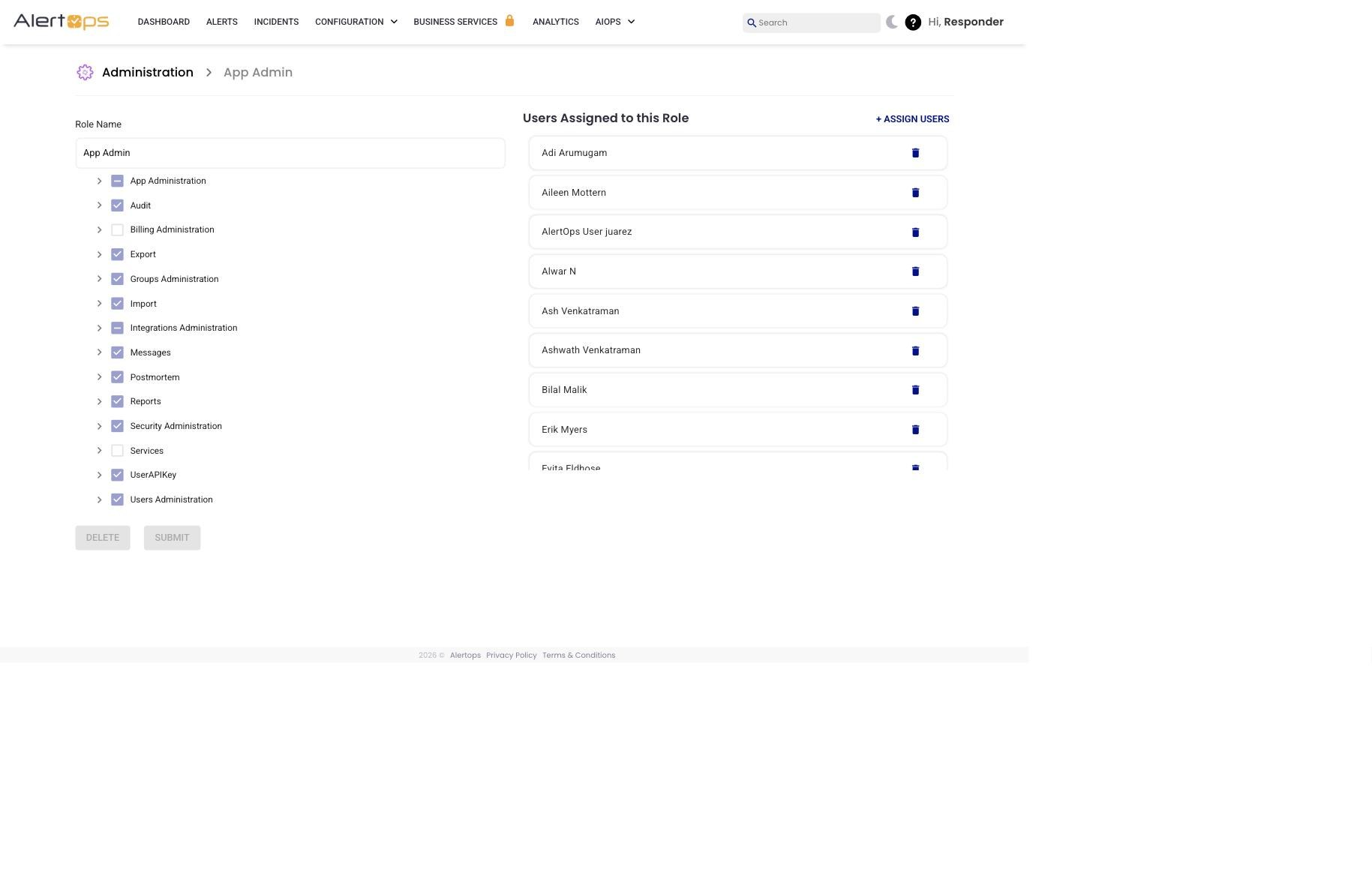
Figure 4. Role edit page — entitlement tree on the left (top-level categories collapsed), Users Assigned panel on the right.
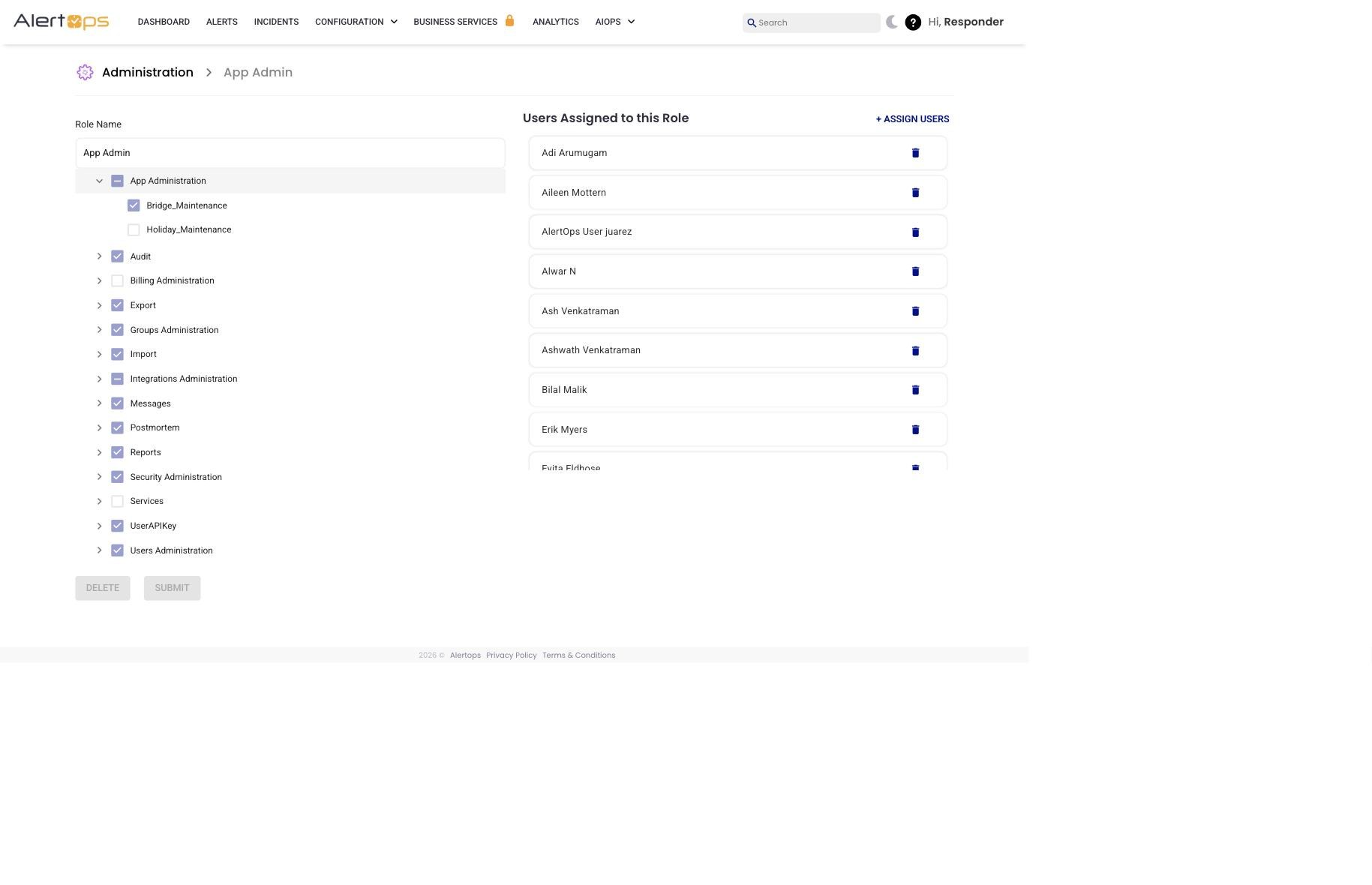
Figure 5. Expanded categories reveal their sub-entitlements (for example, App Administration expands to Bridge_Maintenance, Holiday_Maintenance, and others).
|
Impact is immediate and broad Changing a role's entitlements affects every user currently assigned to that role. Adding an entitlement grants it to all holders; removing one revokes it for all holders on their next page load. Before editing a built-in role, check the Users Assigned panel to see who you will affect. |
Create a Custom Role
Relevant for App Admins on Enterprise plans
When none of the seven built-in roles match your policy, create a custom role with any combination of entitlements.
- Go to Configuration → Administration → Roles.
- Click + ADD ROLE.
- Enter a Role Description that describes the responsibility (for example, "Read-only SRE observer" or "Integrations-only, no messaging").
- Check the entitlements the role should grant. Use the checkbox tree and expand categories to see sub-entitlements.
- Click Submit. The role is available immediately in the Administration list, the User Role dropdown on Add User, and the Profile → Roles toggles.
Use Cases
Delegated team administration
- Goal: Let team leads manage their own groups without global admin access.
- Setup: Create a custom role containing Groups_Update_GroupAccess, Users_Add_Group_Access, Users_Update_GroupAccess, and Messages_View_GroupAccess. Assign the role to each team lead.
- Result: Team leads can add and remove members from their own groups, and see alerts routed to them, without seeing or editing anything outside their groups.
Read-only oversight
- Goal: Give management stakeholders visibility without the ability to change anything.
- Setup: Custom role with Messages_View_GlobalAccess, Reports_GlobalAccess, User_View_GlobalAccess, and Groups_View_GlobalAccess.
- Result: Stakeholders can browse incidents, reports, users, and groups but cannot create, modify, or delete anything.
Integrations-only operator
- Goal: An external vendor or contractor needs to configure integrations but should not see alert content.
- Setup: Custom role with InboundIntegrations_GlobalAccess and OutboundIntegrations_GlobalAccess only.
- Result: The operator can build and edit integrations but cannot view alerts, groups, or users.
Entitlements Reference
Entitlement names are listed exactly as they appear in the Admin UI's entitlement tree. Use the Category column to locate an entitlement quickly — it matches the Admin UI's top-level grouping.
|
Category |
Entitlement |
Definition |
Practical use |
|
App Administration |
Bridge_Maintenance |
Add, Update, and Delete bridges configured within the system. |
Required when managing bridges used for incident coordination. |
|
App Administration |
Message_Rule_Update |
Add and Update existing Escalation Rules within your environment. |
Used when modifying alert escalation logic. |
|
App Administration |
Message_Rule_View |
View existing Escalation Rules within your environment. |
Allows review of escalation logic without edit access. |
|
App Administration |
Subscription_Update |
Update users subscribed to a service in Service Status. |
Manage recipients of service-status notifications. |
|
App Administration |
Template_Maintenance |
Update and Modify Message Templates within your environment. |
Used specifically to manage Service Status message templates. |
|
App Administration |
Topics_Maintenance |
Create, Update, and Modify Topic Message Templates and their associated recipient groups. |
Configure topic-based notifications. |
|
App Administration |
UserAttribute_Maintenance |
Create, Update, and Delete User Attributes available in your environment. |
Required when managing custom user attributes. |
|
App Administration |
Workflows_Update |
Create, Update, and Delete Workflows within your environment. |
Building or modifying workflows. |
|
App Administration |
Workflows_View |
View existing Workflows within your environment. |
Allows inspection of workflows without modification rights. |
|
Audit |
AuditTrail_View |
View the Audit Trail of changes made to the environment. |
Required for audits and change tracking. |
|
Billing Administration |
BillingAdministrationn_Global_Access |
Administer Billing for the account (credit-card billed accounts only; invoice accounts route through support). |
Used by account owners or finance teams. |
|
Export |
Export_GlobalAccess |
Export bulk spreadsheets of Users and Groups from your environment. |
Audits and access reviews. |
|
Groups Administration |
Groups_Add_GlobalAccess |
Create Groups within the environment. |
Onboarding new teams. |
|
Groups Administration |
Groups_Update_GlobalAccess |
Update and Delete any Group within the environment. |
Full administrative group control. |
|
Groups Administration |
Groups_Update_GroupAccess |
Update and Delete Groups the user is a member of. |
Delegated group management. |
|
Groups Administration |
Groups_View_GlobalAccess |
View every Group in the environment. |
Organization-wide group visibility. |
|
Groups Administration |
Groups_View_GroupAccess |
View Groups the user is a member of and their members. |
Visibility limited to owned groups. |
|
Import |
Import_GlobalAccess |
Bulk Import Users and Groups via spreadsheet. |
Large-scale onboarding. |
|
Integrations Administration |
InboundIntegrations_GlobalAccess |
Create, Update, and Delete Inbound Email, API, and Chat Integration templates. |
Configure inbound integrations. |
|
Integrations Administration |
OutboundIntegrations_GlobalAccess |
Create, Update, and Delete Outbound API integrations and methods. |
Configure outbound integrations. |
|
Messages |
Messages_Recieve |
Receive notifications. |
Required for users who receive alerts. |
|
Messages |
Messages_Send_GlobalAccess |
Use the "Create Alert" module to create and send manual alerts. |
Manually trigger alerts. |
|
Messages |
Messages_View_GlobalAccess |
View every Alert in the environment. |
Global alert visibility. |
|
Messages |
Messages_View_GroupAccess |
View Alerts routed to Groups the user is a member of. |
Team-level alert visibility. |
|
Messages |
Messages_View_UserAccess |
View Alerts routed to the user themselves. |
Individual alert visibility. |
|
Postmortem |
Postmortem_Add |
Create Postmortem reports for a closed alert. |
Document incidents after the fact. |
|
Postmortem |
Postmortem_Edit |
Edit existing Postmortem reports for a closed alert. |
Update postmortem records. |
|
Postmortem |
Postmortem_View |
View Postmortem reports for an alert. |
Learning and review. |
|
Postmortem |
PostmortemFields_Maintenance |
Create, Update, and Delete Postmortem fields and templates. |
Administrative control of postmortem schema. |
|
Reports |
Reports_GlobalAccess |
View and Export any Report in the environment. |
Operational and executive reporting. |
|
Security Administration |
SecurityAdministration_Global_Access |
Create, Update, and Delete Roles configured in the environment (i.e., administer RBAC). |
Reserved for RBAC administrators. |
|
Services |
Services_Maintenance |
Create, Update, and Delete Services, Incidents, and Maintenance windows in Service Status. |
Manage the status page and maintenance windows. |
|
Services |
Services_Subscribe |
Subscribe to a Service for status notifications. |
Users opt into service updates. |
|
UserAPIKey |
UserAPIKey_Add |
Add a user-level API Key for the AlertOps API. |
API access and integrations. |
|
Users Administration |
Users_Add_GlobalAccess |
Add new Users to the environment or to a Group. |
User onboarding. |
|
Users Administration |
Users_Add_Group_Access |
Add Users to Groups the user is a member of. |
Delegated group management. |
|
Users Administration |
Users_Update_GroupAccess |
Update and Delete members of Groups the user is a member of. |
Manage group membership. |
|
Users Administration |
User_Update_UserAccess |
Update and Edit the user's own profile attributes. |
Self-service profile updates. |
|
Users Administration |
User_View_GlobalAccess |
View every User in the environment. |
Administrative visibility. |
|
Users Administration |
User_View_GroupAccess |
View every User in Groups the user is a member of. |
Group-scoped visibility. |
|
Users Administration |
User_View_UserAccess |
View the user's own Profile. |
Personal profile access. |
Best Practices
Do
- Treat the AlertOps Admin UI as the source of truth for RBAC enforcement.
- Apply the principle of least privilege. Prefer a tightly-scoped custom role over an over-permissioned built-in role.
- Review role entitlements after AlertOps product updates, since new features sometimes introduce new entitlements that are not assigned to existing roles by default.
- Check the Users Assigned panel before editing a built-in role — you will affect everyone currently holding it.
Don't
- Don't broadly assign high-risk entitlements like SecurityAdministration_Global_Access or BillingAdministrationn_Global_Access. Lock these to a small number of trusted admins.
- Don't edit built-in roles unless you understand the downstream impact — a custom role is usually safer.
- Don't assume every Owner role includes Postmortem entitlements; these are gated to Enterprise packages.