
Overview
Relevant for Developers automating who is on call
A user owns contact methods, a group holds users and nested groups, and a schedule (shift) decides which members are on call, and in which role, at any moment. Escalation policies notify by role, so a wrong shift role pages the wrong person.
Key benefits:
- Safe lookups and re-runs — users.find_by_username, groups.find and schedules.find return null when nothing matches, and groups.ensure returns the group and whether it was created.
- Shifts that follow the rules — schedules.create_shift and the shift-body builder apply the semantic-spec invariants, and the shift reviewer lists the rules an existing shift breaks.
Reading the operation names
Relevant for Developers using any of the five AlertOps SDKs
This guide applies to every AlertOps SDK. It names each operation by its resource path and operation name, such as groups.members.add_users, lists positional arguments in order, and shows request bodies and options as JSON. Where a task needs real code, the example is given in all five languages. Each SDK spells the same call in its own style:
| SDK | The same call | Options and request fields |
| Python | ao.groups.members.add_users(group_id, [101, 102], roles=["Primary"]) | Keyword arguments, such as search="Net" |
| TypeScript | await ao.groups.members.addUsers(groupId, [101, 102], ["Primary"]) | One trailing options object keyed by the names in this guide, such as { search: "Net" } |
| Go | ao.Groups.Members.AddUsers(ctx, groupID, []any{101, 102}, []any{"Primary"}) | &alertops.Request{Fields: alertops.M{"search": "Net"}} for endpoints, alertops.M{…} for helper options |
| Java | ao.groups().members().addUsers(groupId, List.of(101, 102), List.of("Primary")) | Request.of("search", "Net") for endpoints, a Map keyed by the names in this guide for helper options |
| .NET | await ao.Groups.Members.AddUsersAsync(groupId, new object?[] { 101, 102 }, new object?[] { "Primary" }) | new Kwargs { ["search"] = "Net" } |
- Names follow each language's style: update_basic is updateBasic in TypeScript and Java, UpdateBasic in Go and UpdateBasicAsync in .NET. Go keeps initialisms upper case (create_api is CreateAPI, post_to_url is PostToURL).
- Paginated operations also have variants that collect every page or iterate lazily (…All / …Iter; in Python, .all() and .iter() on the operation).
- Helpers that look something up return null (None in Python, nil in Go) when nothing matches. **ensure helpers** return the record together with a flag that says whether it was created.
- Errors are the same classes in every SDK, such as NotFoundError and BadRequestError.
- Code examples come in the order Python, TypeScript, Go, Java, .NET. Each assumes a client named ao (and, in Go, a ctx and a function that returns error), created as in that SDK's Getting Started article.
For one language's details, see Calling the API from Python, TypeScript, Go, Java or .NET.
Before you start
Relevant for Developers setting up the client
User and shift bodies take the time zone display name, such as (UTC-06:00) Central Time (US & Canada), not an IANA zone. Get it from account.time_zone() (the account default) or lookups.time_zone_name("America/Chicago").
Users
Relevant for Developers creating and maintaining user profiles
users.create takes the user plus a contact_methods list and returns the full user, including user_id and each contact_methods[].contact_id. It defaults locale to en-US, type to Standard and roles to ["Basic"].
{
  "user_name": "alice@example.com", "first_name": "Alice", "last_name": "Ng",
  "time_zone": "(UTC-06:00) Central Time (US & Canada)",
  "contact_methods": [{
    "contact_method_name": "Email-Official", "email": {"email_address": "alice@example.com"},
    "enabled": true, "sequence": 1, "wait_time_in_mins": 0, "repeat": false,
    "repeat_times": 0, "repeat_minutes": 0, "notification_time24x7": true
  }]
}
- users.create_with_email(user_name, first_name, last_name, email_address, time_zone) is a shortcut that creates the user with one Email-Official method, enabled and 24x7.
- users.get(x) takes a user id or a user name. users.find_by_username(name) returns null instead of raising.
- users.list is paged and takes search, role, include and sortBy. With include: "roles", each row gains roles[].
- users.groups(user_id) lists a user's groups, and users.delete_if_exists(user_id) returns false instead of raising when the user is already gone.
Unknown ids and unknown names fail differently
GET /users/{x} answers 404 "User does not exist" for an unknown id but 400 "Invalid User : <name>" for an unknown user name. Use find_by_username, which handles both and returns null.
Roles
users.roles.list returns role labels (["Group Admin", "Basic"]), but the underlying assign endpoint takes a role id. The helpers users.roles.assign(user_id, role) and users.roles.unassign(user_id, role) look up the id for you and return the user's labels afterwards: assigning Group Admin returns ["Group Admin", "Basic"].
Contact methods and notification times
Contact methods are keyed by contact_method_name in the path (Email-Official, Email-Personal, …). A method's PUT is a full replace, so prefer modify, which reads the method, applies your changes and writes the whole record back.
| Operation | What it does |
| users.contact_methods.add_email(user_id, "Email-Personal", "alice.home@example.com", {wait_time_in_mins: 1}) | Appends an email method after the existing ones (here, sequence 2) |
| users.contact_methods.modify(user_id, "Email-Personal", {wait_time_in_mins: 2, repeat: true, repeat_times: 2, repeat_minutes: 3}) | Reads the method, applies the changes and writes the whole record back |
| users.contact_methods.set_enabled(user_id, "Email-Personal", false) | Turns one method off |
| users.contact_methods.notification_times.create(user_id, "Email-Personal", {…}) | Limits the method to office hours (an empty list of times means 24x7) |
| users.contact_methods.test(user_id, "Email-Official", {}) | Sends a real test notification |
The body for Monday and Tuesday, 09:00 to 17:30:
{"monday": true, "tuesday": true, "wednesday": false, "thursday": false, "friday": false,
 "saturday": false, "sunday": false, "start_hour": 9, "start_minute": 0, "end_hour": 17, "end_minute": 30}
Push methods come only from the mobile app
contact_methods.delete_push takes {notification_key}. Push registrations are created by the mobile app, so any other key returns 400 "Notification key is invalid".
Out of office and attributes
users.out_of_office.cover_all_groups(user_id, cover_user, start, end) creates an out-of-office record that hands every group to one covering user. The covering user is given by user name, and start and end are date-times in the account time zone (or {date, hour, minute} objects).
- users.attributes.set_values(user_id, {"Cost Center": "NOC-1"}) sets attribute values and returns the re-read values. Values can only be set for attributes that already exist in admin.user_attributes.
- users.out_of_office_report({startDate: "2030-01-01", endDate: "2030-01-31", groupId: 4321}) reports out-of-office periods for every user (v3).
API keys, invitations and calendar feeds
Generating a key replaces the old one
users.generate_api_key(user_id, {}) returns {user_api_key} and replaces that user's key, so anything still using the old key stops working. The new key acts as that user: store it like a password.
- users.resend_invitation(user_id, {}) emails the activation invite again.
- users.schedules.webcal(user_id) returns {url}, a feed URL that embeds an API key. Never log it. users.schedules.export(user_id) returns iCal text.
- Preferences (users.preferences) always belong to the calling user, the owner of the API key.
User operations
| Operation | HTTP | What it does |
| users.create | POST /users | Create a user with contact methods; returns user_id and contact_ids |
| users.get / find_by_username | GET /users/{x} | Fetch by id or user name; the helper returns null when missing |
| users.list | GET /users | Paged list (search, role, include=roles, sortBy) |
| users.update_basic | PUT /users/{id}/basic | Change name, locale, time zone, external_id |
| users.roles.assign / unassign | helper | Add or remove a role by label |
| users.contact_methods.add_email / modify | helper | Append a method or change one (whole-record write) |
| users.generate_api_key | POST /users/{id}/userapikey | Create or replace the user's API key |
Priority notification profiles (users.priority_notifications, users.priority_routing), CSV import and export, and the rest are listed in each SDK's method reference.
Groups
Relevant for Developers building on-call teams
groups.create({group_name}) returns 201 with the full group, including group_id. In practice, use groups.ensure(name), which finds the group by name (case-insensitive) or creates it, and returns the group with a created flag.
- groups.find("noc") returns the same group, or null.
- groups.update_basic(group_id, {group_name: "NOC", description: ["Network on-call"]}) changes the name and description.
- groups.governance(group_id) shows where the group is used: escalation policies, integrations and workflows.
Descriptions are lists
groups.update_basic takes description as a list of strings, not a single string.
Members
groups.members.add_users(group_id, user_ids, roles) appends users by id, in order, each with roles ["Primary"] unless you pass other roles. groups.members.add_group(group_id, child_group_name) nests another group by name. To change one member, read it from groups.members.list(group_id) and send it back with the new values through groups.members.update(group_id, "User", member_id, {body: …}):
{"member_type": "User", "member": "7", "sequence": 2, "roles": ["Secondary"]}
The member body follows these rules:
| Field | Description |
| member_type | User or Group |
| member | The user id for User, the group name for Group |
| sequence | Position in the group; the helpers append after the existing members |
| roles | null for a nested group, [] for stakeholders and groups whose roles come from the shift, ["Primary"] otherwise |
Once the shift owns roles, members don't
members.list returns a role_in_shift flag in its envelope (the list result's raw envelope). When it is true, roles come from the shift, and AlertOps rejects Primary or Secondary on new members with 400. Add them with roles [] and set roles on the shift. ["Manager"] stays valid for a manager who sits outside the rotation.
groups.members.remove is blocked while the member is part of a schedule. Remove them from the shift first.
Contact methods and topics
Group contact methods are keyed by name (Group Email), with no numeric id: groups.contact_methods.create(group_id, {contact_method_name: "Group Email", sequence: 1, email_address: "noc@example.com"}). Attach topics with groups.topics.add(group_id, {topics: [topic_id]}).
Access
groups.access.get(group_id) returns {custom, users[]}, and groups.access.set_custom(group_id, {custom: true}) turns on custom access. groups.access.transfer_owner(group_id, {new_owner: "<user_id>"}) hands the group to another user.
There is usually nobody to add to a group's access list
On the live tenant, groups.access.admins_available returned [] and add_admins, update_admins and remove_admins answered 400 "Nothing to update". That happened with App Admin, Group Admin, Basic and custom-role users. Admins already have implicit access: App and Group Admins get Edit globally, and members of a scoped group-access role get Edit through membership. After set_custom with custom: true, access.get lists them with Edit next to the Owner.
Group operations
| Operation | HTTP | What it does |
| groups.ensure / find | helper | Find by name or create; returns the group and a created flag |
| groups.create / get / delete | POST, GET, DELETE /groups | Basic CRUD |
| groups.update_basic | PUT /groups/{id}/basic | Name, description (list), location |
| groups.members.add_users / add_group | helper | Append users by id or a nested group by name |
| groups.members.update / remove | PUT, DELETE /groups/{id}/members/{type}/{member_id} | Change roles and sequence, or remove |
| groups.access.get / set_custom / transfer_owner | GET, PUT | Access settings and ownership |
| groups.governance | GET /groups/{id}/governance | Policies, integrations and workflows that use the group |
On-call schedules
Relevant for Developers creating shifts and rotations
A shift belongs to one group. Two choices shape it:
- Fixed or Rotating — a Fixed shift always pages the same people in the same roles. A Rotating shift moves members through the roles on a cadence (weekly by default).
- Continuous or block — a continuous shift is one uninterrupted span across days (24x7, or Friday evening to Monday morning). A block shift (continuous false) is a daily time-of-day window on each weekday of the span, such as weekday after-hours 17:00 to 07:59.
| Field | Description |
| schedule_type | Fixed or Rotating |
| continuous | true for one uninterrupted span, false for a daily block |
| start_weekday / end_weekday | Mon … Sun; the span is inclusive and can wrap (Fri to Mon) |
| start_date / end_date | {date: "YYYY-MM-DD", hour, minute}; the times are the shift's daily start and end |
| users | [{user, first_name, last_name, role}]; role is Primary, Secondary or "" (off this week) |
| rotate_frequency / rotate_weekly | Rotating only: {every_x_weeks, rotate_at_day_of_week, rotate_x_users, rotate_at_time} |
The rules a good shift follows
These invariants come from the semantic spec. The shift builder and create_shift apply them by default:
- Primary first (first_member_primary) — the first user is Primary. In a rotation, users[] is week 1, so the first user is on call this week.
- **End on :59** (shift_end_minute_convention) — "5pm to 8am" ends at 07:59, not 08:00, so the last minute is covered and doesn't overlap the next shift.
- Start on the prior Monday (start_align_prior_monday) — the start date snaps to the Monday on or before today.
- End 5 years out (shift_end_date_far_future) — coverage never lapses silently.
- Weekend spans are continuous (overnight_is_continuous) — weekday after-hours is a block.
Create a shift
schedules.create_shift(group_id, schedule_name, users, options) fills each user's first and last name from the group, resolves an IANA time zone to its display name, and posts an invariant-following body. The users must already be members of the group.
| Shift | users | Options |
| Fixed, continuous weekend: Sat 00:00 to Sun 23:59, Primary and Secondary | [alice_id, bob_id] | {time_zone: "America/Chicago", schedule_type: "Fixed", start_weekday: "Sat", end_weekday: "Sun", start_time: [0, 0], end_time: [23, 59], continuous: true} |
| Rotating weekly, weekday after-hours block: Mon to Fri 17:00 to 07:59 | [alice_id, bob_id, carol_id] | {time_zone: "America/Chicago", schedule_type: "Rotating", start_weekday: "Mon", end_weekday: "Fri", start_time: "17:00", end_time: "07:59", continuous: false} |
The rotating shift from the table, in each SDK:
Python
shift = ao.schedules.create_shift(group_id, "After hours", [alice_id, bob_id, carol_id],
                                  time_zone="America/Chicago", schedule_type="Rotating",
                                  start_weekday="Mon", end_weekday="Fri",
                                  start_time="17:00", end_time="07:59", continuous=False)
TypeScript
const shift = await ao.schedules.createShift(groupId, "After hours", [aliceId, bobId, carolId], {
  time_zone: "America/Chicago", schedule_type: "Rotating", start_weekday: "Mon", end_weekday: "Fri",
  start_time: "17:00", end_time: "07:59", continuous: false,
});
Go
shift, err := ao.Schedules.CreateShift(ctx, groupID, "After hours", []any{aliceID, bobID, carolID}, alertops.M{
	"time_zone": "America/Chicago", "schedule_type": "Rotating", "start_weekday": "Mon", "end_weekday": "Fri",
	"start_time": "17:00", "end_time": "07:59", "continuous": false,
})
if err != nil {
	return err
}
Java
JsonNode shift = ao.schedules().createShift(groupId, "After hours", List.of(aliceId, bobId, carolId), Map.of(
    "time_zone", "America/Chicago", "schedule_type", "Rotating", "start_weekday", "Mon", "end_weekday", "Fri",
    "start_time", "17:00", "end_time", "07:59", "continuous", false));
.NET
var shift = await ao.Schedules.CreateShiftAsync(groupId, "After hours", new object?[] { aliceId, bobId, carolId }, new Kwargs
{
    ["time_zone"] = "America/Chicago", ["schedule_type"] = "Rotating", ["start_weekday"] = "Mon", ["end_weekday"] = "Fri",
    ["start_time"] = "17:00", ["end_time"] = "07:59", ["continuous"] = false,
});
In the rotating shift, the roles come back as ["Primary", "", ""]: Alice is on call in week 1.
Pass time_zone explicitly: without it, create_shift uses the first entry of lookups.time_zones() (the UI's preselection), not the account zone. Rotation options (rotate_every_x_weeks, rotate_x_users, rotate_at_day_of_week, rotate_at_time) default to one user every week, at the shift's start day and time.
How a rotation turns
Rotation is bottom-up. The roles stay pinned to their slots in users[], and members move up one slot each rotation step. With [Alice (Primary), Bob (""), Carol ("")], Alice is on call in week 1 and Bob holds the Primary slot in week 2 (checked live against the timeline). An empty role means "off shift this week", not "never on call".
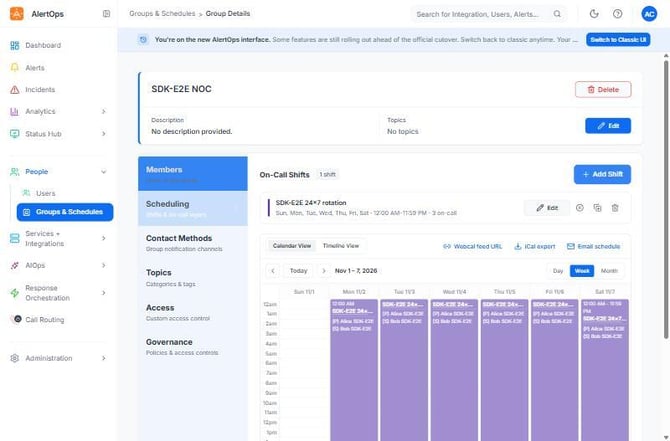
Figure 1. A 24x7 rotation built through the SDK, in the group's calendar. Each day shows (P) Alice and (S) Bob, the week-1 Primary and Secondary. Sunday 11/1 is empty because the start date is aligned to Monday 11/2.
Build or review a body without posting
Every SDK can build a shift body offline and review an existing one:
| SDK | Builder and reviewer |
| Python | shift_payload / shift_issues in alertops.resources.schedules |
| TypeScript | shiftPayload / shiftIssues, exported by @alertops/sdk |
| Go | alertops.ShiftPayload / alertops.ShiftIssues |
| Java | GroupsHelpers.shiftPayload / GroupsHelpers.shiftIssues in com.alertops.sdk.helpers |
| .NET | Shifts.ShiftPayload / Shifts.ShiftIssues |
The builder takes the same options as create_shift and returns the body; post it with schedules.create. The reviewer returns the invariants a body breaks, such as shift_end_minute_convention: end on :59 (or :29), not :00; an empty list means it's clean. Run it over schedules.list_for_group(group_id) to review shifts created by hand in the UI.
Read the timeline
schedules.timeline(group_id, {startDate: "2026-11-02", endDate: "2026-11-16"}) resolves who is on call between two dates. Each row is one occurrence: {scheduleid, schedulename, startdatetime, enddatetime, useroncall: "(P) First Last", oncalluserid}. Block shifts are split at midnight. Add children: true to include nested groups.
schedules.oncall is dead
GET /schedules/{group_id}/oncall is routed as a schedule id of "oncall" and always answers 404 "Schedule not found". Use schedules.timeline or the analytics on-call views. For the same reason, never pass "oncallnow" or "calendar" as a group id.
Update, disable and clone
PUT /schedules/{group_id}/{schedule_id} is a whole-record write that returns no body. The helpers do the GET, merge and PUT for you and return the re-read shift:
- schedules.update_fields(group_id, schedule_id, {schedule_name: "NOC nights v2", color: "#123456"})
- schedules.set_enabled(group_id, schedule_id, false) — the UI toggle re-sends the whole shift too.
- schedules.clone(group_id, schedule_id, {name: "NOC nights copy", start_date: "2026-11-02", end_date: "2031-11-02"})
Schedule operations
| Operation | HTTP | What it does |
| schedules.create_shift | helper | Build an invariant-following shift and post it |
| schedules.create | POST /schedules | Post a raw body (for example from the shift builder) |
| schedules.list_for_group / get / find | GET /schedules/{group_id} | All shifts of a group, one shift, or one by name |
| schedules.update_fields / set_enabled | helper | GET, merge, PUT the whole record |
| schedules.clone | POST .../clone | Copy a shift with a new name and dates |
| schedules.timeline | GET .../timeline | Resolved on-call occurrences |
| schedules.export / webcal | GET | iCalendar bytes (not CSV), or a feed URL that embeds an API key |
| schedules.email.update | PUT .../send_email | Weekly schedule digest email to the group |
Best Practices
Relevant for Anyone running on-call configuration in production
Build in dependency order
- Create users, then the group, then members, then shifts. A shift can only name users who are already members.
- Use groups.ensure and users.find_by_username so a re-run reuses objects instead of failing or duplicating them.
Keep roles in one place
- Once a group has a shift, set Primary and Secondary on the shift only and add new members with roles [].
- Keep the manager out of the rotation: add them as a member with roles ["Manager"].
Write shifts that don't leave gaps
- Let create_shift choose the dates and end times, and run the shift reviewer over shifts made by hand.
- Check the result with schedules.timeline for the next two weeks, not just the create response.
Configuration Examples
Relevant for Starting templates for common team setups
Example 1 — Minimal: one person, 24x7
| Step | Operation |
| 1 | account.time_zone() for the display name |
| 2 | users.find_by_username("oncall@example.com"), or users.create_with_email(...) when it returns null |
| 3 | groups.ensure("Payments") |
| 4 | groups.members.add_users(group_id, [user_id]) |
| 5 | schedules.create_shift(group_id, "Payments 24x7", [user_id], {time_zone: "America/Chicago", schedule_type: "Fixed"}) — Mon to Sun, 00:00 to 23:59, continuous |
Example 2 — Typical: weekly after-hours rotation with a manager
| Step | Operation |
| 1 | groups.ensure("NOC") |
| 2 | groups.members.add_users(group_id, [alice_id, bob_id, carol_id]) |
| 3 | schedules.create_shift(group_id, "NOC after hours", [alice_id, bob_id, carol_id], {time_zone: "America/Chicago", schedule_type: "Rotating", start_weekday: "Mon", end_weekday: "Fri", start_time: "17:00", end_time: "07:59", continuous: false}) |
| 4 | groups.members.add_users(group_id, [mona_id], ["Manager"]) — outside the rotation |
Example 3 — Audit every group's shifts
Iterate every group with the paginated variant of groups.list, read each group's shifts with schedules.list_for_group(group_id), and run the shift reviewer over each one. Report any shift whose list of broken rules is not empty.
Troubleshooting
Relevant for Anyone debugging users, groups or shifts
Creating a user or shift fails on the time zone
- The body carries an IANA zone such as America/Chicago. Send the display name from lookups.time_zone_name() or account.time_zone(). create_shift converts IANA zones for you; users.create does not.
Looking up a user by name raises BadRequestError
- users.get("<name>") answers 400 "Invalid User : <name>" for an unknown name. Use users.find_by_username, which returns null.
Adding a member with Primary fails with 400
- The group's roles come from its shift (role_in_shift is true). Add the member with roles [], then put them on the shift.
A member can't be removed
- The member is in a schedule. Remove them from the shift's users (for example with update_fields), then call groups.members.remove.
The rotation pages the wrong person
- The first user in users[] is not Primary, or the shift ends at :00. Run the shift reviewer and fix the body.
- Read schedules.timeline for the dates in question to see who is resolved as on call.
Group access calls return 400 "Nothing to update"
- Every eligible admin already has implicit access, so there's nothing to grant. Read groups.access.get to see the effective permissions.
Related Articles
- Escalation Policies and Response Plays with the AlertOps SDKs
- Working with Alerts in the AlertOps SDKs
- Getting Started with the AlertOps Python SDK
- Getting Started with the AlertOps TypeScript SDK
Need help?
Email support@alertops.com or contact your AlertOps representative.