
Overview
Relevant for Developers automating escalation setup
An escalation policy (EP) is a reusable template over roles: it notifies a group's Primary members, then escalates to Secondary and Manager after waits you set, and it carries workflows and outbound actions. A response play (RP) is an explicit list of users and groups, each step with its own wait, plus one repeat of the whole play. Every inbound integration needs an EP (or an RP) to know whom to notify.
Key benefits:
- Safe whole-record writes — escalation_policies.update and update_options read, merge and write back, so settings you didn't touch survive.
- Idempotent roles — member_roles.upsert creates a role or updates its timings.
- One access API — escalation_policies.access also serves response plays, which share the same backend endpoints.
Reading the operation names
Relevant for Developers using any of the five AlertOps SDKs
This guide applies to every AlertOps SDK. It names each operation by its resource path and operation name, such as groups.members.add_users, lists positional arguments in order, and shows request bodies and options as JSON. Where a task needs real code, the example is given in all five languages. Each SDK spells the same call in its own style:
| SDK | The same call | Options and request fields |
| Python | ao.groups.members.add_users(group_id, [101, 102], roles=["Primary"]) | Keyword arguments, such as search="Net" |
| TypeScript | await ao.groups.members.addUsers(groupId, [101, 102], ["Primary"]) | One trailing options object keyed by the names in this guide, such as { search: "Net" } |
| Go | ao.Groups.Members.AddUsers(ctx, groupID, []any{101, 102}, []any{"Primary"}) | &alertops.Request{Fields: alertops.M{"search": "Net"}} for endpoints, alertops.M{…} for helper options |
| Java | ao.groups().members().addUsers(groupId, List.of(101, 102), List.of("Primary")) | Request.of("search", "Net") for endpoints, a Map keyed by the names in this guide for helper options |
| .NET | await ao.Groups.Members.AddUsersAsync(groupId, new object?[] { 101, 102 }, new object?[] { "Primary" }) | new Kwargs { ["search"] = "Net" } |
- Names follow each language's style: update_basic is updateBasic in TypeScript and Java, UpdateBasic in Go and UpdateBasicAsync in .NET. Go keeps initialisms upper case (create_api is CreateAPI, post_to_url is PostToURL).
- Paginated operations also have variants that collect every page or iterate lazily (…All / …Iter; in Python, .all() and .iter() on the operation).
- Helpers that look something up return null (None in Python, nil in Go) when nothing matches. **ensure helpers** return the record together with a flag that says whether it was created.
- Errors are the same classes in every SDK, such as NotFoundError and BadRequestError.
- Code examples come in the order Python, TypeScript, Go, Java, .NET. Each assumes a client named ao (and, in Go, a ctx and a function that returns error), created as in that SDK's Getting Started article.
For one language's details, see Calling the API from Python, TypeScript, Go, Java or .NET.
Before you start
Relevant for Developers setting up the client
You need a group with members (see Users, Groups and On-Call Schedules with the AlertOps SDKs). EP and RP lists use offset as a page index; the paginated variants (…All / …Iter) handle that.
Create an escalation policy
Relevant for Developers creating and maintaining policies
escalation_policies.create with this body returns the full policy, including escalation_policy_id:
{
  "escalation_policy_name": "NOC Escalation",
  "description": "Primary, then Secondary after 2 minutes, then Manager",
  "priority": "High", "enabled": true, "quick_launch": false
}
A new policy already has:
- a Primary member role with 5 minutes between members
- the tenant's default Stop Delivery on Assignment or Closed workflow attached
- version "1" and notify_using_centralized_settings false
Description and quick_launch are required
POST /escalation_policies/basic answers 400 "Description cannot be null or empty" without a description. quick_launch is required too; create defaults it to false. Manual alerts (alerts.create) can only use a policy with quick_launch true, so set it on policies people pick by hand.
Other basic operations:
| Operation | What it does |
| escalation_policies.update(epid, {priority: "Critical", quick_launch: true}) | GET basic, merge, PUT the whole record |
| escalation_policies.set_status(epid, {enabled: false}) | Turn the policy off |
| escalation_policies.clone(epid, {escalation_policy_name: "NOC Escalation (High)", description: "Clone"}) | Copy the policy |
| escalation_policies.ensure("NOC Escalation", {description: "NOC ladder"}) | Find by name or create; returns the policy and a created flag |
| escalation_policies.usage(epid) | Where it is used: {integrations, workflows, reply, technical_services} |
PUT .../basic is a whole-record write that returns no body, so use update. Deleting is blocked while the policy is in use (is_used). GET .../basic includes alert_type_id and sla_in_hours, which the full get leaves out.
Centralized or user notification
Relevant for On-call admins choosing how people are contacted
An EP notifies in one of two modes:
- Centralized — the contact-method sequence and retries are defined in the EP, per role. This is the recommended default.
- User — each user's own notification profile (or their priority-matched profile) is used instead. Per-user priority profiles must be maintained on every user.
Switch with escalation_policies.set_notify_mode(epid, {notify_using_centralized_settings: true}). Switching to centralized seeds the Primary role with an Email-Official contact method: escalation_policies.member_roles.list(epid) then shows Email-Official on the first role's contact_methods.
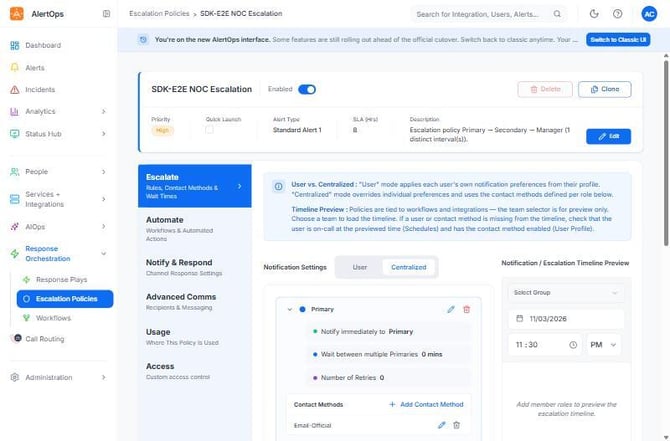
Figure 1. The SDK-E2E NOC Escalation policy, created through the SDK, in the editor. Centralized is selected, Primary is notified immediately with 0 minutes between Primaries, and Email-Official is the role's contact method.
Member roles and the four timing levers
Relevant for On-call admins shaping escalation timing
An EP has up to three ladder roles: Primary, Secondary and Manager. It can express at most four distinct timing intervals (max_four_escalation_levers):
| Lever | Description |
| wait_time_between_members_in_mins | Per role: wait between members of the same role (Primary 1, then Primary 2) |
| role_wait_time_in_mins | Per role: wait before escalating to this role |
| wait_time_before_notifying_next_group_in_min | On the policy: wait before the next group when there are several or nested groups |
| no_of_retries + retry_interval | Set on each role: how many times to re-run the ladder, and how many minutes apart |
A timeline with more distinct intervals, or unequal gaps between members of one role, needs a response play.
escalation_policies.member_roles.upsert(epid, member_role_type, fields) creates the role or updates its timings. A three-tier ladder:
| Role | Fields |
| Primary | {wait_time_between_members_in_mins: 0} |
| Secondary | {role_wait_time_in_mins: 2, wait_time_between_members_in_mins: 0}, plus the contact_methods list below |
| Manager | {role_wait_time_in_mins: 2, wait_time_between_members_in_mins: 0}, plus the contact_methods list below |
A role's contact_methods list, here email only:
[{"contact_method_name": "Email-Official", "wait_time_in_mins": 0, "sequence": 1, "to_bcc_or_cc": "To"}]
Afterwards, member_roles.list(epid) returns the roles Primary, Secondary and Manager. Set the policy-level lever with escalation_policies.update(epid, {wait_time_before_notifying_next_group_in_min: 5}).
member_roles.add fails with "already exists" for a role the policy has; upsert updates it instead. member_roles.get for a role the policy doesn't have returns null (200 with an empty body), not 404.
Calling update_basic directly
Pass the role body as the request body, including member_role_type. A member_role_type keyword field is taken as the path parameter, not a body field.
Role contact methods
In centralized mode, each role has its own ordered contact methods, managed through escalation_policies.member_roles.contact_methods:
- add(epid, "Secondary", {contact_method_name: "Email-Personal", wait_time_in_mins: 2, sequence: 2, to_bcc_or_cc: "To"})
- update(epid, "Secondary", "Email-Personal", {body: …}) with the whole method:
{"contact_method_name": "Email-Personal", "wait_time_in_mins": 4, "sequence": 2, "to_bcc_or_cc": "CC",
 "repeat": true, "repeat_times": 2, "repeat_minutes": 3}
repeat_times is 2 to 100 and repeat_minutes at least 2. to_bcc_or_cc applies to email methods only. The UI blocks deleting a role's only method. Group-level targets (Group Email, Primary Email …) go through escalation_policies.group_contact_methods.
Options, workflows, outbound and recipients
Relevant for Developers wiring a policy into automation
Options
Options hold the acknowledgement, assignment, escalate and close channels, notification templates, message_text and sla_in_hours.
Options PUT replaces the whole record
PUT .../options blanks anything you leave out and needs alert_type set to the alert type name, or it answers 400 "AlertType cannot be null". Use update_options, which reads the options, merges your changes and fills alert_type from alert_type_name.
escalation_policies.update_options(epid, changes) with these changes turns on email acknowledgement and sets the message text and SLA:
{"acknowledgement": {"phone": false, "sms": false, "email": true, "group_chat": false},
 "message_text": "NOC alert", "sla_in_hours": 6.0}
acknowledgement is null on a new policy. Acknowledging means "I saw it" and the ladder continues; assignment takes ownership and stops it (through the default workflow).
Workflows and outbound
| Operation | Body | Notes |
| escalation_policies.workflows.add(epid, body) | [{"workflow_id": 41716}] | Pick the id from workflows.available(epid) |
| escalation_policies.outbound_actions.add(epid, body) | [{"outbound_action_id": "501-7"}] | From outbound_actions.available(epid); the id is <outbound_integration_id>-<method_id> |
| escalation_policies.outbound_actions.remove(epid, body) | [{"action_id": 88}] | The action_id from outbound_actions.list(epid), not outbound_action_id |
| escalation_policies.outbound_integrations.add(epid, body) | [{"outbound_integration_id": 501}] | |
| escalation_policies.outbound_integrations.update(epid, 501, {…}) | {"interval_in_sec": 60, "actions": [{"action_name": "hook", "enabled": true}]} |
workflows.available lists only enabled workflows of the policy's alert type. Enable a workflow before attaching it. A workflow's Send Message action must not target the policy it is attached to; clone the policy instead.
Recipients
Recipients are default users and groups for the policy. recipient_type_id is 1 for a group and 2 for a user. escalation_policies.recipients.add(epid, recipients) takes a list like this:
[{"recipient_type_id": 1, "recipient_id": 12345, "recipient_name": "NOC"},
 {"recipient_type_id": 2, "recipient_id": 101, "recipient_name": "Alice Ng"}]
escalation_policies.recipients.clear(epid) removes every recipient and returns how many there were.
Access and preview
Relevant for Admins restricting who can edit a policy, and anyone checking timing
escalation_policies.access.grant(epid, {users: [101], groups: [12345], permission: "View"}) turns on custom access and grants users or groups View or Edit. To change one admin afterwards, send [{"user_id": 101, "permission_id": 2}] to access.update_admins(epid, …) (2 is Edit, 3 is View).
Access rules verified live
admins_available is empty until custom access is on, and setting custom to its current value is 400 "Nothing to update". Only users whose role has the message_rule_update entitlement qualify: a Basic user gives 400 "User: <id> is invalid", an App Admin works. Transfer ownership last; the previous owner can't transfer it back.
escalation_policies.preview(epid, group_id, {schedule_date_time: "2026-11-04 23:30"}) resolves the notification timeline for one group at a given time (schedule_date_time is YYYY-MM-DD HH:mm). Each row has time_line_minutes, group_member and contactdata.
Live, a new policy over a two-member group previewed as minute 0 for the first user and minute 5 for the second (the default 5 minutes between Primaries).
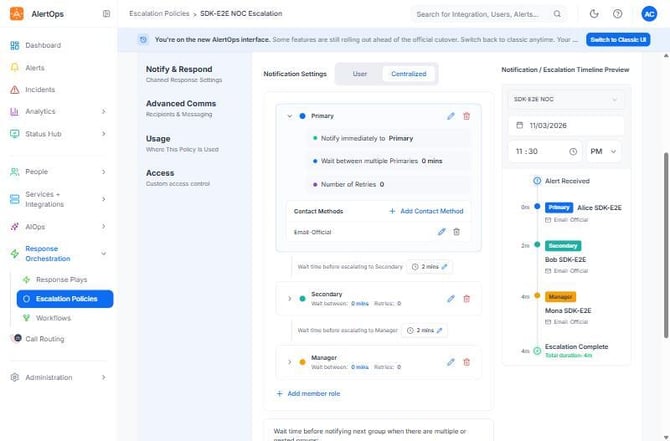
Figure 2. The same policy with the UI's timeline preview for the SDK-E2E NOC group: Alice (Primary) at 0 m, Bob (Secondary) at 2 m and Mona (Manager) at 4 m, from role waits of 2 minutes each.
Response plays
Relevant for Developers building one-off or irregular notification sequences
A response play is a list of members (users or groups) in sequence. Each member's wait_time_in_mins is the delay after the previous step (0 to 600), and one global repeat re-runs the whole play.
| Step | Operation |
| Create | response_plays.create({response_play_name: "Major Incident Play", priority: "Critical", description: "Six timed steps"}) |
| Set the steps | response_plays.members.set_sequence(rid, [["User", alice_id], ["User", bob_id, 1], ["Group", 12345, 2]]) — the first wait is forced to 0 |
| Add a step | response_plays.members.append(rid, [["User", mona_id, 5]]) |
| Repeat | response_plays.set_repeat(rid, {repeat: true, repeat_minutes: 3, repeat_times: 2}) |
| Preview | response_plays.preview(rid, {schedule_date_time: "2026-11-04 23:30"}) — repeats expand into rows |
- members.add takes a bare list [{member_type, user_id or group_id (string), sequence, wait_time_in_mins}] and returns the whole member list. append and set_sequence also accept [type, id, wait] entries, with the wait optional.
- members.update(rid, member_id, {wait_time_in_mins: 7, sequence: 2}) changes one step.
- update and update_options work as for EPs (options need the alert type name).
- Group contact methods ignore wait_time_in_mins; it is always 0.
- Access has its own paths in the new UI: response_plays.access calls /response_plays/{id}/access* and keeps the same bodies and the grant helper. response_plays.access_legacy reaches the same data through the classic /escalation_policies/{id}/access* paths.
- To remove several members, call members.remove once per member. The new UI's bulk DELETE /response_plays/{id}/members (members.remove_bulk) answers 405 Method Not Allowed.
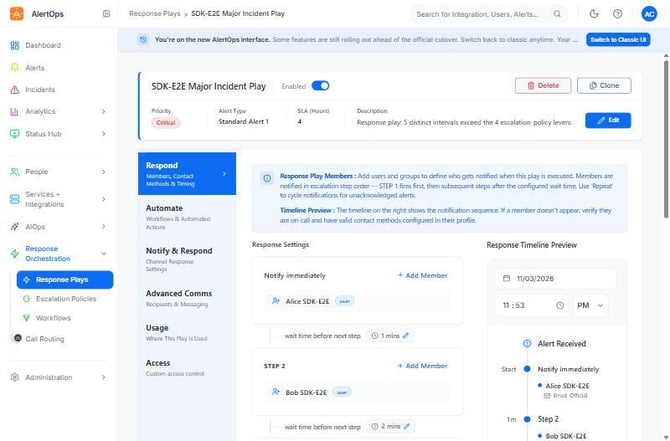
Figure 3. A response play created from a six-step timeline. Alice is notified immediately, then Bob after 1 minute and the next step after 2 minutes. Its description records why the planner chose a play: five distinct intervals exceed the four escalation-policy levers.
Choosing an escalation policy or a response play
Relevant for On-call designers turning a timeline into configuration
| Use an escalation policy when | Use a response play when |
| The timeline fits in 4 distinct intervals | It needs more than 4 distinct intervals |
| Members of one role are spaced equally | Gaps within one role differ (0, 2, 5, 9 minutes) |
| You want a reusable template over roles and shifts | You want named people or groups in a fixed order |
| Workflows and outbound actions should ride along | You interleave users and groups with arbitrary waits |
The semantic layer's escalation planner applies this rule for you and returns either member roles or response-play members:
| SDK | Planner |
| Python | plan_escalation([Step(0), Step(5), …]) in alertops.semantic |
| TypeScript | planEscalation([step(0), step(5), …]) |
| Go | alertops.PlanEscalation([]alertops.Step{alertops.NewStep(0, "primary", nil), …}, alertops.EscalationOptions{}) |
| Java | Plan.planEscalation(List.of(…)) |
| .NET | Planner.PlanEscalation(steps) |
For steps at 0 and 5 minutes (primary), 15 (secondary) and 30 (manager), the plan's mode is escalation_policy and its reason is "Escalation policy Primary → Secondary → Manager (3 distinct interval(s))."
Nested groups with wait_time_before_notifying_next_group_in_min are another way to add timing without a play.
Operation Reference
Relevant for Developers looking up an operation
| Operation | HTTP | What it does |
| escalation_policies.create | POST /escalation_policies/basic | Create; returns the full policy |
| escalation_policies.update / ensure / find | helper | Merge-and-PUT basic fields; find or create by name |
| escalation_policies.set_notify_mode | PUT .../notify | Centralized or user notification |
| escalation_policies.member_roles.upsert | helper | Create a role or update its timings |
| escalation_policies.member_roles.contact_methods.add | POST | Add a contact method to a role |
| escalation_policies.update_options | helper | Merge-and-PUT the options record |
| escalation_policies.workflows.add / outbound_actions.add | POST | Attach automation |
| escalation_policies.recipients.add / clear | POST, DELETE | Default recipients |
| escalation_policies.access.grant | helper | Custom access for users and groups |
| escalation_policies.preview | GET .../preview/{group_id} | Resolved notification timeline |
| response_plays.create | POST /response_plays/basic | Create; returns the full play |
| response_plays.members.set_sequence / append | helper | Replace or extend the steps |
| response_plays.set_repeat | PUT .../repeat | Global repeat of the play |
| response_plays.preview | GET .../preview | Timeline with repeats expanded |
Clone, migrate, catalogues (escalation_policies.catalog, response_plays.catalog) and the rest are in each SDK's method reference.
Best Practices
Relevant for Anyone running escalation in production
Design the ladder
- Prefer centralized notification; switch to user mode only when people must manage their own channels.
- Keep each policy within four distinct intervals; plan with the escalation planner before you write.
- For priority-specific behaviour in centralized mode, clone the policy per priority and select the clone with integration overrides.
Write safely
- Change basic fields and options only through update and update_options.
- Attach workflows after enabling them, and never point a workflow's Send Message at its own policy.
Test first
- Run preview against the real group before connecting an integration.
- Notify only test users (for example @example.com addresses) while you iterate.
Configuration Examples
Relevant for Starting templates for common escalation setups
Example 1 — Three-tier centralized ladder (the SDK-E2E policy)
| Field | Value |
| Notify mode | Centralized |
| Primary | immediately, 0 minutes between members, Email-Official |
| Secondary | role_wait_time_in_mins 2 |
| Manager | role_wait_time_in_mins 2 (4 minutes after Primary) |
| Acknowledgement | email only |
Python
email = [{"contact_method_name": "Email-Official", "wait_time_in_mins": 0, "sequence": 1, "to_bcc_or_cc": "To"}]
ep = ao.escalation_policies.create(escalation_policy_name="NOC Escalation", description="NOC ladder", priority="High")
epid = ep["escalation_policy_id"]
ao.escalation_policies.set_notify_mode(epid, notify_using_centralized_settings=True)
for role, wait in [("Primary", 0), ("Secondary", 2), ("Manager", 2)]:
    ao.escalation_policies.member_roles.upsert(epid, role, role_wait_time_in_mins=wait,
                                               wait_time_between_members_in_mins=0, contact_methods=email)
ao.escalation_policies.update_options(epid, acknowledgement={"phone": False, "sms": False, "email": True,
                                                             "group_chat": False})
TypeScript
const email = [{ contact_method_name: "Email-Official", wait_time_in_mins: 0, sequence: 1, to_bcc_or_cc: "To" }];
const ep = await ao.escalationPolicies.create({ escalation_policy_name: "NOC Escalation", description: "NOC ladder", priority: "High" });
const epId = ep.escalation_policy_id;
await ao.escalationPolicies.setNotifyMode(epId, { notify_using_centralized_settings: true });
for (const [role, wait] of [["Primary", 0], ["Secondary", 2], ["Manager", 2]] as const) {
  await ao.escalationPolicies.memberRoles.upsert(epId, role, {
    role_wait_time_in_mins: wait, wait_time_between_members_in_mins: 0, contact_methods: email,
  });
}
await ao.escalationPolicies.updateOptions(epId, { acknowledgement: { phone: false, sms: false, email: true, group_chat: false } });
Go
email := []any{alertops.M{"contact_method_name": "Email-Official", "wait_time_in_mins": 0, "sequence": 1, "to_bcc_or_cc": "To"}}
ep, err := ao.EscalationPolicies.Create(ctx, &alertops.Request{Fields: alertops.M{
	"escalation_policy_name": "NOC Escalation", "description": "NOC ladder", "priority": "High",
}})
if err != nil {
	return err
}
epID := alertops.Get(ep, "escalation_policy_id")
if _, err = ao.EscalationPolicies.SetNotifyMode(ctx, epID,
	&alertops.Request{Fields: alertops.M{"notify_using_centralized_settings": true}}); err != nil {
	return err
}
for _, r := range []struct {
	role string
	wait int
} {
	if _, err = ao.EscalationPolicies.MemberRoles.Upsert(ctx, epID, r.role, alertops.M{
		"role_wait_time_in_mins": r.wait, "wait_time_between_members_in_mins": 0, "contact_methods": email,
	}); err != nil {
		return err
	}
}
_, err = ao.EscalationPolicies.UpdateOptions(ctx, epID, alertops.M{
	"acknowledgement": alertops.M{"phone": false, "sms": false, "email": true, "group_chat": false},
})
Java
var email = List.of(Map.of("contact_method_name", "Email-Official", "wait_time_in_mins", 0, "sequence", 1, "to_bcc_or_cc", "To"));
JsonNode ep = ao.escalationPolicies().create(Request.of(
    "escalation_policy_name", "NOC Escalation", "description", "NOC ladder", "priority", "High"));
JsonNode epId = ep.get("escalation_policy_id");
ao.escalationPolicies().setNotifyMode(epId, Request.of("notify_using_centralized_settings", true));
for (var r : List.of(Map.entry("Primary", 0), Map.entry("Secondary", 2), Map.entry("Manager", 2))) {
  ao.escalationPolicies().memberRoles().upsert(epId, r.getKey(), Map.of(
      "role_wait_time_in_mins", r.getValue(), "wait_time_between_members_in_mins", 0, "contact_methods", email));
}
ao.escalationPolicies().updateOptions(epId, Map.of(
    "acknowledgement", Map.of("phone", false, "sms", false, "email", true, "group_chat", false)));
.NET
var email = new JsonArray(new JsonObject { ["contact_method_name"] = "Email-Official", ["wait_time_in_mins"] = 0, ["sequence"] = 1, ["to_bcc_or_cc"] = "To" });
var ep = await ao.EscalationPolicies.CreateAsync(new Kwargs
{
    ["escalation_policy_name"] = "NOC Escalation", ["description"] = "NOC ladder", ["priority"] = "High",
});
var epId = ep!["escalation_policy_id"]!;
await ao.EscalationPolicies.SetNotifyModeAsync(epId, new Kwargs { ["notify_using_centralized_settings"] = true });
foreach (var (role, wait) in new[] { ("Primary", 0), ("Secondary", 2), ("Manager", 2) })
{
    await ao.EscalationPolicies.MemberRoles.UpsertAsync(epId, role, new Kwargs
    {
        ["role_wait_time_in_mins"] = wait, ["wait_time_between_members_in_mins"] = 0, ["contact_methods"] = email.DeepClone(),
    });
}
await ao.EscalationPolicies.UpdateOptionsAsync(epId, new Kwargs
{
    ["acknowledgement"] = new JsonObject { ["phone"] = false, ["sms"] = false, ["email"] = true, ["group_chat"] = false },
});
When the SDK-E2E scenario built this ladder (through the semantic layer) and fired an alert, Alice was notified at 0.0 minutes, Bob at 2.1 and Mona at 4.1, and the off-shift Carol was not notified.
Example 2 — Response play from a list of people
| Step | Operation |
| 1 | response_plays.create({response_play_name: "Database Play", description: "DB escalation"}) |
| 2 | response_plays.members.set_sequence(rid, [["User", 101, 0], ["User", 102, 1], ["User", 103, 3], ["User", 101, 6]]) |
Troubleshooting
Relevant for Anyone debugging escalation configuration
Create fails with 400 "Description cannot be null or empty"
- Pass a non-empty description to escalation_policies.create.
A manual alert fails with "Invalid Escalation Policy or Response Play value"
- The policy has quick_launch false. Run escalation_policies.update(epid, {quick_launch: true}).
Options update fails with 400 "AlertType cannot be null", or settings disappear
- A raw put_options was sent without alert_type or without every field. Use update_options.
Adding a role fails with "already exists"
- The policy already has that role (every new policy has Primary). Use member_roles.upsert.
My workflow isn't in workflows.available
- The workflow is disabled, or its alert type differs from the policy's. Enable it and match alert_type_id from get_basic.
Access calls return 400 "Nothing to update" or "User: <id> is invalid"
- custom already has the value you sent, or the user's role lacks the message_rule_update entitlement. Read access.get first; grant App Admin or a role with that entitlement.
Migrate fails with "Escalation Policy Version has been already updated"
- The policy is already version 1, which every API-created policy is. Nothing to do.
Delete is refused
- The policy is in use. Check usage(epid) and detach integrations, workflows and technical services first.
Related Articles
- Users, Groups and On-Call Schedules with the AlertOps SDKs
- Inbound Integrations, Alert Ingestion and Heartbeats with the AlertOps SDKs
- Workflows, Outbound Integrations and Maintenance Windows with the AlertOps SDKs
- Working with Alerts in the AlertOps SDKs
- Planning On-Call Setups with the AlertOps Semantic Layer
Need help?
Email support@alertops.com or contact your AlertOps representative.