
Overview
Relevant for Developers automating what happens after an alert arrives
Workflows are rules that react to alerts, messages or notification deliveries: when conditions match, they run actions such as changing priority, cancelling deliveries or calling a webhook. An Alert workflow only fires for alerts of an escalation policy it is attached to. Outbound integrations define the external calls (methods) that workflows and escalation policies can make. Maintenance windows suppress alerts from chosen inbound integrations for a scheduled period.
Key capabilities:
- One-call workflow build — workflows.build creates the workflow, adds conditions and actions in order and can enable it.
- Catalog helpers — workflows.catalog.alert_type_id and condition_id resolve names to the ids the API wants.
- Safe outbound edits — outbound.update_settings keeps the method list when you change a name or credentials.
- Date-time-based windows — maintenance_windows.schedule builds the window body from start and end date-times.
Reading the operation names
Relevant for Developers using any of the five AlertOps SDKs
This guide applies to every AlertOps SDK. It names each operation by its resource path and operation name, such as groups.members.add_users, lists positional arguments in order, and shows request bodies and options as JSON. Where a task needs real code, the example is given in all five languages. Each SDK spells the same call in its own style:
| SDK | The same call | Options and request fields |
| Python | ao.groups.members.add_users(group_id, [101, 102], roles=["Primary"]) | Keyword arguments, such as search="Net" |
| TypeScript | await ao.groups.members.addUsers(groupId, [101, 102], ["Primary"]) | One trailing options object keyed by the names in this guide, such as { search: "Net" } |
| Go | ao.Groups.Members.AddUsers(ctx, groupID, []any{101, 102}, []any{"Primary"}) | &alertops.Request{Fields: alertops.M{"search": "Net"}} for endpoints, alertops.M{…} for helper options |
| Java | ao.groups().members().addUsers(groupId, List.of(101, 102), List.of("Primary")) | Request.of("search", "Net") for endpoints, a Map keyed by the names in this guide for helper options |
| .NET | await ao.Groups.Members.AddUsersAsync(groupId, new object?[] { 101, 102 }, new object?[] { "Primary" }) | new Kwargs { ["search"] = "Net" } |
- Names follow each language's style: update_basic is updateBasic in TypeScript and Java, UpdateBasic in Go and UpdateBasicAsync in .NET. Go keeps initialisms upper case (create_api is CreateAPI, post_to_url is PostToURL).
- Paginated operations also have variants that collect every page or iterate lazily (…All / …Iter; in Python, .all() and .iter() on the operation).
- Helpers that look something up return null (None in Python, nil in Go) when nothing matches. **ensure helpers** return the record together with a flag that says whether it was created.
- Errors are the same classes in every SDK, such as NotFoundError and BadRequestError.
- Code examples come in the order Python, TypeScript, Go, Java, .NET. Each assumes a client named ao (and, in Go, a ctx and a function that returns error), created as in that SDK's Getting Started article.
For one language's details, see Calling the API from Python, TypeScript, Go, Java or .NET.
Before you start
Relevant for Developers setting up the client
| Resource | What lives there |
| workflows | Workflow CRUD, conditions, actions, access, catalog |
| escalation_policies.workflows | Attaching workflows to an escalation policy (list, available, add, remove) |
| outbound | Outbound integrations, methods, catalog (templates, security types, web methods) |
| maintenance_windows | Maintenance window CRUD and the schedule helper |
Build a workflow
Relevant for Developers creating automation rules
A workflow has a type, an alert type (for Alert and Message workflows), start conditions and actions.
| Workflow type | Type id | Alert type | Typical actions |
| Alert | 2 | An alert type such as Standard Alert | Update Priority, Update Status, SendMessage, Send Webhook |
| Message | 1 | A message type such as Standard Message | CancelDeliveries |
| Notification | 10 | None (use alert type id 0 in the catalogs) | CancelUserDeliveries |
workflows.build(name, workflow_type, options) resolves the alert type, creates the workflow disabled, adds each condition and action, and enables it only if you pass enabled: true. It returns the full workflow, including workflow_id; alert_type reads back as the name, such as Standard Alert 1. Build an Alert workflow with the escalation policy's alert type (alert_type_id from escalation_policies.get_basic(12345)) and these options:
{
  "alert_type": 7,
  "conditions": [{"name": "AlertStatus", "operator": "is", "value": "On Hold"}],
  "actions": [{"name": "Update Priority", "value": "Low"}]
}
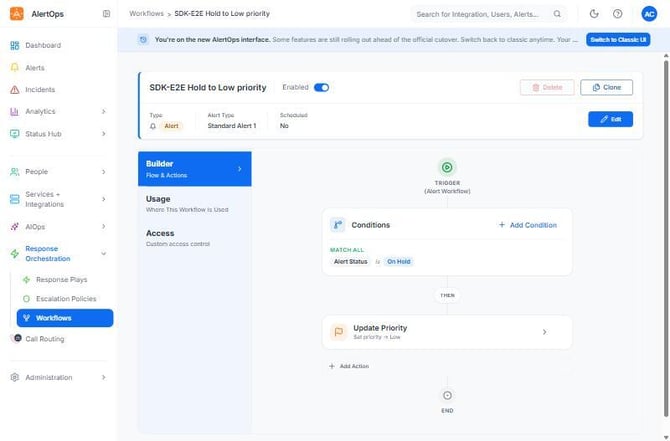
Figure 1. The "SDK-E2E Hold to Low priority" workflow built with workflows.build. The header shows type Alert and alert type Standard Alert 1 (the escalation policy's type, not the default Standard Alert). The builder shows one Match All condition (Alert Status is On Hold) and one action (Update Priority to Low).
Alert type is an id on create and a name on read
POST /workflows takes alert_type as the alert type id. The record and PUT /basic use alert_type as the name and expose the id as alert_type_id. build accepts either a name or an id and resolves it. Without alert_type, it picks Standard Alert (or Standard Message).
Conditions and actions
Condition bodies are {type, match, name, operator, value, list_id}. type is start (default) or stop, and match is all (default) or any. Time conditions use the operators > and <. Action bodies are {name, value, …}, where name is an action name from the catalog.
| Operation | Effect |
| workflows.conditions.add(wid, {name: "AlertStatus", operator: "is", value: "Open"}) | Adds a condition; returns it with condition_id |
| workflows.actions.add(wid, {name: "Update Priority", value: "High"}) | Adds an action; returns it with action_id |
| workflows.actions.update(wid, action_id, {name: "Update Priority", value: "Low"}) | Changes an action |
| Action | Fields |
| Update Priority | value: a priority name (Low, High …) |
| Update Status | value: a status (Closed …), optional message_text |
| SendMessage | value: an escalation policy or response play name, plus users[] and groups[] names. Targets come from actions.targets_available(wid) |
| Send Webhook | value: the web method, plus webhook_url and message_text |
conditions.add and actions.add return the new record (condition_id, action_id). Their updates and deletes return no body.
Look up condition and action names
The catalogs are per workflow type and alert type. Use the helpers to resolve ids, then read the allowed values.
| Operation | Returns |
| workflows.catalog.types() | [{id, name, alert_types[{id, name}]}] |
| workflows.catalog.alert_type_id("Alert", "Standard Alert") | The alert type id |
| workflows.catalog.actions(2) | Action names for Alert workflows |
| workflows.catalog.conditions(2, alert_type_id, {exclude: "aifields"}) | Condition fields |
| workflows.catalog.condition_id("Alert", alert_type_id, "AlertStatus") | One condition's id |
| workflows.catalog.condition_values(2, alert_type_id, condition_id) | Allowed values, such as the message_thread_status_type names |
For Notification workflows, catalog.delivery_attempt_fields() lists the <<keyword>> fields, and the conditions catalog takes alert type id 0: workflows.catalog.conditions(10, 0).
Recurring workflows and stop conditions
A recurring workflow re-runs every recurrence_interval while its start conditions hold, until a stop condition matches. workflows.build("Lower priority hourly until closed", "Alert", options) with these options lowers the priority every hour until the alert closes:
{
  "scheduled": true, "recurrence_interval": 60,
  "conditions": [{"name": "AlertStatus", "operator": "is", "value": "Open"},
                 {"type": "stop", "name": "AlertStatus", "operator": "is", "value": "Closed"}],
  "actions": [{"name": "Update Priority", "value": "Low"}]
}
Stop conditions need a recurring workflow
A type: "stop" condition on a workflow without scheduled: true and a recurrence_interval fails with 400 "Stop condition is not allowed in an non-recurring workflow".
Enable and attach a workflow
Relevant for On-call admins putting a workflow into effect
A workflow does nothing until it is enabled and attached to an escalation policy. Once both are true it fires on that policy's live alerts.
- Enable it: workflows.enable(wid) (or workflows.set_status(wid, {enabled: true})).
- Attach it: escalation_policies.workflows.add(12345, [{workflow_id: wid}]).
- Check where it is attached: workflows.usage(wid) returns [{id, name, is_escalation_policy}].
Attach only enabled workflows of the policy's alert type
POST /escalation_policies/{id}/workflows accepts a workflow only if it is enabled and has the same alert type as the policy. Otherwise it fails with 400 "Workflow ID: <id> is a duplicate or not found". catalog.alert_type_id("Alert") returns Standard Alert, which isn't the policy's alert type on every tenant, so pass the policy's alert_type_id to build. escalation_policies.workflows.available(ep_id) lists exactly the workflows you can attach.
PUT /status enables a workflow even with no conditions or actions. The UI blocks that, but the API doesn't, so check the workflow before enabling it. Enabling an attached workflow makes it fire on live alerts.
Workflow operations
| Operation | HTTP | What it does |
| workflows.build(name, type, {alert_type, conditions, actions, scheduled, recurrence_interval, enabled}) | POST + POSTs + GET | Create with conditions and actions, optionally enable |
| workflows.list and its paginated variants / find(name) | GET /workflows | List (query search, workflowtype, enabled, sortBy). offset is a page index |
| workflows.get(id) | GET /workflows/{id} | Workflow with conditions[] and actions[] |
| workflows.update_basic(id, …) | PUT /workflows/{id}/basic | Name, enabled, alert_type (name), scheduled |
| workflows.enable(id) / disable(id) | PUT /workflows/{id}/status | Switch on or off, then read back |
| workflows.clone(id, {name}) | POST /workflows/{id}/clone | Full copy with new condition and action ids |
| workflows.usage(id) | GET /workflows/{id}/usage | Where it is attached |
| workflows.delete_if_exists(id) | PUT status + DELETE | Disable, then delete. false if already gone |
| workflows.conditions.* / workflows.actions.* | /workflows/{id}/conditions, /actions | list, add, update, delete |
| workflows.access.* | /workflows/{id}/access | Custom access, admins, owner transfer |
| escalation_policies.workflows.add(ep_id, [{workflow_id}]) | POST /escalation_policies/{id}/workflows | Attach. remove detaches (DELETE with a body) |
Access works like the other editors: grantees need a workflow entitlement (Basic-role users fail with "User: <id> is invalid"), admins_available is empty until custom access is on, and transfer_owner needs a user who already has access. Each SDK's method reference lists every operation.
Outbound integrations and methods
Relevant for Developers connecting AlertOps to external systems
An outbound integration holds security settings and one or more methods (REST or SOAP calls). Creating one sends nothing. It only calls out when a workflow or escalation policy uses one of its methods.
- Create it: outbound.create({outbound_integration_name: "Ticketing API"}). security_type defaults to None.
- Add a REST method: outbound.methods.add_rest(outbound_id, "Create ticket", "https://tickets.example.com/api/issues", {…}) with the options below. It returns the method with its method_id.
- Check where it is used: outbound.usage(outbound_id).
{"request_data": "{\"title\": \"AlertOps alert\"}", "headers": {"Content-Type": "application/json"}}
add_rest builds a REST/JSON method body for the Standard Alert alert type. Pass alert_type (a name) for another type, and web_method for anything other than POST.
PUT replaces the whole record, methods included
PUT /integrations/outbound/{id} stores exactly the methods you send: an empty list deletes every method. Each echoed method needs alert_type as the alert type name, but reads only carry alert_type_name, so sending a record back unchanged fails with 404 "Alert Template: not found". Use outbound.update_settings(id, changes), which reads the record, copies alert_type_name into alert_type on every method and writes it back.
For example, outbound.update_settings(outbound_id, {outbound_integration_name: "Ticketing API (prod)"}) renames the integration and keeps its methods.
security_type: "Basic" requires a password in security. The available types come from outbound.catalog.web_security_types() (Basic, BPPM Auth Token, None, OAUTH 2 SessionID).
| Operation | HTTP | What it does |
| outbound.create({outbound_integration_name, security_type, security, methods}) | POST /integrations/outbound | Create. Returns the full record |
| outbound.list({name}) / find(name) | GET /integrations/outbound | Bare list. outbound_integration_id is a string here |
| outbound.get(id) / usage(id) | GET | Record with methods[] and usage (workflows, escalation policies, response plays) |
| outbound.update_settings(id, changes) | GET + PUT | Change name or security, keep methods |
| outbound.delete(id) / delete_if_exists(id) | DELETE | Blocked while the integration is used or bidirectional |
| outbound.methods.add_rest(id, name, uri, …) | POST /{id}/methods | Add a REST/JSON method |
| outbound.methods.get(id, method_id) | GET /{id}/method/{method_id} | One method (singular method in the path) |
| outbound.methods.update / clone / delete | PUT / POST / DELETE /{id}/methods/{method_id} | Update (full body, returns nothing), clone (with a name), delete |
| outbound.catalog.template_detail(template_id) | GET /app/outbound/templates/{id} | A template with its JSON-string fields parsed |
Reads add alert_type_id and alert_type_name to each method, and method_type.headers is a JSON string.
Maintenance windows
Relevant for On-call admins silencing alerts during planned work
A maintenance window suppresses alerts from the inbound integrations it lists, once, daily, weekly or monthly. maintenance_windows.schedule(description, integration_ids, start, end, options) builds the body from date-times and returns the created window, with its maintenance_window_id and a status such as Planned. For example, "Saturday patching" for integration 54321 from 2026-11-07 02:00 to 04:00.
Dates and times are in the account time zone
start_date, start_time, end_date and end_time are read as the account's local time, not UTC. Check the zone with account.summary() → zone_name (IANA) before you build date-times.
For recurring windows, pass recurrence and the days. Daily selects all seven days for you. For example, "Thursday deploys" from 2026-11-12 03:00 to 2026-12-31 05:00 with the options {recurrence: "Weekly", days: ["thursday"]}.
Weekly windows must span at least a week
A Weekly window whose end date is less than a week after its start date is rejected ("Start Date and End Date can not be same; Difference ... should be atleast a week").
| Operation | HTTP | What it does |
| maintenance_windows.schedule(description, integration_ids, start, end, {recurrence, days}) | POST /maintenancewindows | Create from date-times |
| maintenance_windows.list({maintenanceStatus}) | GET /maintenancewindows | Bare list. Current, Planned, Past or All |
| maintenance_windows.find(description, status) | GET | Find a window by its description (status defaults to All) |
| maintenance_windows.get(id) | GET /maintenancewindows/{id} | One window. integration reads back as [{id, name}] |
| maintenance_windows.update(id, body) | PUT /maintenancewindows/{id} | Whole record, same body as create. Returns nothing |
| maintenance_windows.delete(id) / delete_if_exists(id) | DELETE | Delete |
Writes take bare integration ids; reads return [{id, name}]. To build an update body from date-times, use the window-body builder and pass its result to maintenance_windows.update:
| SDK | Window-body builder |
| Python | window_body in alertops.resources.maintenance |
| TypeScript | windowBody, exported by @alertops/sdk |
| Go | alertops.WindowBody |
| Java | AlertsHelpers.windowBody in com.alertops.sdk.helpers |
| .NET | MaintenanceWindowsResource.WindowBody |
Best Practices
Relevant for Anyone running workflows and maintenance in production
Workflows
- Build and test workflows while they are unattached, then enable and attach.
- Pass the escalation policy's alert_type_id to build instead of relying on the Standard Alert default.
- Use escalation_policies.workflows.available(ep_id) to confirm a workflow can be attached before you call add.
- Disable before deleting. delete_if_exists does both.
Outbound
- Change outbound settings only through update_settings. Never PUT a record you didn't read in full.
- Set each method's alert_type deliberately. add_rest defaults to Standard Alert.
Maintenance
- Build date-times in the account time zone and keep windows as short as the work allows.
- List every integration the work affects. Integrations that aren't listed keep alerting.
Configuration Examples
Relevant for Starting templates for common setups
Example 1 — Lower priority when an alert is put On Hold (verified live)
This is the workflow from the SDK end-to-end scenario. It reads the policy's alert type, builds and enables the workflow in one call, then attaches it:
Python
ep = ao.escalation_policies.get_basic(ep_id)
wf = ao.workflows.build("Hold to Low priority", "Alert", alert_type=ep["alert_type_id"], enabled=True,
                        conditions=[{"name": "AlertStatus", "operator": "is", "value": "On Hold"}],
                        actions=[{"name": "Update Priority", "value": "Low"}])
ao.escalation_policies.workflows.add(ep_id, [{"workflow_id": wf["workflow_id"]}])
TypeScript
const ep = await ao.escalationPolicies.getBasic(epId);
const wf = await ao.workflows.build("Hold to Low priority", "Alert", {
  alert_type: ep.alert_type_id, enabled: true,
  conditions: [{ name: "AlertStatus", operator: "is", value: "On Hold" }],
  actions: [{ name: "Update Priority", value: "Low" }],
});
await ao.escalationPolicies.workflows.add(epId, [{ workflow_id: wf.workflow_id }]);
Go
ep, err := ao.EscalationPolicies.GetBasic(ctx, epID, nil)
if err != nil {
	return err
}
wf, err := ao.Workflows.Build(ctx, "Hold to Low priority", "Alert", alertops.M{
	"alert_type": alertops.Get(ep, "alert_type_id"), "enabled": true,
	"conditions": []any{alertops.M{"name": "AlertStatus", "operator": "is", "value": "On Hold"}},
	"actions":    []any{alertops.M{"name": "Update Priority", "value": "Low"}},
})
if err != nil {
	return err
}
_, err = ao.EscalationPolicies.Workflows.Add(ctx, epID,
	&alertops.Request{Body: []any{alertops.M{"workflow_id": alertops.Get(wf, "workflow_id")}}})
Java
JsonNode ep = ao.escalationPolicies().getBasic(epId);
JsonNode wf = ao.workflows().build("Hold to Low priority", "Alert", Map.of(
    "alert_type", ep.get("alert_type_id"), "enabled", true,
    "conditions", List.of(Map.of("name", "AlertStatus", "operator", "is", "value", "On Hold")),
    "actions", List.of(Map.of("name", "Update Priority", "value", "Low"))));
ao.escalationPolicies().workflows().add(epId, List.of(Map.of("workflow_id", wf.get("workflow_id"))));
.NET
var ep = await ao.EscalationPolicies.GetBasicAsync(epId);
var wf = await ao.Workflows.BuildAsync("Hold to Low priority", "Alert", new Kwargs
{
    ["alert_type"] = ep?["alert_type_id"], ["enabled"] = true,
    ["conditions"] = new JsonArray(new JsonObject { ["name"] = "AlertStatus", ["operator"] = "is", ["value"] = "On Hold" }),
    ["actions"] = new JsonArray(new JsonObject { ["name"] = "Update Priority", ["value"] = "Low" }),
});
await ao.EscalationPolicies.Workflows.AddAsync(epId,
    Kwargs.Body(new JsonArray(new JsonObject { ["workflow_id"] = wf?["workflow_id"]?.DeepClone() })));
To check it, put an open alert of that policy On Hold with alerts.set_status(alert_id, {status: "6"}). In the end-to-end run, a few seconds later the alert's priority changed from High to Low.
Example 2 — Stop paging once a message is acknowledged
workflows.build("Cancel on ack", "Message", options) with:
{"conditions": [{"name": "MessageStatusType", "operator": "is", "value": "Acknowledged"}],
 "actions": [{"name": "CancelDeliveries"}]}
Example 3 — Build and enable in one call
workflows.build("Failed delivery cleanup", "Notification", options) with these options returns a workflow whose workflow_type_name is Notification and alert_type_id is 0:
{"enabled": true,
 "conditions": [{"name": "DeliveryStatusType", "operator": "is", "value": "Failed"}],
 "actions": [{"name": "CancelUserDeliveries"}]}
Troubleshooting
Relevant for Anyone debugging workflows, outbound calls or maintenance
"Workflow ID: <id> is a duplicate or not found" when attaching
- The workflow is disabled. Enable it with workflows.enable(wid) first.
- The workflow's alert type differs from the policy's. Compare workflows.get(wid) → alert_type_id with escalation_policies.get_basic(ep_id) → alert_type_id, and rebuild with the policy's id.
- The workflow is already attached. Check escalation_policies.workflows.list(ep_id).
"Stop condition is not allowed in an non-recurring workflow"
- Create the workflow with scheduled: true and a recurrence_interval, or drop the stop condition.
The workflow never fires
- It isn't attached to the policy that owns the alerts. Check workflows.usage(wid).
- It's disabled, or its conditions don't match. Read workflows.get(wid) and compare values with catalog.condition_values.
Deleting a missing workflow raises BadRequestError
- DELETE /workflows/{id} answers 400 "Workflow ID: <id> not found" (a GET answers 404). Use delete_if_exists, which treats both as already gone.
404 "Alert Template: not found" on an outbound PUT
- A method was sent back without alert_type (the name). Use outbound.update_settings.
All outbound methods disappeared
- A PUT was sent with methods: [] or without the methods. Re-add them with methods.add_rest, and use update_settings from now on.
A weekly maintenance window is rejected
- The end date is less than a week after the start date. Extend end to at least seven days after start.
A maintenance window starts at the wrong hour
- The date-times were built in UTC. Rebuild them in the account time zone (account.summary() → zone_name).
Related Articles
- Inbound Integrations, Alert Ingestion and Heartbeats with the AlertOps SDKs
- Working with Alerts in the AlertOps SDKs
- Escalation Policies and Response Plays with the AlertOps SDKs
- Administration, Account, Analytics and Lookups with the AlertOps SDKs
- Getting Started with the AlertOps Python SDK
Need help?
Email support@alertops.com or contact your AlertOps representative.