
Overview
Relevant for Developers wiring monitoring tools into AlertOps
An inbound integration is how alerts get into AlertOps. Each one has an ingest URL, an escalation policy (or response play) and recipient groups. Every SDK covers the whole integration editor through inbound: mapping, filters, delaying and grouping, override rules, dynamic recipient groups, access and the inbound log. It posts payloads through ingest and manages heartbeat monitors through heartbeats.
Key capabilities:
- One-call creation — inbound.create_api builds a Custom API integration with a unique source and returns the full record, including api_url.
- Safe cloning — inbound.clone_unique clones and re-sources in one step, so the clone gets its own URL.
- Keyless ingestion — ingest.post_to_integration reads the integration's api_url and posts to it. The URL itself is the credential.
- Heartbeats — heartbeats.create, heartbeats.ping and heartbeats.status cover a monitor end to end.
Reading the operation names
Relevant for Developers using any of the five AlertOps SDKs
This guide applies to every AlertOps SDK. It names each operation by its resource path and operation name, such as groups.members.add_users, lists positional arguments in order, and shows request bodies and options as JSON. Where a task needs real code, the example is given in all five languages. Each SDK spells the same call in its own style:
| SDK | The same call | Options and request fields |
| Python | ao.groups.members.add_users(group_id, [101, 102], roles=["Primary"]) | Keyword arguments, such as search="Net" |
| TypeScript | await ao.groups.members.addUsers(groupId, [101, 102], ["Primary"]) | One trailing options object keyed by the names in this guide, such as { search: "Net" } |
| Go | ao.Groups.Members.AddUsers(ctx, groupID, []any{101, 102}, []any{"Primary"}) | &alertops.Request{Fields: alertops.M{"search": "Net"}} for endpoints, alertops.M{…} for helper options |
| Java | ao.groups().members().addUsers(groupId, List.of(101, 102), List.of("Primary")) | Request.of("search", "Net") for endpoints, a Map keyed by the names in this guide for helper options |
| .NET | await ao.Groups.Members.AddUsersAsync(groupId, new object?[] { 101, 102 }, new object?[] { "Primary" }) | new Kwargs { ["search"] = "Net" } |
- Names follow each language's style: update_basic is updateBasic in TypeScript and Java, UpdateBasic in Go and UpdateBasicAsync in .NET. Go keeps initialisms upper case (create_api is CreateAPI, post_to_url is PostToURL).
- Paginated operations also have variants that collect every page or iterate lazily (…All / …Iter; in Python, .all() and .iter() on the operation).
- Helpers that look something up return null (None in Python, nil in Go) when nothing matches. **ensure helpers** return the record together with a flag that says whether it was created.
- Errors are the same classes in every SDK, such as NotFoundError and BadRequestError.
- Code examples come in the order Python, TypeScript, Go, Java, .NET. Each assumes a client named ao (and, in Go, a ctx and a function that returns error), created as in that SDK's Getting Started article.
For one language's details, see Calling the API from Python, TypeScript, Go, Java or .NET.
Before you start
Relevant for Developers setting up the client
You need an escalation policy id (or a response play id) and the names of the recipient groups. Group names, not ids, are what the create body takes.
| Resource | What lives there |
| inbound | Integration CRUD and every editor tab (mapping, filters, rules, access, log, catalog) |
| ingest | Alerts and pings to https://notify.alertops.com (no API key; change the host with the client's notify base URL option) |
| heartbeats | Heartbeats, heartbeat groups, uptime and analytics (v3) |
Create an API integration
Relevant for Developers adding a new alert source
inbound.create_api(name, options) creates a Custom API integration (JSON over POST) and returns the full record read back from the API, including inbound_integration_id and api_url. With these options, api_url ends in /POSTAlert/<account token>/paymentsprod:
{"source": "paymentsprod", "escalation_policy_id": 12345, "recipient_groups": ["NOC"]}
Creating that integration and posting a first alert to it (see Send alerts in below):
Python
integration = ao.inbound.create_api("Payments Monitoring", source="paymentsprod",
                                    escalation_policy_id=12345, recipient_groups=["NOC"])
print(integration["api_url"])        # https://notify.alertops.com/POSTAlert/<account token>/paymentsprod
request_id = ao.ingest.post_to_integration(integration["inbound_integration_id"],
                                           {"subject": "Disk full on db-01", "description": "92% used on /var"})
TypeScript
const integration = await ao.inbound.createApi("Payments Monitoring", {
  source: "paymentsprod", escalation_policy_id: 12345, recipient_groups: ["NOC"],
});
console.log(integration.api_url);   // https://notify.alertops.com/POSTAlert/<account token>/paymentsprod
const requestId = await ao.ingest.postToIntegration(integration.inbound_integration_id,
  { subject: "Disk full on db-01", description: "92% used on /var" });
Go
integration, err := ao.Inbound.CreateAPI(ctx, "Payments Monitoring", alertops.M{
	"source": "paymentsprod", "escalation_policy_id": 12345, "recipient_groups": []any{"NOC"},
})
if err != nil {
	return err
}
fmt.Println(alertops.Get(integration, "api_url")) // https://notify.alertops.com/POSTAlert/<account token>/paymentsprod
requestID, err := ao.Ingest.PostToIntegration(ctx, alertops.Get(integration, "inbound_integration_id"),
	alertops.M{"subject": "Disk full on db-01", "description": "92% used on /var"})
Java
JsonNode integration = ao.inbound().createApi("Payments Monitoring", Map.of(
    "source", "paymentsprod", "escalation_policy_id", 12345, "recipient_groups", List.of("NOC")));
System.out.println(integration.get("api_url"));   // https://notify.alertops.com/POSTAlert/<account token>/paymentsprod
JsonNode requestId = ao.ingest().postToIntegration(integration.get("inbound_integration_id"),
    Map.of("subject", "Disk full on db-01", "description", "92% used on /var"));
.NET
var integration = await ao.Inbound.CreateApiAsync("Payments Monitoring", new Kwargs
{
    ["source"] = "paymentsprod", ["escalation_policy_id"] = 12345, ["recipient_groups"] = new[] { "NOC" },
});
Console.WriteLine(integration?["api_url"]);   // https://notify.alertops.com/POSTAlert/<account token>/paymentsprod
var requestId = await ao.Ingest.PostToIntegrationAsync(integration!["inbound_integration_id"]!,
    new JsonObject { ["subject"] = "Disk full on db-01", ["description"] = "92% used on /var" });
source is the last segment of the ingest URL and must be unique; recipient_groups are group names. If you leave out source, the SDK generates a random one (sdk plus 12 hex characters). Pass response_play_id instead of escalation_policy_id to route to a response play.
The ingest URL routes by source, not by integration
api_url is https://notify.alertops.com/POSTAlert/<account token>/<source>. The token is the same for every integration on the account, so only the source segment tells integrations apart. Two integrations with the same source share one URL, and alerts posted to it can land on the other integration. Give every integration its own source.
Clone without sharing a URL
inbound.clone copies the source, so the clone and the original share an ingest URL. Use inbound.clone_unique(integration_id, name, source) instead, for example with the name Payments Monitoring (staging) and the source paymentsstaging. It clones, then writes the new source into the clone's mapping, so the clone's api_url differs from the original's.
Template integrations can have the same problem: a ConnectWise Manage template integration gets the fixed source CWManageTicket. Re-source it straight after creating it with inbound.mapping.update(integration_id, {source: …, source_value: …}).
Inbound integration operations
| Operation | HTTP | What it does |
| inbound.create_api(name, {source, escalation_policy_id, recipient_groups}) | POST + GET | Create a Custom API integration and return the full record |
| inbound.list and its paginated variants | GET /integrations/inbound | List integrations. Query search, type (API, Email, Chat, Heartbeat), enabled, sortBy. offset is a page index |
| inbound.get(id) / inbound.find(name) | GET | One integration by id, or by exact name (case-insensitive) |
| inbound.update(id, record) | PUT /{id} | Full-record replace. Send escalation_policy (the id) |
| inbound.set_enabled(id, enabled) | PUT /{id}/status | Enable or disable, then read back |
| inbound.clone_unique(id, name, source) | POST /{id}/clone + mapping | Clone with its own source |
| inbound.test(id) | POST /{id}/testurl | Have AlertOps post its test payload (opens a real alert) |
| inbound.delete(id) / delete_if_exists(id) | DELETE /{id} | Delete (delete_if_exists returns false on 404) |
| inbound.mapping.update(id, changes) | GET + POST /{id}/mapping/internal | Read the url_mapping, overlay changes, save the whole mapping |
| inbound.filters.add(id, field, type, value, {match, negate}) | POST /{id}/filters | Add a v2 (classic) filter condition |
| inbound.rule_filters.add(id, conditions) / clear(id) | POST / DELETE (v3) | New-UI IF / ELSE IF event filters |
| inbound.delaying_grouping, override_rules, dynamic_groups | PUT / POST | Grouping, EP override and recipient-group rules (sections below) |
| inbound.log.recent(id, {days: 1}) | GET /integrations/inbound/log | Recent log rows for one integration |
| ingest.post_to_integration(id, payload) | POST notify /POSTAlert/{token}/{source} | Post a payload to the integration's URL |
inbound.catalog holds the editor's pickers (types, api_templates, filter_types, api_filter_types, v3_filter_types and more). The legacy ConnectWise and time-of-day override endpoints are listed in each SDK's method reference.
Change the mapping
Relevant for Developers adjusting how payload fields map to alert fields
The API mapping lives in api_settings.url_mapping on the integration record. Both write endpoints replace the whole mapping, so a partial body blanks every field you leave out. inbound.mapping.update(integration_id, changes) reads the current mapping, overlays your changes and saves the whole thing. For example, these changes map the subject and short text:
{"subject": "<subject>", "short_text": "<description>"}
Mapping writes replace the whole url_mapping
PUT /{id}/mapping (mapping.replace) and POST /{id}/mapping/internal (mapping.set_internal) both store exactly the body you send. Send the full mapping or use mapping.update. GET /{id}/mapping/internal is a dead route (405): read the mapping from inbound.get(id) → api_settings.url_mapping.
Filter which events open alerts
Relevant for Developers dropping noise before it becomes an alert
There are two filter APIs. The classic editor uses the v2 filter sets. The new UI's Which events to filter editor uses v3 rule filters.
Classic filters (v2)
A v2 filter set has a match-all list (add_all_filter) and a match-any list (add_any_filter). inbound.filters.add(integration_id, field_name, type, value, {match, negate}) adds one condition to either list and returns the whole set:
| Call | Effect |
| filters.add(iid, "Body", "Contains", "payments") | Adds a match-all condition |
| filters.add(iid, "Subject", "Contains", "test", {match: "any", negate: true}) | Adds a negated match-any condition |
| filters.delete(iid, filter_id) | Deletes one condition; the id is in add_any_filter.filters[].filter_id of the returned set |
Match-all Contains is stored as Contains Any
A Contains condition added to add_all_filter reads back as Contains Any with a list value (["payments"]). Match-any conditions keep their type. filters.get returns null when no filters exist, and each list reads back as null once its last filter is deleted.
To edit a filter, pass the id as the path value and in the body: inbound.filters.update(iid, filter_id, {body: …}) with
{"filter_id": 4411, "condition": {"field_name": "Body", "type": "Contains", "value": "payments"}, "not": false}
New-UI rule filters (v3)
Rule filters are IF / ELSE IF rules: only events that match a rule are processed. fieldName is a mapped token such as <subject>, and type is a value from inbound.catalog.v3_filter_types() (for example Contains or Matches Regex).
| Call | Effect |
| rule_filters.add(iid, [{fieldName: "<subject>", type: "Contains", value: "PROD"}]) | Adds a rule and returns it with its ruleId |
| rule_filters.list(iid) | Every rule, unwrapped from {isLegacy, rules}; the envelope's isLegacy is false on an SDK-created integration |
| rule_filters.update(iid, rule_id, {body: …}) | Replaces one rule (body below) |
| rule_filters.clear(iid) | Deletes every rule and returns how many there were |
{"category": 1, "isOrClause": false,
 "conditions": [{"fieldName": "<subject>", "type": "Contains", "value": "PRD", "conditionGroup": 1, "not": false, "sortOrder": 1}]}
Pass or_clause: true to rule_filters.add to make the rule an OR clause. There is no reorder endpoint for rule filters (404).
Delay or group notifications
Relevant for On-call admins reducing notification bursts
delaying_grouping controls whether alerts arriving close together are grouped into one alert, or whether notifications are delayed. Both helpers write the rule and return the read-back:
- inbound.delaying_grouping.group_within(iid, 7) groups alerts that arrive within 7 minutes.
- inbound.delaying_grouping.delay_every(iid, 5) sends one notification every 5 minutes.
Delaying and grouping are exclusive
Setting one clears the other. delaying_grouping.get returns null until either has been set, and the PUT returns null.
Route alerts with override rules and dynamic groups
Relevant for On-call admins sending some alerts to a different policy or team
Override rules switch the escalation policy (or response play) when data and time conditions match. Dynamic groups switch the recipient group.
Escalation policy override rules
inbound.override_rules.create(integration_id, fields) with these fields switches to policy 23456 on weekdays from 09:00 to 17:00 when the body contains database:
{
  "escalation_policy_id": 23456, "sort_order": 1,
  "time_condition": {
    "week": {"sun": false, "mon": true, "tue": true, "wed": true, "thu": true, "fri": true, "sat": false},
    "start_time": {"hour": 9, "minute": 0}, "end_time": {"hour": 17, "minute": 0}
  },
  "data_conditions": [{"condition_group": 1, "field_name": "Body", "type": "Contains", "value": "database",
                       "not": false, "sort_order": 1}]
}
create returns the full rule list (escalation_policy_id reads back as a string). Each rule needs a unique sort_order; duplicates are rejected. override_rules.reorder takes [{override_rule_id, sort_order}] for every rule. An update re-creates the data conditions with new ids.
Dynamic recipient groups (v2 and v3)
The v2 endpoint replaces the whole rule list. It takes the group name and reads back the group id (as a string) plus group_name. inbound.dynamic_recipients.set(iid, rules) takes a list like this:
[{"condition": {"field_name": "Body", "type": "Contains", "value": "payments"}, "recipient_group": "Payments"}]
The v3 endpoints see the same rules in camelCase (ruleId, groupId). inbound.dynamic_groups.add(iid, group_id, conditions) appends one rule with the next sortOrder, for example with the conditions [{fieldName: "Body", type: "Contains", value: "db"}]. Move it with inbound.dynamic_groups.reorder(iid, [{ruleId: …, sortOrder: 1}]).
v3 create always appends
POST .../dynamic_groups gives the new rule the next sortOrder, whatever sortOrder you send. Use reorder to move it.
Control access
Relevant for App Admins restricting who can edit an integration
Turn on custom access, then add users or groups. Use permission_id (3 View, 2 Edit). A permission: "View" string is ignored and stored as Edit.
| Call | Effect |
| inbound.access.set_custom(iid, {custom: true}) | Turns on custom access |
| inbound.access.admins_available(iid, {includeGroups: true}) | Users and groups that can be added |
| inbound.access.add_admins(iid, [{user_id: 101, permission_id: 3}]) | Adds a user with View |
| inbound.access.update_admins(iid, [{user_id: 101, permission_id: 2}]) | Changes that user to Edit |
Re-sending a user's current permission removes that user
PUT access/admins with the permission the user already has removes the user from the access list. Only send changes. PUT access/owner moves ownership away from the API-key user, who then can no longer change access (delete still works).
Only users whose role carries the integrations entitlement and who don't have access yet are valid for add_admins (see admins_available). Others fail with "User: <id> is invalid".
Send alerts in
Relevant for Developers posting alerts from code or a monitoring bridge
ingest.post_to_integration(integration_id, payload) reads the integration's api_url and posts the payload there. The notify host takes no API key, and it answers 200 with the request id as a JSON string. If you already have the URL, ingest.post_to_url(api_url, payload) skips the read. A payload:
{"subject": "Disk full on db-01", "description": "92% used on /var"}
A second payload can append instead of open
While an alert from the integration is still open, a new payload is Mapped Appended to that alert (same alert_id) instead of opening a new one. Close the previous alert first if you need a separate alert, and check mapping_status in the inbound log.
A payload that matches no open or close rule is still accepted with 200, so the response alone doesn't tell you whether an alert opened.
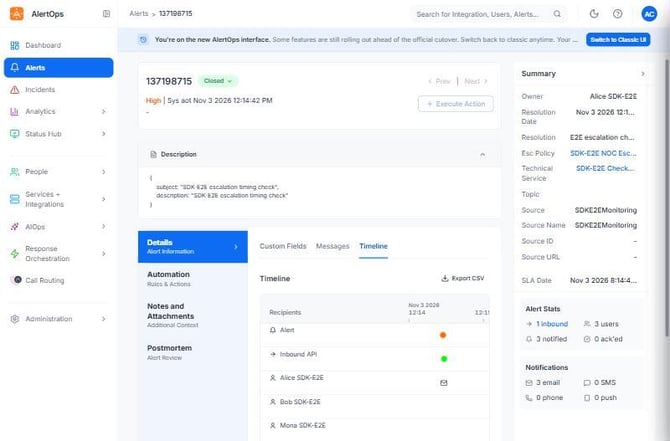
Figure 1. An alert posted through an SDK-created integration. The Summary panel shows Source SDKE2EMonitoring, the integration's unique source segment, plus the escalation policy and the three users notified.
Test an integration
inbound.test(integration_id) asks AlertOps to post its own test payload and returns the request id. It opens a real alert, so close it afterwards.
POST /{id}/testurl must have no body. Sending {} fails with "Method Type cannot be empty". inbound.test sends none for you.
Read the inbound log
Relevant for Developers confirming what happened to a payload
The log shows each inbound message with its mapping_status (Mapped Opened, Mapped Appended …) and the alert_id it produced. Rows appear within about 10 seconds.
- inbound.log.recent(integration_id, {days: 1}) returns the recent rows for one integration, each with message_id, mapping_status and alert_id.
- inbound.log.get(message_id) returns one message's detail: body, recipients and dates.
The log ignores its integration filter
GET /integrations/inbound/log requires datefrom and dateto (YYYY-MM-DDTHH:mm, account time zone). The documented integration filter is ignored, so every integration's rows come back. log.recent pads the window a day either side and filters by integration in the client.
For a custom window, call the paginated variant of inbound.log.list with {datefrom, dateto} and filter on inbound_integration_id yourself.
Heartbeats
Relevant for Developers monitoring jobs that must check in on a schedule
A heartbeat is a v2 inbound integration of type Heartbeat. It alerts when no ping arrives within its interval. Creating, reading, updating and deleting go through the v2 inbound endpoints. Groups, status, uptime and analytics are v3 under /integrations/heartbeats.
| Step | Operation |
| Create a group | heartbeats.groups.create({name: "Batch jobs", description: "Nightly jobs"}) |
| Create the heartbeat | heartbeats.create("Backup Job Heartbeat", 60, 12345, {recipient_groups: ["NOC"], group_id: group_id}) — name, interval in minutes, escalation policy id |
| Ping it | heartbeats.ping(heartbeat_id) |
| Check it | heartbeats.status(heartbeat_id) returns {status: "Up", lastTriggered, interval, group_id} |
The heartbeat's api_url is https://notify.alertops.com/Heartbeat/<per-heartbeat token>: it has no source segment, because each heartbeat has its own token. heartbeats.create requires an escalation policy id or response_play_id and raises ValueError otherwise.
| Operation | HTTP | What it does |
| heartbeats.update(id, {interval_min, …changes}) | GET + PUT /integrations/inbound/{id} | Read the full record, apply changes, save, read back |
| heartbeats.grouped() | GET /integrations/heartbeats/grouped (v3) | {groups[{groupId, groupName, integrations[]}], ungroupedServices[]} |
| heartbeats.status(id) | GET grouped | One heartbeat's row (status, lastTriggered, interval) plus group_id |
| heartbeats.uptime() | GET /integrations/heartbeats/uptime (v3) | 25 slots per heartbeat: 1 up, 0 missed, -1 no data |
| heartbeats.analytics(id, {fromDate, toDate}) | GET /{id}/analytics (v3) | upTime, missedCount, upTimeData[]. Dates YYYY-MM-DD; none means today |
| heartbeats.set_group(id, {groupId}) | PUT /{id}/group (v3) | Move to a group. A null groupId means Uncategorized |
| heartbeats.groups.create / update / delete / find | v3 /integrations/heartbeats/groups | Heartbeat groups. Deleting a group uncategorises its members |
There is no plain heartbeat list
GET /integrations/heartbeats is 404 (heartbeats.list is a dead operation). Use heartbeats.grouped() or heartbeats.status(id). The grouped response names the ungrouped bucket ungroupedServices, not the documented ungroupedIntegrations.
A ping turns status to Up within seconds. Ranged analytics (with fromDate/toDate) was seen reporting 0% uptime for a day that had a successful ping, so treat per-day figures with care.
Best Practices
Relevant for Anyone running integrations in production
Routing
- Always pass an explicit, descriptive source to create_api, and never reuse one across integrations.
- Use clone_unique, never clone, unless you mean to share an ingest URL.
- Re-source template integrations (ConnectWise and others with a fixed source) right after creating them.
Writes
- Change mappings with mapping.update, never with a partial mapping.replace.
- Send only real changes to access.update_admins. A no-op entry removes the user.
- Give each override rule a distinct sort_order.
Testing
- Close alerts opened by inbound.test or test payloads, and confirm outcomes in the inbound log, not from the 200.
Configuration Examples
Relevant for Starting templates for common setups
Example 1 — Minimal: one integration and one test alert
| Step | Operation |
| 1 | inbound.create_api("Checkout API", {source: "checkoutapi", escalation_policy_id: 12345, recipient_groups: ["NOC"]}) |
| 2 | ingest.post_to_integration(integration_id, {subject: "Checkout latency high", description: "p95 > 2 s"}) |
| 3 | inbound.log.recent(integration_id) — the first row shows Mapped Opened and the new alert_id |
Example 2 — Typical: filtered, grouped, with an after-hours override
| Step | Operation |
| 1 | inbound.create_api("Database Monitoring", {source: "dbprod", escalation_policy_id: 12345, recipient_groups: ["DBA"]}) |
| 2 | inbound.rule_filters.add(iid, [{fieldName: "<subject>", type: "Contains", value: "PROD"}]) |
| 3 | inbound.delaying_grouping.group_within(iid, 10) |
| 4 | inbound.override_rules.create(iid, {…}) with the body below |
{"escalation_policy_id": 23456, "sort_order": 1, "data_conditions": [],
 "time_condition": {
   "week": {"sun": true, "mon": true, "tue": true, "wed": true, "thu": true, "fri": true, "sat": true},
   "start_time": {"hour": 18, "minute": 0}, "end_time": {"hour": 23, "minute": 59}}}
Troubleshooting
Relevant for Anyone debugging alert ingestion
Alerts show up on the wrong integration
- Two integrations share a source, so they share an ingest URL. Compare api_url values and re-source one with inbound.mapping.update(iid, {source, source_name, source_value}).
- The integration is a clone made with clone. Re-source it, or recreate it with clone_unique.
A payload returned 200 but no new alert appeared
- An alert from the same integration was still open, so the payload was Mapped Appended to it. Check inbound.log.recent(iid) and close the open alert.
- The payload didn't match the filters or open-alert rules. Check the row's mapping_status and your rule_filters or filters.
The inbound log returns every integration's rows
- The integration query filter is ignored by the API. Use log.recent(iid) or filter on inbound_integration_id.
- A 400 from log.list means datefrom or dateto is missing. Both are required, as YYYY-MM-DDTHH:mm in the account time zone.
"Method Type cannot be empty" from testurl
- A body was sent with POST /{id}/testurl. Call inbound.test(iid), which sends none.
"User: <id> is invalid" when adding access
- The user's role lacks the integrations entitlement, or the user already has access. Pick from inbound.access.admins_available(iid, {includeGroups: true}).
402 from update_alert_tags
- Alert correlation tags need the Correlation package feature. PaymentRequiredError is expected without it.
Related Articles
- Working with Alerts in the AlertOps SDKs
- Escalation Policies and Response Plays with the AlertOps SDKs
- Workflows, Outbound Integrations and Maintenance Windows with the AlertOps SDKs
- Getting Started with the AlertOps Python SDK
- Getting Started with the AlertOps TypeScript SDK
Need help?
Email support@alertops.com or contact your AlertOps representative.