
Overview
Relevant for Developers automating alert triage and response
An alert is opened by an inbound integration or by hand. It carries messages, and each message fans out to recipients as notifications over their contact methods, timed by the alert's escalation policy. alerts covers listing, manual creation, the lifecycle (assign, close, hold, snooze, merge, promote to incident) and the material around an alert: notes, attachments, custom fields, postmortems and drafts.
Key benefits:
- Listing that works the first time — alerts.list_recent sets viewBy A and an exclusive createdTo of tomorrow, and the paginated variants (…All / …Iter) follow the alerts cursor.
- Lifecycle helpers — reopen, hold, cancel and resolve hide the numeric status codes.
- A working acknowledge path — auth.act_on_link runs the Acknowledge, Assign, Escalate or Close button from a notification.
Reading the operation names
Relevant for Developers using any of the five AlertOps SDKs
This guide applies to every AlertOps SDK. It names each operation by its resource path and operation name, such as groups.members.add_users, lists positional arguments in order, and shows request bodies and options as JSON. Where a task needs real code, the example is given in all five languages. Each SDK spells the same call in its own style:
| SDK | The same call | Options and request fields |
| Python | ao.groups.members.add_users(group_id, [101, 102], roles=["Primary"]) | Keyword arguments, such as search="Net" |
| TypeScript | await ao.groups.members.addUsers(groupId, [101, 102], ["Primary"]) | One trailing options object keyed by the names in this guide, such as { search: "Net" } |
| Go | ao.Groups.Members.AddUsers(ctx, groupID, []any{101, 102}, []any{"Primary"}) | &alertops.Request{Fields: alertops.M{"search": "Net"}} for endpoints, alertops.M{…} for helper options |
| Java | ao.groups().members().addUsers(groupId, List.of(101, 102), List.of("Primary")) | Request.of("search", "Net") for endpoints, a Map keyed by the names in this guide for helper options |
| .NET | await ao.Groups.Members.AddUsersAsync(groupId, new object?[] { 101, 102 }, new object?[] { "Primary" }) | new Kwargs { ["search"] = "Net" } |
- Names follow each language's style: update_basic is updateBasic in TypeScript and Java, UpdateBasic in Go and UpdateBasicAsync in .NET. Go keeps initialisms upper case (create_api is CreateAPI, post_to_url is PostToURL).
- Paginated operations also have variants that collect every page or iterate lazily (…All / …Iter; in Python, .all() and .iter() on the operation).
- Helpers that look something up return null (None in Python, nil in Go) when nothing matches. **ensure helpers** return the record together with a flag that says whether it was created.
- Errors are the same classes in every SDK, such as NotFoundError and BadRequestError.
- Code examples come in the order Python, TypeScript, Go, Java, .NET. Each assumes a client named ao (and, in Go, a ctx and a function that returns error), created as in that SDK's Getting Started article.
For one language's details, see Calling the API from Python, TypeScript, Go, Java or .NET.
Before you start
Relevant for Developers preparing a tenant for alert automation
- Manual alerts need an escalation policy with quick_launch set to true (see Escalation Policies and Response Plays with the AlertOps SDKs).
- Ingested alerts come from an integration's api_url (see Inbound Integrations, Alert Ingestion and Heartbeats with the AlertOps SDKs).
- Use test recipients (for example @example.com users) while you build: creating, resending and escalating alerts sends real notifications.
List and export alerts
Relevant for Developers reading alerts for reports and triage
GET /alerts filters on creation date. Pass both dates as YYYY-MM-DD, and pass viewBy A for all alerts. The newest alerts come first. For example, alerts.list with these fields lists open alerts from four days:
{"viewBy": "A", "createdFrom": "2026-11-01", "createdTo": "2026-11-05", "status": "1", "limit": 100}
- alerts.list_recent(1) lists the last day's alerts with viewBy A and createdTo set to tomorrow.
- alerts.list_recent(7, {all_pages: true, priority: "Critical"}) follows every page and filters by priority.
- alerts.export({viewBy: "A", createdFrom: "2026-11-03", createdTo: "2026-11-05"}) returns CSV text with the same filters.
createdTo is exclusive and viewBy defaults to "mine"
createdTo set to today leaves out today's alerts: pass tomorrow. Without viewBy A the API returns only the caller's own alerts, which is often an empty list for an API key.
| Field | Description |
| createdFrom, createdTo | YYYY-MM-DD; required in practice; createdTo is exclusive |
| viewBy | A for all alerts; the default is the caller's own |
| status | Comma-separated status ids (see the status table below) |
| priority, owner, integration, escalationPolicy, subject, source | Further filters |
| limit | Page size; the paginated variants follow metadata.next |
A new alert can take a few seconds to appear in the list, so poll briefly after creating or ingesting one.
Create a manual alert
Relevant for Developers raising alerts from scripts and tools
alerts.create with this body returns the full alert, including alert_id, the first message_id and the status Open:
{
  "escalation_policy": 31337,
  "priority": "Critical",
  "subject": "Disk full on db-01",
  "description": "/var is at 98%",
  "recipients": [{"recipient_type": "Group", "recipient_id": 12345},
                 {"recipient_type": "User", "recipient_id": 101}]
}
escalation_policy is the id of a policy with quick_launch true. recipient_type is User or Group. Pass response_play with a play id instead of escalation_policy to drive the alert with a response play.
Only quick-launch policies can raise manual alerts
With a policy whose quick_launch is false, POST /alerts answers "Invalid Escalation Policy or Response Play value". Turn it on with escalation_policies.update(ep_id, {quick_launch: true}).
Ingested events are appended, not duplicated
Events from the same integration source with an empty source id are appended to the open alert ("Mapped Appended"). A second ingest opens a new alert only after the first is closed.
Read an alert
Relevant for Anyone inspecting what happened to an alert
| Operation | Returns |
| alerts.get(alert_id) | The alert: status, priority, escalation_policy.id, owner, is_incident and more |
| alerts.status_changes(alert_id) | [{last_modified_date, user_name, status, owner, incident}] |
| alerts.timeline(alert_id) | [{event_time, event_source, event_type, …}] |
| alerts.recipients(alert_id) | The users on the alert |
| alerts.messages.summary(alert_id) | {inbound_events, users, notifications, acknowledged, email, sms, …} |
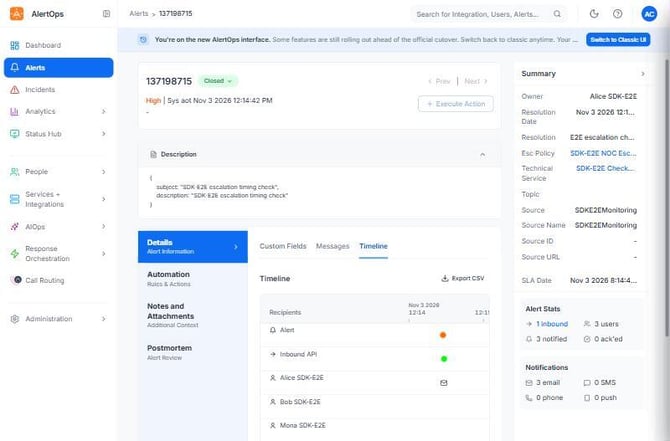
Figure 1. An alert ingested through the SDK's API integration, after the SDK closed it. The summary shows owner Alice, the SDK-E2E NOC escalation policy and the technical service; the stats show 1 inbound event, 3 users and 3 notified, with 0 acknowledged.
Manage the lifecycle
Relevant for Developers assigning, closing and parking alerts
| Operation | Effect |
| alerts.assign(alert_id, {user: 101}) | Status Assigned; returns the alert |
| alerts.hold(alert_id) | On Hold |
| alerts.reopen(alert_id) | Open (also ends a hold or snooze) |
| alerts.snooze(alert_id, {snooze_hours: 2}) | 1 to 168 hours; Snoozed |
| alerts.close(alert_id, {user: 101, resolution: "Disk cleaned"}) | Closes the alert |
| alerts.resolve(alert_id, 101, "Done") | Closes, or cancels alerts that can't be closed; does nothing if already done |
| alerts.bulk_assign({user: 101, alerts: [1001, 1002]}) | Assigns several alerts |
| alerts.bulk_close({user: 101, alerts: [1001, 1002], resolution: "Batch fix"}) | Closes several alerts |
Assigning an alert takes ownership and stops the escalation ladder through the default Stop Delivery on Assignment or Closed workflow. In the SDK-E2E run, an alert assigned straight away notified only the Primary; Secondary and Manager were never paged.
alerts.set_status(alert_id, {status: "<id>"}) takes a status id as a string and returns no body. The ids, from lookups.alert_status():
| Status | Id |
| Open | 1 (settable: reopens) |
| Closed | 2 (use close) |
| Cancelled | 4 (settable) |
| Assigned | 5 (use assign) |
| On Hold | 6 (settable) |
| Merged | 9 (use merge) |
| Snoozed | 10 (use snooze) |
Merge, unmerge and promote
| Operation | Effect |
| alerts.merge({alerts: [child_id], parent_alert_id: parent_id}) | The child's status becomes Merged |
| alerts.merged_alerts(parent_id) | [{alert_id, description, …}] |
| alerts.unmerge({alerts: [child_id], parent_alert_id: parent_id}) | The child reopens |
| alerts.promote_to_incident(parent_id, {…}) | Promotes the alert to an incident (body below) |
{"message_text": "Customer impact", "escalation_policy_id": 31337, "topic_id": null,
 "recipients": [{"recipient_id": 101, "recipient_type": "User"}]}
merge, unmerge, promote_to_incident and set_status return no body; re-read the alert to see the change.
Messages and notifications
Relevant for Developers following deliveries and nudging an escalation
| Operation | Effect |
| alerts.messages.latest_id(alert_id) | The newest message_id |
| alerts.messages.notifications(alert_id, message_id) | Per recipient: {recipient, notifications[{status, contact, date_sent}]} |
| alerts.messages.reply(alert_id, {message_text: "Investigating", escalation_policy_id: 31337, recipients: [{recipient_id: 101, recipient_type: "User"}]}) | Replies on the alert |
| alerts.messages.resend(alert_id, message_id, [{recipient_id: 101, recipient_type: "User"}]) | Sends the message again |
| alerts.messages.escalate(alert_id, message_id) | "Escalated to <last>, <first>" |
| alerts.messages.escalate_to_next_group(alert_id, message_id) | Moves to the next group |
| alerts.messages.cancel(alert_id, message_id) | "Cancel Complete" |
- cancel works only while deliveries are still pending; afterwards it answers 400 "Nothing to Cancel".
- escalate and escalate_to_next_group need a next user or group and the first delivery to have gone out. Right after create they answer "There is no user/group to escalate to".
- To add people to an open alert, use alerts.add_recipients(alert_id, {…}) with the body below. The key is recipient, not recipient_id, and a recipient already on the alert gives 400 "Create not complete".
{"escalation_policy": 31337, "response_play": null,
 "recipients": [{"recipient_type": "User", "recipient": "102", "send_message": true}]}
Acknowledge an alert
Relevant for Developers building acknowledge buttons, bots and responders
The web acknowledge action is refused on the tenant
alerts.acknowledge(alert_id) (POST .../messages/{id}/acknowledge) answers 400 "Alert is not enabled for acknowledge" on every alert the test suite could create. That held with every EP acknowledgement channel on, on centralized and user EPs, with the recipient's own key, and on an exact clone of a policy whose alerts allow it. Of 1,041 tenant alerts, the 114 that were acknowledged all went through a notification channel (email link, SMS, phone keypress or push), never through this action.
The new UI uses an alert-level call instead, alerts.acknowledge_alert(alert_id, {device_id: "", user_id: …}) (POST /alerts/{id}/acknowledge). It shows the button only when the alert's acknowledge_allowed is true. On this tenant the call answers 400 "Alert not acknowledged.", so it is held back by the same server-side gate. alerts.technical_services(alert_id) (v3) lists the technical services an alert belongs to.
Acknowledgement works through the token in the notification. Each alert email has Acknowledge, Assign, Escalate and Close buttons that link to https://app.alertops.com/<account>/alert/acknowledge?Token=<32 hex>&TokenType=DLV. Pass that link to auth.act_on_link:
- Copy the button link from the delivered notification (an Outlook safelinks-wrapped copy works too).
- Call auth.act_on_link(link).
- Read the result: the action (acknowledge) and the alert summary, whose message_status is now ACK and alert_status is still Open.
Python
action, summary = ao.auth.act_on_link(link)
print(action, summary["message_status"], summary["alert_status"])   # acknowledge ACK Open
TypeScript
const [action, summary] = await ao.auth.actOnLink(link);
console.log(action, summary.message_status, summary.alert_status);   // acknowledge ACK Open
Go
action, summary, err := ao.Auth.ActOnLink(ctx, link, nil)
if err != nil {
	return err
}
fmt.Println(action, alertops.Get(summary, "message_status"), alertops.Get(summary, "alert_status")) // acknowledge ACK Open
Java
PlatformHelpers.LinkResult result = ao.auth().actOnLink(link);
System.out.println(result.action() + " " + result.alert().path("message_status").asText()
    + " " + result.alert().path("alert_status").asText());   // acknowledge ACK Open
.NET
var (action, summary) = await ao.Auth.ActOnLinkAsync(link);
Console.WriteLine($"{action} {summary?["message_status"]} {summary?["alert_status"]}");   // acknowledge ACK Open
Verified with a real alert email on 2026-11-03: the message went PACK → ACK and the alert stayed Open. Acknowledging says "I saw it" and the ladder keeps going; assign or close the alert to stop it.
To call the steps yourself, split the link into its action, account, token and token type, then use the token operations:
| SDK | Link parser |
| Python | parse_action_link in alertops.resources.auth |
| TypeScript | parseActionLink, exported by @alertops/sdk |
| Go | alertops.ParseActionLink |
| Java | PlatformHelpers.parseActionLink in com.alertops.sdk.helpers |
| .NET | AuthResource.ParseActionLink |
- auth.alert_by_token({tokenType, account, token}) returns {message_status, alert_status, can_assign, …}.
- auth.acknowledge_by_token({account, token, token_type, contact: "", resolution: ""}) acknowledges.
- auth.close_by_token({account, token, token_type, contact: "", resolution: "Fixed"}) closes.
One token, all four actions, one acknowledgement
The same token serves Acknowledge, Assign, Escalate and Close. A token acknowledges once: a second acknowledge answers 400 "Message not acknowledged.". A bad token answers 400 "Token is invalid". These endpoints are anonymous, so the token is the only credential: treat notification links like passwords.
Acknowledge and close by token were exercised live; assign and escalate use the same mechanism but weren't sent, to avoid extra emails.
Notes, attachments, fields, postmortems and drafts
Relevant for Developers enriching alerts and closing the loop
| Operation | Effect |
| alerts.notes.create(alert_id, {note: "Rolled back release 42"}) | Adds a note; returns it with note_id |
| alerts.notes.update(alert_id, note_id, {note: "Rolled back release 42 at 09:10"}) | Changes a note |
| alerts.attachments.add(alert_id, "df.txt", <bytes>, "text/plain") | Uploads a file and returns its new row |
| alerts.attachments.download(alert_id, attachment_id) | Raw bytes |
| alerts.update_fields(alert_id, [{alert_field_id: 3, alert_field_value: "db-01"}]) | Sets custom field values; take the ids from the alert's alert_fields |
- update_fields takes a bare list. An entry without alert_field_id blanks the field.
- The legacy alerts.update needs status (a name) and applies only source fields (source, source_id …). It ignores subject, priority and description.
Postmortems exist only on closed alerts: postmortem.get answers 400 "is not closed" while the alert is open, then {} until one is saved. Create and update need every active postmortem field, so use alerts.postmortem.save(alert_id, {…}), which fills them in:
{"name": "db-01 disk", "owner": 101, "status": "Draft",
 "impact_start": "2026-11-03T09:00", "impact_end": "2026-11-03T09:30", "duration": 30,
 "values": {"Root Cause": "Log rotation disabled"}}
Drafts: alerts.drafts.create(body) takes the same body as alerts.create and returns an alert in status "Message Draft". The draft_id the draft endpoints use is that alert's message_id. drafts.find(subject) looks one up and drafts.send(draft_id, body) opens it. Deleting a draft leaves the backing alert in "Message Draft": it can't be closed, only cancelled (alerts.cancel, or resolve, which does that for you).
Operation Reference
Relevant for Developers looking up an operation
| Operation | HTTP | What it does |
| alerts.list / list_recent | GET /alerts | Filtered list; cursor paging via metadata.next |
| alerts.export | GET /alerts/export | CSV text with the same filters |
| alerts.create | POST /alerts | Manual alert through a quick-launch EP or a response play |
| alerts.get / timeline / status_changes | GET /alerts/{id} | Record, event timeline, status history |
| alerts.assign / close / bulk_assign / bulk_close | POST | Ownership and resolution |
| alerts.set_status / reopen / hold / cancel / resolve | PUT /alerts/{id}/status | Status changes by id, or helpers |
| alerts.snooze / update_snooze | POST, PUT .../snooze | Park for 1 to 168 hours |
| alerts.merge / unmerge / promote_to_incident | POST, PUT | Grouping and incidents |
| alerts.messages.notifications / summary | GET | Delivery detail and counts |
| alerts.messages.reply / resend / escalate / cancel | POST | Message actions |
| auth.act_on_link | helper | Run a notification button (acknowledge, assign, escalate, close) |
| auth.acknowledge_by_token / close_by_token | POST /auth/.../token | Token actions, anonymous |
| alerts.notes / attachments / update_fields | GET, POST, PUT | Enrichment |
| alerts.postmortem.save / drafts.create / drafts.send | helper, POST | Postmortems and drafts |
Workflow and outbound logs (workflow_log, outbound_log, run_outbound_action) and the legacy preview are in each SDK's method reference.
Best Practices
Relevant for Anyone automating alerts in production
Query deliberately
- Always pass viewBy A and a createdTo of tomorrow, or use list_recent.
- Keep date ranges short and filter by integration or escalationPolicy instead of scanning everything.
Stop escalation the right way
- Assign or close an alert to stop the ladder; acknowledging alone lets it continue.
- Clean up with resolve, which handles drafts and already-closed alerts without errors.
Handle notification links as secrets
- Don't log or store action links longer than needed; anyone with the link can act on the alert.
- Act on each link once and read the result from the returned summary.
Configuration Examples
Relevant for Starting templates for alert automation
Example 1 — Triage: assign today's open critical alerts
| Step | Operation |
| 1 | alerts.list_recent(1, {all_pages: true, status: "1", priority: "Critical"}) |
| 2 | For each alert: alerts.assign(alert_id, {user: 101}) |
| 3 | For each alert: alerts.notes.create(alert_id, {note: "Auto-assigned by triage bot"}) |
Example 2 — Count today's alerts per integration
Iterate alerts.list with its lazy paginated variant and {viewBy: "A", createdFrom: "2026-11-04", createdTo: "2026-11-05"}, and count the alerts by integration.id.
Example 3 — Chat bot: acknowledge from a pasted link
Call auth.act_on_link(link). On success, reply with the action and the summary's message_status and alert_status. On BadRequestError, reply with the error's messages, for example ["Message not acknowledged."] for a reused token.
Troubleshooting
Relevant for Anyone debugging alert calls
The list is empty, or today's alerts are missing
- viewBy is missing, so only the caller's own alerts come back. Pass viewBy A.
- createdTo is today; it is exclusive. Pass tomorrow, or use list_recent.
- The alert is a few seconds old. Poll again shortly.
Create fails with "Invalid Escalation Policy or Response Play value"
- The policy's quick_launch is false, or the id isn't a policy. Set quick_launch to true or use a quick-launch policy.
Acknowledge fails with 400 "Alert is not enabled for acknowledge"
- The web action is refused on this tenant. Use auth.act_on_link(link) with the notification's button link.
Acknowledge by token fails with 400 "Message not acknowledged."
- The token was already used to acknowledge. Read auth.alert_by_token(…): message_status is ACK already.
Token calls fail with 400 "Token is invalid"
- The link was truncated or rewritten. Pass the full link, or the safelinks URL, to the link parser and check the token is 32 hex characters.
Escalate fails with "There is no user/group to escalate to"
- The first delivery hasn't gone out yet, or there's no next member or group. Wait for messages.notifications to show a delivery, then retry.
Cancel fails with 400 "Nothing to Cancel"
- Every delivery of the message has already been sent.
Postmortem calls fail
- 400 "is not closed": close the alert first. A list of missing field names: use postmortem.save, which sends every active field.
A draft can't be closed
- Draft-backed alerts can only be cancelled. Use alerts.cancel(alert_id) or resolve.
Related Articles
- Inbound Integrations, Alert Ingestion and Heartbeats with the AlertOps SDKs
- Escalation Policies and Response Plays with the AlertOps SDKs
- Workflows, Outbound Integrations and Maintenance Windows with the AlertOps SDKs
- Getting Started with the AlertOps Python SDK
- Getting Started with the AlertOps TypeScript SDK
Need help?
Email support@alertops.com or contact your AlertOps representative.