
Overview
Relevant for Developers and solution engineers turning on-call requirements into configuration
The semantic layer encodes the rules from the AlertOps semantic spec so a plan is right by construction. It has two halves. Planners are pure functions with no API calls: they turn "three people, weekly after-hours rotation, Secondary after 10 minutes" into exact request bodies plus review items. The executor (the client's semantic resource) applies plans to a tenant, re-reads each write to detect drift, and undoes what it created if something fails. Every SDK ships the same planners and executor, ported from the Python reference and checked against its recorded traces.
Key benefits:
- Invariants enforced in code — :59 end times, Monday-aligned starts, 5-year end dates, week-1 roles and the four-lever limit can't be forgotten.
- The EP-vs-RP decision made for you — the escalation planner picks an escalation policy or a response play from the timeline's shape.
- Reviewable before writing — validate_design and check_tier list what blocks a plan and what needs an upgrade.
- All-or-nothing applies — apply_blueprint rolls back on any error, and the report shows created objects and drift.
Reading the operation names
Relevant for Developers using any of the five AlertOps SDKs
This guide applies to every AlertOps SDK. It names each operation by its resource path and operation name, such as groups.members.add_users, lists positional arguments in order, and shows request bodies and options as JSON. Where a task needs real code, the example is given in all five languages. Each SDK spells the same call in its own style:
| SDK | The same call | Options and request fields |
| Python | ao.groups.members.add_users(group_id, [101, 102], roles=["Primary"]) | Keyword arguments, such as search="Net" |
| TypeScript | await ao.groups.members.addUsers(groupId, [101, 102], ["Primary"]) | One trailing options object keyed by the names in this guide, such as { search: "Net" } |
| Go | ao.Groups.Members.AddUsers(ctx, groupID, []any{101, 102}, []any{"Primary"}) | &alertops.Request{Fields: alertops.M{"search": "Net"}} for endpoints, alertops.M{…} for helper options |
| Java | ao.groups().members().addUsers(groupId, List.of(101, 102), List.of("Primary")) | Request.of("search", "Net") for endpoints, a Map keyed by the names in this guide for helper options |
| .NET | await ao.Groups.Members.AddUsersAsync(groupId, new object?[] { 101, 102 }, new object?[] { "Primary" }) | new Kwargs { ["search"] = "Net" } |
- Names follow each language's style: update_basic is updateBasic in TypeScript and Java, UpdateBasic in Go and UpdateBasicAsync in .NET. Go keeps initialisms upper case (create_api is CreateAPI, post_to_url is PostToURL).
- Paginated operations also have variants that collect every page or iterate lazily (…All / …Iter; in Python, .all() and .iter() on the operation).
- Helpers that look something up return null (None in Python, nil in Go) when nothing matches. **ensure helpers** return the record together with a flag that says whether it was created.
- Errors are the same classes in every SDK, such as NotFoundError and BadRequestError.
- Code examples come in the order Python, TypeScript, Go, Java, .NET. Each assumes a client named ao (and, in Go, a ctx and a function that returns error), created as in that SDK's Getting Started article.
For one language's details, see Calling the API from Python, TypeScript, Go, Java or .NET.
Before you start
Relevant for Developers finding the planners in their SDK
Planners need user ids. Resolve names first, for example with users.find_by_username.
| SDK | Planners and spec lookups | Executor |
| Python | plan_rotation, plan_escalation, validate_design, check_tier, canonical … in alertops.semantic. Install the extra first: pip install "alertops-sdk[semantic]" (it adds PyYAML) | ao.semantic |
| TypeScript | planRotation, planEscalation, validateDesign, checkTier, canonical …, exported by @alertops/sdk | ao.semantic |
| Go | alertops.PlanRotation, PlanEscalation, ValidateDesign, CheckTier, Canonical … | ao.Semantic |
| Java | Plan.planRotation, planEscalation, validateDesign, checkTier and SemanticSpec.canonical in com.alertops.sdk.semantic | ao.semantic() |
| .NET | Planner.PlanRotation, PlanEscalation, ValidateDesign, CheckTier and SemanticSpec.Canonical in AlertOps.Semantic | ao.Semantic |
The TypeScript, Go, Java and .NET SDKs embed the semantic spec, so they need nothing extra.
Plan a rotation and an escalation
Relevant for Developers describing shift coverage and who is notified when
The rotation planner takes a rotation spec (group name, members in week-1 order and a coverage window) and returns a plan with payload (a POST /schedules body without group, which the executor adds), review_items and warnings. The escalation planner takes a list of steps and returns a plan with mode, reason, member_roles or response_play_members, review_items and distinct_intervals.
This plans a weekly after-hours rotation for three people and a ladder of Primary at 0 and 5 minutes, Secondary at 15 and Manager at 30:
Python
from alertops.semantic import Coverage, Member, RotationSpec, Step, plan_escalation, plan_rotation, validate_design

rotation = plan_rotation(RotationSpec("NOC", [Member(101, "Alice", "Ng"), Member(102, "Bob", "Ruiz"),
                                              Member(103, "Carol", "Lee")], Coverage("after_hours")))
escalation = plan_escalation([Step(0), Step(5), Step(15, "secondary"), Step(30, "manager")])
print(rotation.warnings)                       # ["2 member(s) start off-shift (role '') and rotate in on later weeks."]
print(escalation.mode)                         # escalation_policy
print(validate_design(rotation, escalation))   # [] when clean
TypeScript
import { coverage, member, planEscalation, planRotation, rotationSpec, step, validateDesign } from "@alertops/sdk";

const rotation = planRotation(rotationSpec("NOC",
  [member(101, "Alice", "Ng"), member(102, "Bob", "Ruiz"), member(103, "Carol", "Lee")],
  { coverage: coverage("after_hours") }));
const escalation = planEscalation([step(0), step(5), step(15, "secondary"), step(30, "manager")]);
console.log(rotation.warnings);                       // ["2 member(s) start off-shift (role '') and rotate in on later weeks."]
console.log(escalation.mode);                         // escalation_policy
console.log(validateDesign(rotation, escalation));    // [] when clean
Go
spec := alertops.NewRotationSpec("NOC", []alertops.Member{
	{UserID: 101, FirstName: "Alice", LastName: "Ng"}, {UserID: 102, FirstName: "Bob", LastName: "Ruiz"},
	{UserID: 103, FirstName: "Carol", LastName: "Lee"},
})
spec.Coverage = alertops.Coverage{Kind: alertops.CoverageAfterHours}
rotation, err := alertops.PlanRotation(spec, nil)
if err != nil {
	return err
}
escalation, err := alertops.PlanEscalation([]alertops.Step{
	alertops.NewStep(0, "primary", nil), alertops.NewStep(5, "primary", nil),
	alertops.NewStep(15, "secondary", nil), alertops.NewStep(30, "manager", nil),
}, alertops.EscalationOptions{})
if err != nil {
	return err
}
fmt.Println(rotation.Warnings)                                    // [2 member(s) start off-shift (role '') and rotate in on later weeks.]
fmt.Println(escalation.Mode)                                      // escalation_policy
fmt.Println(alertops.ValidateDesign(&rotation, &escalation, nil)) // [] when clean
Java
import com.alertops.sdk.core.Json;
import com.alertops.sdk.semantic.Plan;

Plan.RotationPlan rotation = Plan.planRotation(Plan.RotationSpec.of("NOC",
    List.of(new Plan.Member(Json.toNode(101), "Alice", "Ng"), new Plan.Member(Json.toNode(102), "Bob", "Ruiz"),
            new Plan.Member(Json.toNode(103), "Carol", "Lee")),
    Plan.Coverage.of("after_hours")));
Plan.EscalationPlan escalation = Plan.planEscalation(List.of(
    Plan.Step.of(0, "primary", null), Plan.Step.of(5, "primary", null),
    Plan.Step.of(15, "secondary", null), Plan.Step.of(30, "manager", null)));
System.out.println(rotation.warnings());                         // [2 member(s) start off-shift (role '') and rotate in on later weeks.]
System.out.println(escalation.mode());                           // escalation_policy
System.out.println(Plan.validateDesign(rotation, escalation));   // [] when clean
.NET
using AlertOps.Semantic;

var rotation = Planner.PlanRotation(new RotationSpec("NOC",
    new[] { new Member(101, "Alice", "Ng"), new Member(102, "Bob", "Ruiz"), new Member(103, "Carol", "Lee") })
{
    Coverage = new Coverage("after_hours"),
});
var escalation = Planner.PlanEscalation(new[] { new Step(0), new Step(5), new Step(15, "secondary"), new Step(30, "manager") });
Console.WriteLine(string.Join("; ", rotation.Warnings));             // 2 member(s) start off-shift (role '') and rotate in on later weeks.
Console.WriteLine(escalation.Mode);                                  // escalation_policy
Console.WriteLine(Planner.ValidateDesign(rotation, escalation).Count);   // 0 when clean
The rotation's week-1 roles are ["Primary", "", ""]: Alice is on call and Bob and Carol rotate in later. The rotation payload's start_date is the Monday on or before today at 17:00, and its end_date five years later at 07:59. The escalation plan's member roles are:
| member_role_type | role_wait_time_in_mins | wait_time_between_members_in_mins |
| Primary | 0 | 5 |
| Secondary | 10 | 0 |
| Manager | 15 | 0 |
Coverage kinds
A coverage takes a kind plus optional start, end and days, with wall-clock times the way people say them: "5pm to 8am" is start [17, 0] and end [8, 0]. The planner turns the end into 07:59.
| Kind | Days and default window |
| 24x7 | Every day, 00:00 to 23:59, continuous |
| business_hours | Mon to Fri, 08:00 to 16:59, block (one window per day) |
| after_hours | Mon to Fri, 17:00 to 07:59, block |
| weekend | Fri 17:00 to Mon 07:59, continuous |
| custom | Your days (default Mon to Fri) with your start and end; continuous if it touches Sat or Sun |
Rotation spec fields
Field names follow each language's style (secondary_count is SecondaryCount in Go and .NET and secondaryCount in Java; TypeScript keeps secondary_count). In Java, Plan.RotationSpec.of(name, members, coverage) fills the defaults below; use the record's full constructor to change them.
| Field | Description |
| group_name, members | The group and its rotation members (user id, first name, last name), in week-1 order |
| coverage | A coverage; default 24x7 |
| primary_count, secondary_count | How many members are on shift as Primary and Secondary each week (default 1 and 0) |
| rotating | true (default) for a Rotating shift, false for Fixed |
| frequency, every, rotate_x_users | Weekly (default), Daily or Monthly; every N periods; members moved per step |
| time_zone | Display name; default (UTC-06:00) Central Time (US & Canada) |
| start_date, end_date, schedule_name | Optional; the start snaps to the prior Monday, the end defaults to 5 years later |
Invariants the planner enforces
- rotation_first_week_is_explicit and first_member_primary — users[] is week 1, the first primary_count members are Primary, then Secondary, and the rest are "" (off shift this week). Rotation is bottom-up: members move up one slot per step.
- shift_end_minute_convention — an end of 08:00 becomes 07:59, and 00:00 becomes 23:59.
- start_align_prior_monday and shift_end_date_far_future — the start date is a Monday, the end date 5 years later.
- overnight_is_continuous — coverage that touches Saturday or Sunday is continuous; weekday windows are blocks.
A plan with no members, no Primary, or more on-shift slots than members carries a block review item, and the executor refuses to apply it.
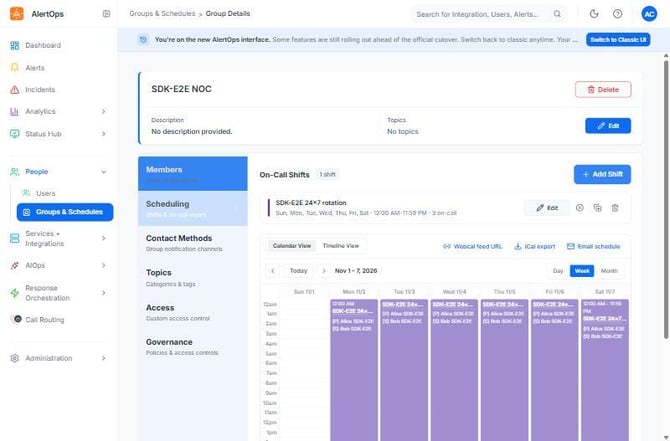
Figure 1. What the rotation planner produced for the SDK-E2E scenario (a 24x7 coverage, three members, secondary_count 1): a continuous 12:00 AM to 11:59 PM shift with (P) Alice and (S) Bob in week 1 and Carol off shift. The week starts on Monday 11/2, so Sunday 11/1 is empty.
How steps become roles
Relevant for Developers designing escalation timelines
A step has at (minutes after the alert opens), a role (primary by default, secondary or manager), an optional target (a user or group id) and a target type (User by default). The escalation planner's options are retries, retry_interval, contact_methods and force.
- role_wait_time_in_mins is the gap from the previous step to the role's first step (Primary is always 0).
- wait_time_between_members_in_mins is the gap between steps of the same role, which must be equal.
- retries and retry_interval go on every role. Contact methods default to Email-Official only.
The EP-vs-RP decision
The planner switches to a response play (mode response_play) when:
- the timeline has more than 4 distinct intervals (max_four_escalation_levers; a retry interval counts as one), or
- the same role has unequal gaps between its members.
Response-play steps need a concrete target; a step without one adds a block review item. Pass force: "response_play" to always build a play; force: "escalation_policy" raises ValueError when same-role gaps are unequal.
For example, six steps at 0, 1, 3, 6, 10 and 15 minutes, each with a target user, plan as a response play. The reason reads "Response play: 5 distinct intervals exceed the 4 escalation-policy levers.", and the members' wait_time_in_mins are [0, 1, 2, 3, 4, 5].
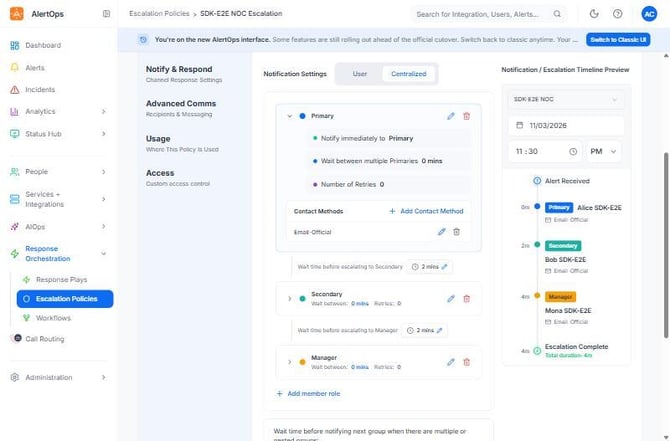
Figure 2. The policy applied from a Primary step at 0, a Secondary step at 2 and a Manager step at 4 minutes, previewed in the UI for the SDK-E2E NOC group: Alice (Primary) at 0 m, Bob (Secondary) at 2 m, Mona (Manager) at 4 m.
Review a design before applying it
Relevant for Solution engineers checking a plan with a customer
validate_design(rotation, escalation, {integration_has_ep}) returns review items with severity, message and rule. severity is info, warn or block.
| Rule | What it reports |
| (plan items) | Every review item the planners added, such as missing members or response-play steps without a target |
| shift_end_minute_convention | warn when a shift ends on :00 |
| first_member_primary | block when a rotation has no Primary in week 1, or the ladder doesn't start with Primary |
| max_four_escalation_levers | block when an EP plan has more than 4 member roles |
| escalation_policy_required | block when integration_has_ep is false |
| ep_vs_rp_decision | info on response plays: nested groups are an alternative |
Tier checks
check_tier(account_tier, features) compares the features a plan needs with the account's tier (free, standard, premium, enterprise) and returns account_tier, min_required_tier, satisfied, flags and addons. tier_of maps the account's package name, and features_from_text does a rough phrase match:
| Call | Result |
| tier_of(<account.summary() → product_package_name>) | "Enterprise Trial" → "enterprise" |
| features_from_text("We need SSO and a status page") | ["sso_saml", "status_hub"] |
| check_tier("premium", ["sso_saml", "status_hub"]) | satisfied false, flags [{"feature": "status_hub", "requires": "enterprise", "account": "premium"}] |
Spec lookups
canonical("first responder") returns "primary" from the spec's taxonomy, and invariant("shift_end_minute_convention") returns the rule's text. Use them to normalize customer wording and to quote the rule in review notes.
Apply plans with the executor
Relevant for Developers writing plans to a tenant
The semantic resource applies plans. Each apply_* call fills a report and re-reads what it wrote.
| Operation | What it does |
| semantic.ensure_group(name, report) | Find the group by name or create it; records it as reused or created |
| semantic.ensure_members(group_id, user_ids, roles) | Add the users that aren't members yet |
| semantic.apply_rotation(group_name, plan, report) | Ensure group and members, create the shift, compare it with the plan |
| semantic.apply_escalation_policy(name, plan, {priority: "Critical", centralized: true, next_group_wait: 0}) | Create the EP, set the notify mode, write roles and their contact methods, compare timings |
| semantic.apply_response_play(name, plan, {priority: "Critical", repeat}) | Create the RP with its steps and optional repeat, compare waits |
| semantic.create_api_integration(spec, {escalation_policy_id, response_play_id}) | Create an API integration wired to the EP or RP |
| semantic.wire_integration(integration_id, {escalation_policy_id, recipient_groups, recipient_users}) | Repoint an existing integration; returns {before, after} |
| semantic.apply_blueprint(bp, {rollback: true}) | Validate and create the whole stack in dependency order |
| semantic.rollback(report) | Delete what the report created, newest first |
ensure_members follows the shift's role rule
When the group's member list reports role_in_shift, roles live on the shift (roles_live_on_shift). ensure_members then adds members with no roles, and raises ValueError "group has a shift: roles are set on the shift, not on members" if you pass Primary or Secondary. Roles ["Manager"] add a manager outside the rotation (manager_shift_agnostic).
create_api_integration refuses to run without an EP or RP ("every inbound integration needs an escalation policy"). The ingest URL's source defaults to the integration name with non-alphanumeric characters removed. Give every integration a unique source, because AlertOps routes ingested alerts by it.
Blueprints
A blueprint describes a small stack: group_name, rotation, member_ids, escalation_name, escalation (EP or RP, from the plan's mode), priority (default Critical) and integration (an integration spec with name, source, recipient_groups and recipient_users).
apply_blueprint runs validate_design first and raises ValueError on any block item before writing anything. It then creates the objects in dependency order. With an EP and no recipient groups, the integration also targets the blueprint's group. On any exception it rolls back what it created and re-raises. Applying the plans from Plan a rotation and an escalation:
Python
from alertops.semantic import Blueprint, IntegrationSpec

report = ao.semantic.apply_blueprint(Blueprint(group_name="NOC", rotation=rotation, escalation=escalation,
                                               integration=IntegrationSpec("noc-monitoring")))
print(report.summary())   # OK: created 4 ... (group, schedule, escalation_policy, inbound_integration)
if not report.ok:
    print(report.drift)
    ao.semantic.rollback(report)   # remove everything the report created
TypeScript
import { blueprint, integrationSpec } from "@alertops/sdk";

const report = await ao.semantic.applyBlueprint(blueprint("NOC", {
  rotation, escalation, integration: integrationSpec("noc-monitoring"),
}));
console.log(report.summary());   // OK: created 4 … (group, schedule, escalation_policy, inbound_integration)
if (!report.ok) {
  console.log(report.drift);
  await ao.semantic.rollback(report);   // remove everything the report created
}
Go
report, err := ao.Semantic.ApplyBlueprint(ctx, &alertops.Blueprint{
	GroupName: "NOC", Rotation: &rotation, Escalation: &escalation, Priority: "Critical",
	Integration: &alertops.IntegrationSpec{Name: "noc-monitoring"},
}, nil)
if err != nil {
	return err // the blueprint already rolled back what it created
}
fmt.Println(report.Summary()) // OK: created 4 … (group, schedule, escalation_policy, inbound_integration)
if !report.OK() {
	fmt.Println(report.Drift)
	_, err = ao.Semantic.Rollback(ctx, report) // remove everything the report created
}
Java
import com.alertops.sdk.semantic.Blueprint;
import com.alertops.sdk.semantic.Report;

Report report = ao.semantic().applyBlueprint(
    Blueprint.of("NOC", rotation, escalation, Blueprint.IntegrationSpec.of("noc-monitoring")));
System.out.println(report.summary());   // OK: created 4 … (group, schedule, escalation_policy, inbound_integration)
if (!report.ok()) {
  System.out.println(report.drift);
  ao.semantic().rollback(report);       // remove everything the report created
}
.NET
var report = await ao.Semantic.ApplyBlueprintAsync(new Blueprint("NOC")
{
    Rotation = rotation, Escalation = escalation, Integration = new IntegrationSpec("noc-monitoring"),
});
Console.WriteLine(report.Summary());   // OK: created 4 … (group, schedule, escalation_policy, inbound_integration)
if (!report.Ok)
{
    Console.WriteLine(string.Join("\n", report.Drift));
    await ao.Semantic.RollbackAsync(report);   // remove everything the report created
}
Reports and drift
Report members follow each language's style (rolled_back is rolledBack() in Java and RolledBack in Go and .NET; ok is OK() in Go and Ok in .NET).
| Field | Description |
| created, reused | Entries with kind, id, name and detail; kinds are group, schedule, escalation_policy, response_play, inbound_integration |
| drift | Differences found on read-back, as text |
| review_items, warnings | Planner and validation output; rollback failures also land in warnings |
| rolled_back, ok | ok is false when there is drift or a rollback |
| ids(kind), summary() | Ids of one kind; a printable summary |
Read-back compares the shift's type, continuity, weekdays, start and end times and users with roles; each EP role's four timing fields; a play's member count and waits; and the integration's EP and recipient groups.
Drift doesn't roll back
Only an exception triggers the automatic rollback. A completed apply with drift returns a report whose ok is false: check it, and call semantic.rollback(report) yourself if you don't want to keep the result. Rollback never deletes objects listed under reused.
Worked example: the SDK-E2E scenario
Relevant for Anyone who wants proof that a plan behaves as designed
The Python SDK's end-to-end scenario (tools/e2e_scenario.py) builds a connected stack with the planners and checks how it behaves when alerts fire. The on-call part:
| Step | Operation |
| 1 | semantic.ensure_group("SDK-E2E NOC") |
| 2 | Plan a 24x7 rotation of Alice, Bob and Carol with secondary_count 1, time zone (UTC-06:00) Central Time (US & Canada) and schedule name "SDK-E2E 24x7 rotation"; apply it with semantic.apply_rotation("SDK-E2E NOC", plan) and check that the report is ok |
| 3 | semantic.ensure_members(group_id, [mona], ["Manager"]): a manager outside the rotation |
| 4 | Plan the ladder Primary at 0, Secondary at 2, Manager at 4 minutes; apply it with semantic.apply_escalation_policy("SDK-E2E NOC Escalation", plan, {priority: "High"}) |
| 5 | escalation_policies.update_options(ep_id, {acknowledgement: {phone: false, sms: false, email: true, group_chat: false}}) |
| 6 | Plan six targeted steps at 0, 1, 3, 6, 10 and 15 minutes (Alice, Bob, Carol, Alice, Bob, Mona); apply the response play with semantic.apply_response_play("SDK-E2E Major Incident Play", plan, {priority: "Critical"}) |
The script then adds a workflow, an API integration, a technical service, a heartbeat and a status page, fires real alerts and writes a report. The run on 2026-11-03 passed 13 of 13 checks, including:
| Check | Result |
| Rotation is 24x7 continuous; week 1 is Alice Primary, Bob Secondary, Carol off | Pass |
| EP role waits are Primary 0, Secondary +2, Manager +2 | Pass |
| Escalation timing after one ingested alert | Alice 0.0 min, Bob 2.1 min, Mona 4.1 min |
| Off-shift Carol not notified | Pass |
| Assigning the alert at once stops the ladder (no Bob or Mona after 5 minutes) | Pass |
Best Practices
Relevant for Anyone using the semantic layer on a customer tenant
Plan, review, then apply
- Print the plan's payload and warnings and the validate_design result for the customer before writing anything.
- Run check_tier on the features the requirements mention, so an upgrade is raised before the build.
Keep applies reversible
- Prefer apply_blueprint for new stacks: it is all-or-nothing on errors.
- Keep every report; it is the input to rollback.
- Check the report's ok after every apply and read drift when it is false.
Know what the executor leaves to you
- Policies are created with quick_launch false. Set it with escalation_policies.update(ep_id, {quick_launch: true}) if people will raise manual alerts with them.
- Acknowledgement channels, workflows and options are not part of a plan. Set them afterwards with the resource APIs.
Configuration Examples
Relevant for Starting templates for common requirements
Example 1 — After-hours rotation with a three-step ladder
The code in Plan a rotation and an escalation and Blueprints is this example: a weekly after-hours rotation for three people, a Primary, Secondary and Manager ladder, and an API integration, created in one all-or-nothing apply.
Example 2 — Response play with a repeat
Plan six targeted steps at 0, 2, 5, 9, 14 and 20 minutes (users 101, 102, 103, 101, 102, 103). The intervals exceed the four levers, so the plan is a response play. Apply it with semantic.apply_response_play("DB play", plan, {repeat: …}) and this repeat:
{"repeat": true, "repeat_minutes": 3, "repeat_times": 1}
Example 3 — Repoint an existing integration
semantic.wire_integration(4321, {escalation_policy_id: ep_id, recipient_groups: ["NOC"]}) returns before and after, each with escalation_policy_id, recipient_groups and recipient_users.
Troubleshooting
Relevant for Anyone debugging a plan or an apply
ImportError: alertops.semantic needs PyYAML (Python)
- Install the extra: pip install "alertops-sdk[semantic]".
ValueError "blueprint has blocking review items" or "rotation plan has blocking review items"
- A block item was found before anything was written. Print the validate_design result and fix the plan: add members, raise the member count above primary_count + secondary_count, or give each response-play step a target.
ValueError "plan is a response play; use apply_response_play"
- The timeline needs more than four distinct intervals or has unequal same-role gaps. Apply it with apply_response_play, simplify the timeline, or pass force to the escalation planner.
ValueError "cannot force an escalation policy: same-role gaps are unequal"
- An EP can't express different gaps inside one role. Make the gaps equal, split the steps across roles, or use a response play.
ValueError "every inbound integration needs an escalation policy"
- Pass escalation_policy_id or response_play_id to create_api_integration, or give the blueprint an escalation.
The report's ok is false
- Read drift: the tenant stored something different from the plan (for example a shift end time). Fix the plan or the tenant, then rollback and re-apply if needed.
- rolled_back is true after a failed blueprint; the exception that caused it was re-raised.
Rollback left objects behind
- Rollback failures are recorded in the report's warnings, for example an object that something else now uses. Remove the dependency and delete the object by hand.
Related Articles
- Users, Groups and On-Call Schedules with the AlertOps SDKs
- Escalation Policies and Response Plays with the AlertOps SDKs
- Inbound Integrations, Alert Ingestion and Heartbeats with the AlertOps SDKs
- Getting Started with the AlertOps Python SDK
- Getting Started with the AlertOps TypeScript SDK
Need help?
Email support@alertops.com or contact your AlertOps representative.