
Purpose
On-Call Reminders are advance notifications AlertOps sends to you before each of your scheduled on-call shifts. They exist so you are never surprised by an incoming page — you get time to finish what you are doing, grab a laptop, or swap with a teammate if something has changed.
Audience
Relevant for every AlertOps user with an on-call schedule
Anyone assigned to at least one on-call schedule can use this feature. Responders manage their own reminders from their Profile; Admins cannot set reminders on another user's behalf.
Prerequisites
- An active AlertOps user account.
- At least one on-call schedule that includes you (otherwise there is nothing to remind you about).
- A verified email address and/or an AlertOps mobile-app installation, depending on which channels you want reminders on.
How It Works
AlertOps watches the schedules you are on and sends reminder notifications at the offsets you configure on your Profile. Each reminder is a row with three parts: a number, a unit (Minutes, Hours, or Days), and the fixed label "before shift starts." You enable delivery channels (Email, Push Notification, or both) at the section level — every reminder you configure fires on all enabled channels.
|
Propagation delay Changes to reminder settings become active approximately 15 minutes after saving. If you just updated a reminder and the next one does not match, wait one cycle before investigating further. |
Limits and Defaults
- Maximum 3 reminders per user. After three offsets are configured, the Add Reminder button disappears.
- Overlapping times are not allowed. You cannot save two offsets that resolve to the same moment (for example, "60 Minutes" and "1 Hour" before shift start).
- Default first offset: 1 Hour. When you enable Email or Push in edit mode, AlertOps auto-adds a first row set to 1 Hour before shift start — change the number or unit to suit.
- Offset range: minimum 15 minutes, maximum 14 days. Regardless of the unit, the 14-day cap is absolute (e.g., Minutes is capped at 20,160 = 14×24×60; Hours is capped at 336 = 14×24).
- Channels apply to all offsets. Email and Push are not per-offset switches — enabling a channel sends every configured offset on that channel.
Where On-Call Reminders Live
Relevant for every AlertOps user
Reminders are configured on your Profile, in the section labeled On Call Reminder (singular, no hyphen — different from the article title "On-Call Reminders"). It sits between Preferences and Contact Methods. The section is visible in both view and edit modes; configuring reminders requires clicking Edit first. Once you have offsets saved, view mode shows each offset row directly; before any offsets are saved, view mode shows only the two disabled channel checkboxes.
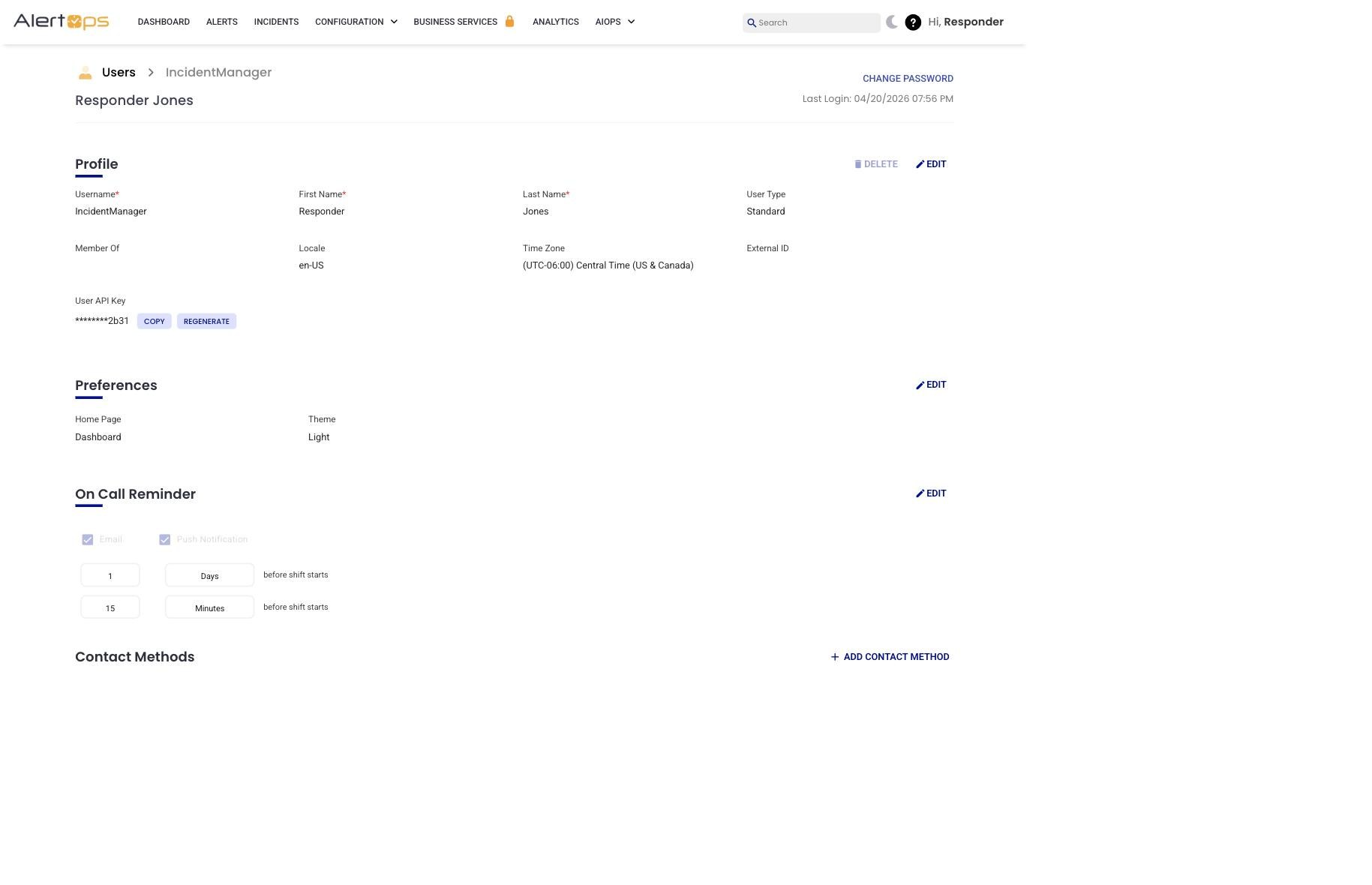
Figure 1. On Call Reminder section (view mode) on the Profile page, with two offsets saved: 1 Days before shift starts and 15 Minutes before shift starts, on both Email and Push Notification.
Configure Your On-Call Reminders
Relevant for every AlertOps user
- In the top-right corner of the AlertOps web app, click your greeting chip (for example, Hi, IncidentManager) to open the user menu.
- Select Profile.
- Scroll down to the On Call Reminder section — it sits below Preferences, and it is below the fold on most screen sizes.
- Click Edit at the top-right of that card.
- Check Email and/or Push Notification. The moment a channel is enabled, AlertOps adds a first offset row set to 1 Hour before shift start, and the ADD REMINDER button appears. (Without a channel enabled, there is no Add Reminder button.)
- Adjust the first offset to match what you want — type a number in the left field, choose Minutes / Hours / Days from the unit dropdown. The row reads [number] [unit] before shift starts, with a trash icon to the right to delete that row.
- Optional: click ADD REMINDER to add another offset. You can have up to 3 reminders total; the Add Reminder button disappears after the third. Overlapping times are not allowed (for example, you cannot save "60 Minutes" and "1 Hour" together).
- Click the green check-mark (✓) to save. The red ✗ next to it cancels.
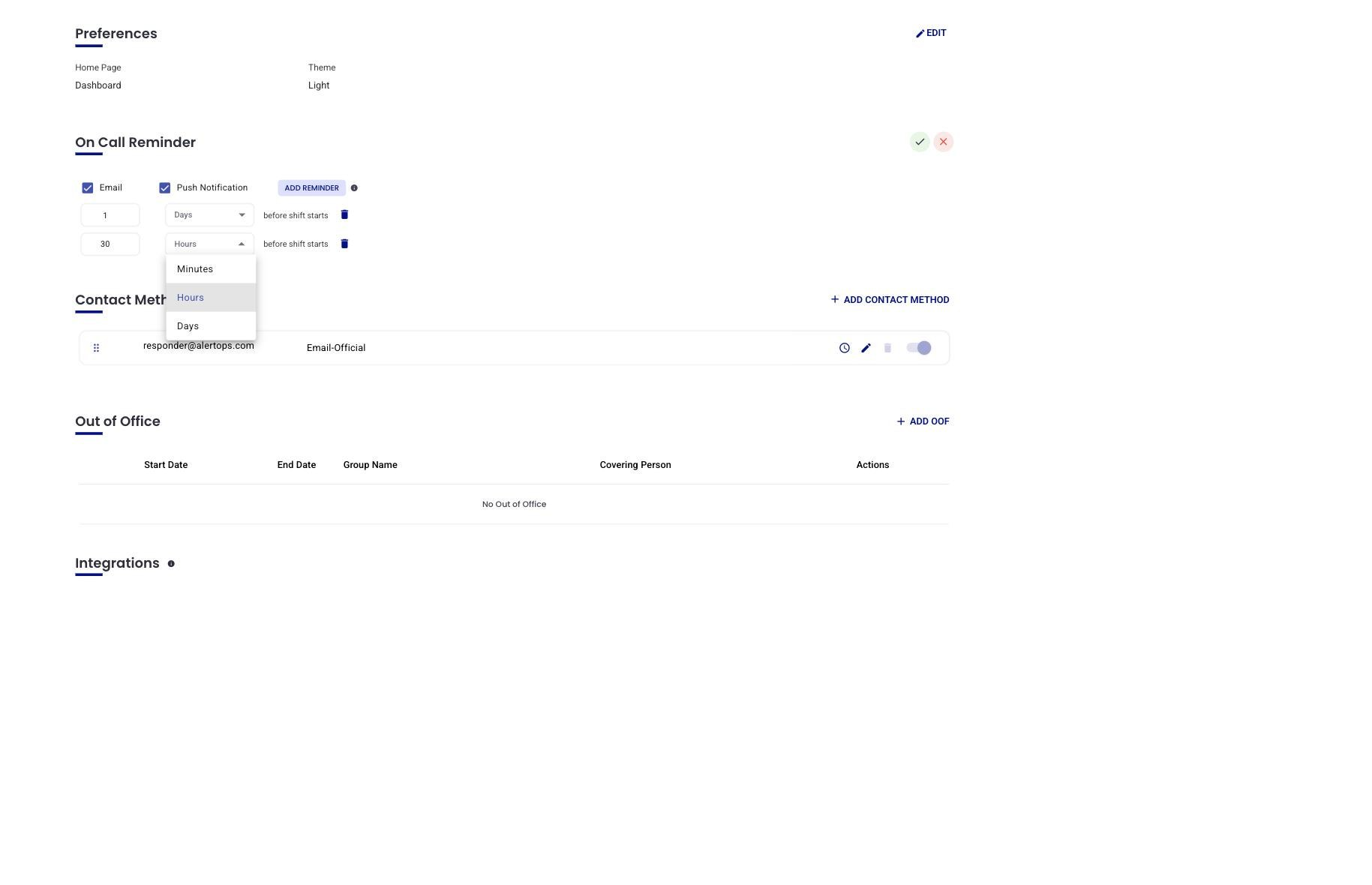
Figure 2. Edit mode with Email and Push enabled, the ADD REMINDER button visible, two offset rows configured, and the unit dropdown expanded showing Minutes / Hours / Days.
Result. Before each of your on-call shifts, AlertOps sends a reminder at every offset you configured, on every channel you enabled.
Verify It Worked
- Return to Profile. The On Call Reminder section should show your configured offsets.
- Wait for the next scheduled on-call shift and confirm receipt of the reminder via email, push, or both.
Troubleshooting
- No reminders received. Confirm that the email address and/or mobile device are verified in your Contact Methods. Enabling a channel here does not add a contact method — it uses whatever is already in your Contact Methods.
- Incorrect timing. Check the unit on each offset; a "1" in the wrong unit is the difference between a one-minute warning and a one-day warning.
- Add Reminder button missing. Enable at least one channel (Email or Push Notification) first. The button only appears once a channel is enabled, and disappears once three reminders are configured.
- Save fails with a duplicate-times error. Two of your offsets resolve to the same moment before shift start (for example, 60 Minutes and 1 Hour). Change one of them to a different time and try again.
- Recent changes not applied. Settings take effect about 15 minutes after save. If you just changed something, give it one cycle before investigating.
Use Cases
Individual on-call preparation
- Goal: Make sure you are ready when your shift starts.
- Setup: Enable Email and Push, and configure two offsets — 1 day before and 1 hour before shift start.
- Result: You get one reminder that lets you plan your day, and a second closer to the shift that prompts you to grab your laptop.
Backup awareness
- Goal: Secondary responders know a shift is imminent before the pager fires.
- Setup: Each Secondary configures a push-only reminder 30 minutes before shift start.
- Result: Backups are aware just ahead of the escalation window, which shortens the time to acknowledge if the Primary does not respond.
Best Practices
Do
- Use multiple offsets on any rotation that matters (one day ahead + one hour ahead is a reasonable default).
- Enable both email and push for redundancy — if one channel fails, the other usually lands.
- Review reminder settings after any schedule change. A rotation change does not automatically adjust your offsets.
Don't
- Don't rely on reminders without verifying your Contact Methods. A reminder to a stale phone number is worse than no reminder.
- Don't set reminders that cut things close (a 2-minute offset for a high-risk service leaves no time to react).